




JoFotara error 400 appears when your accounting software sends an invoice to the National Invoicing System (JoFotara) and the reply comes back with the code 400 Bad Request instead of a QR code. What sets this code apart is that the Income and Sales Tax Department (ISTD) states that the explanation of the error arrives in writing, in the EINV_MESSAGE field of the response file.
The short answer is that error 400 means a value in the invoice’s XML file is wrong, and the cause sits in the error item inside EINV_RESULTS. Read its EINV_MESSAGE field word for word, match it against the messages the technical guide documents, then correct the value and send the invoice again with the same number and the same unique identifier.
This article shows how to read the response file element by element and what each field of an error item carries. It then gives you an index of the messages the guide documents for code 400, with one line for each. Our Error Center covers each message in more detail in a separate article, and the overall picture of every rejection code is in our article JoFotara Error Codes: Why an Invoice Is Rejected and How to Fix It.
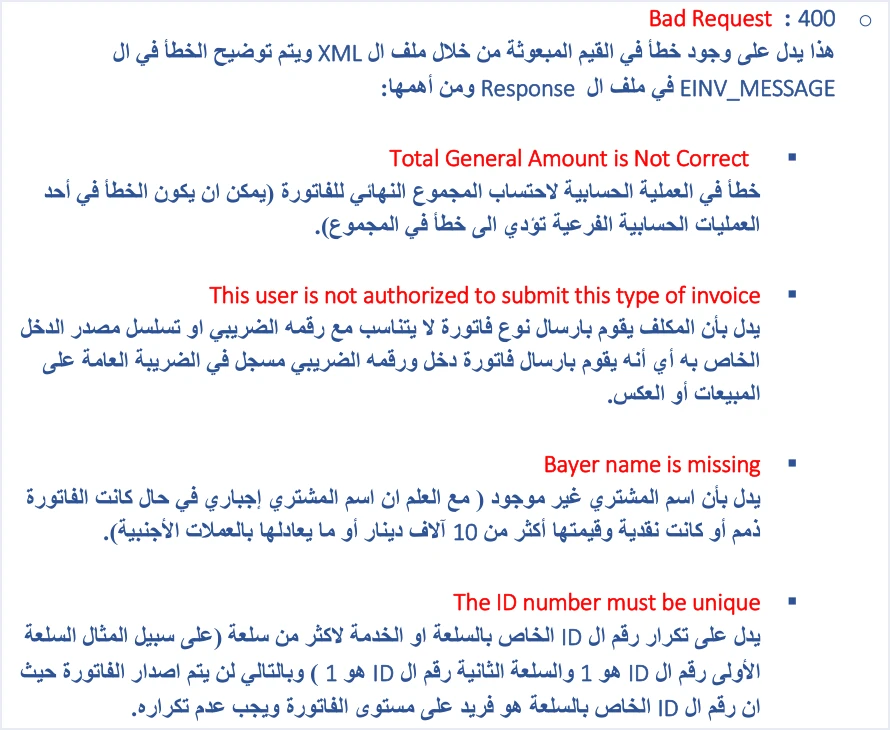
What JoFotara error 400 means
ISTD’s technical guide for integrating with the National Invoicing System through the API (version 1.5, p. 101) describes this code in one short sentence.
«هذا يدل على وجود خطأ في القيم المبعوثة من خلال ملف ال XML ويتم توضيح الخطأ في ال EINV_MESSAGE في ملف ال Response».
In English, the guide says the code indicates an error in the values sent in the XML file, and that the error is explained in EINV_MESSAGE in the response file. ISTD publishes this guide in Arabic only; the English here is our rendering, and the Arabic text is the authority.
That sentence holds two facts, and the whole method rests on them.
- The error is in the file’s values. Code 400 concerns what your software wrote inside the invoice file, such as totals, types, rates and fields. It does not concern access to the system or the credentials.
- The cause is written in the reply. The guide points you to the
EINV_MESSAGEfield of the response file, so there is no need to guess before you have read it.
After this definition the guide lists a set of messages, which it introduces as the most important ones. They are the most important ones, not the complete list. So if you receive a message that is not in the index below, read its text exactly as it came and take it to ISTD technical support, instead of treating it as a message that looks similar.
Where the rejection reason sits in the response file
After every submission the system returns a response file in JSON format. The technical guide gives six purposes for this file, among them telling you whether the invoice was accepted or rejected, showing you the reasons for an error, and letting your system process the result automatically. The table below gathers the elements that matter when you read an error 400.
The rule the guide repeats in its guidelines is clear. Decide the status of the invoice from EINV_STATUS, not from the Response Status Code. An invoice counts as received and accepted only if a QR code comes back in EINV_QR, and the guide requires that code to be shown on the seller’s invoice. The EINV_STATUS values themselves are outside the scope of this article; our article JoFotara API Response: The EINV Elements covers them.
Anatomy of one item inside EINV_RESULTS
EINV_RESULTS carries a general field named status, whose value is PASS or ERROR, followed by three lists. Every item in any of these lists, whether it is information, a warning or an error, is made up of the same five fields. Understanding those five fields is all you need to read any reply.
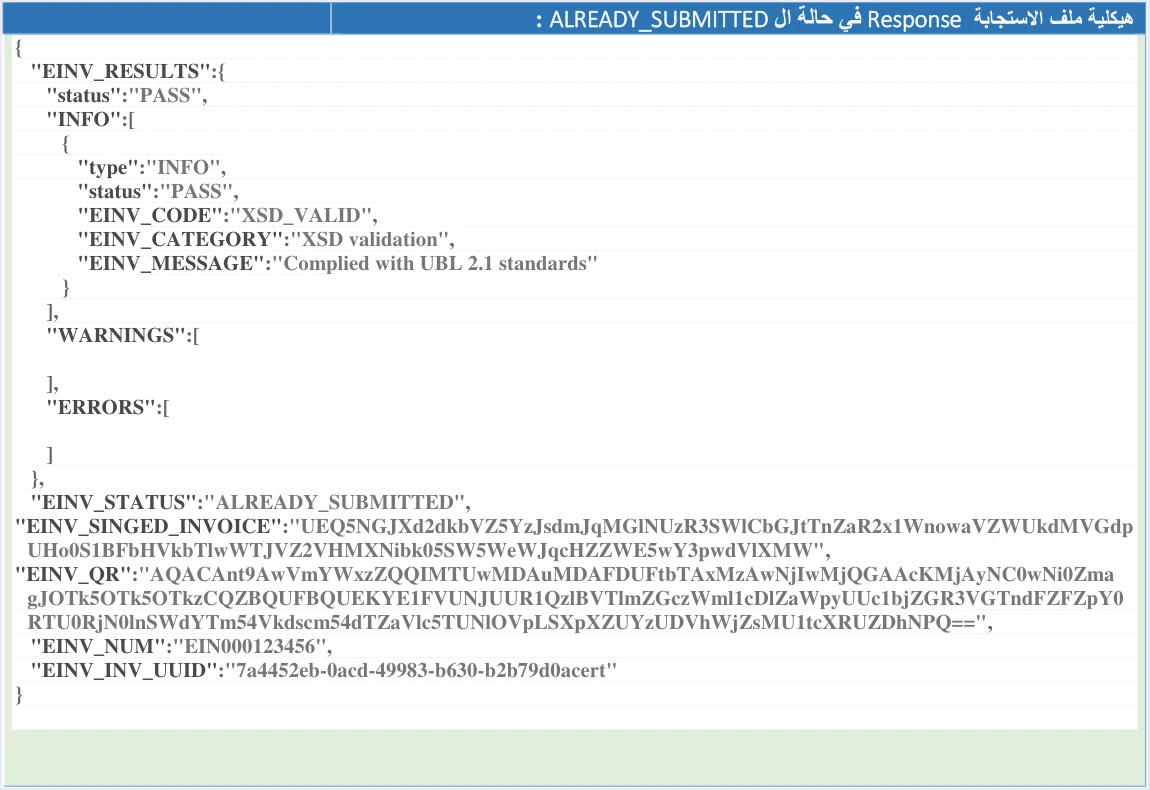
The image above is the guide’s example of a reply with the status ALREADY_SUBMITTED. It has one item in the INFO list and two empty lists. The signed invoice and QR code values in it are illustrative, and the unique identifier shown in it is not well formed, so do not copy any of them into your system. The table below sets the five fields of an item beside their values in the success item that the guide gives.
The guide also gives an example of an error item on a rejected invoice. In it, EINV_CODE holds the value totalGeneralTaxesAmount, EINV_CATEGORY holds the value invoice, and EINV_MESSAGE holds the text Total General Amount is Not Correct.
Three practical points follow from this table.
EINV_MESSAGEis the text you match. The guide documents the messages by their wording, so this text is what you search for in the index, in the guide and when you write to technical support.- Keep
EINV_CODEandEINV_CATEGORYwith the message. A complete error log saves the developer and technical support time in locating the fault, and the guide recommends logging errors in detail. - The verdict on the invoice does not come from a single item. Whatever the items in the three lists say, the verdict belongs to the
EINV_STATUSfield.
INFO, WARNINGS and ERRORS: which list to read first
On an error 400, start with the ERRORS list, because it carries the reason for rejection. ERRORS is a list and not a single field, so read all of its items before you change anything, and fix everything in it in one pass.
In the guide’s examples, the INFO list carries the result of the check against the UBL 2.1 standard. The WARNINGS list appears empty in the guide’s examples, and we found nothing in the guide that explains what effect a warning has on whether an invoice is accepted. So do not build logic into your system that assumes a particular meaning for a warning. Simply log whatever arrives in that list as it is.
Index of error 400 messages documented in the technical guide
These are the messages the technical guide lists under code 400 (pp. 101 and 102), with their wording exactly as the guide prints it. Some of the messages are spelled imprecisely in the source, such as Bayer for Buyer and arear for area. We have kept them as they appear in the guide, and you should always search with the text exactly as it reaches you in the reply.
Scroll the table sideways to see the remaining columns
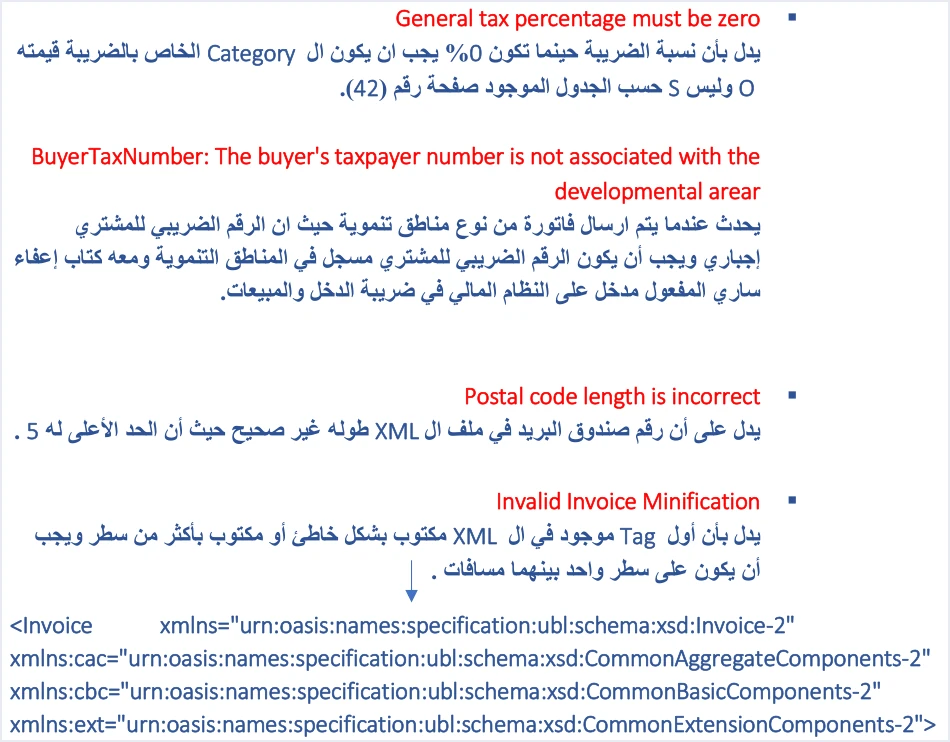
The message General tax percentage must be zero needs one caution. The guide’s text says that at 0% the category must have the value O and not S. Yet the category table in the same guide (p. 42) gives the zero rate two valid categories, Z for an exempt line and O for a zero-rated line. So the error this message deals with is the use of S at 0%, not the use of Z for an exempt item on a local invoice. On export, development zones, transit, foreign trade and free zone assignment invoices, the same page requires O for all goods.
Our Error Center treats each of these messages in a separate article that explains its causes and how to check for it. If the rejection comes from a missing mandatory field, see our article JoFotara Mandatory Fields: Reading the Technical Guide.
From message to fix: five steps in order
These steps are built on the ten guidelines that close the technical guide, arranged along the path of reading an error 400, from the moment the reply arrives to the moment you send again.
- Read
EINV_STATUSbefore anything else. It is what settles that the invoice was not accepted, and the absence of a QR code fromEINV_QRconfirms it. - Open the ERRORS list and collect all of its items. Copy the five fields of each item as they are, without translating or summarizing them.
- Match the
EINV_MESSAGEtext against the index. Identify the field or the calculation the message points to, and check its value in the actual XML file that was sent, not on the settings screen. - Log the error in detail and show the user a simplified message. This is one of the guide’s guidelines, and a detailed error log is what the developer and technical support will need later. Also keep the invoice number, its unique identifier and its status for tracking.
- Send again with the same number and the same unique identifier (UUID). When a submission fails, the guide requires sending it again with the same two values, and it warns that generating a new identifier on a resend can lead to duplicate invoices.
The guide’s guidelines also recommend checking the totals, the taxes, the tax number, the buyer’s number and the mandatory fields before sending. These are the same values that several of the messages in the index above revolve around. If the rejection continues after the fix, the guide refers you to ISTD’s technical support committee for invoicing affairs through its website, istd.gov.jo. Take with you the five fields of the error item, the invoice number and its unique identifier.
How error 400 differs from the neighboring codes
One line per code is enough to keep you from searching in the wrong place. Code 400 is an error in the values of the XML file, and its cause is written in EINV_MESSAGE. Code 403 means a wrong Client ID or Secret Key. The guide traces code 500 first to the tax number or the income-source sequence, less often to the Client ID and the Secret Key, or to a tax rate in the XML file that is not among the tax rates ISTD has approved. Code 504 means the system could not be reached, either because of the taxpayer’s firewall or because of ISTD’s site.
Watch for one overlap between 400 and 500. The income-source sequence appears among the causes of error 500, and it also appears in the explanation of the message This user is not authorized to submit this type of invoice under code 400. What decides the case is the code and the message text together. If you receive this message with code 400, the fix lies in matching the invoice type to your tax number and your income-source sequence.
How Qoyod helps
The code 400 messages concern values inside the invoice file, and this is where it helps to let your accounting software build the file for you. Qoyod’s integration with the National Invoicing System works on this layer as follows.
- A check before sending. Qoyod checks each invoice at field level as it is created, covering the tax number, the document type and payment method, the General Sales Tax rate and whether the lines are complete, and alerts you to any error before the invoice is sent, to reduce rejections.
- Every invoice’s status in view. ISTD returns the invoice status and any error message, and Qoyod shows them in its status panel.
- Resending with the same identifier. The status panel lists invoices that were not sent and need to be resent, and when you resend one it keeps the same UUID. That is what the guide’s guidelines require.
The pre-send check is an alert, not a guarantee. It covers the fields listed above. The final decision rests with ISTD.
Where to go next
- The overall picture of rejection codes is in our article JoFotara Error Codes: Why an Invoice Is Rejected and How to Fix It.
- Every element of the response file is explained in our article JoFotara API Response: The EINV Elements.
- The checks to run before you send are gathered in our article JoFotara Validation Checklist Before You Submit.
- How the system works and how to connect your business to it is covered in our article Jordan’s National E-Invoicing System.
E-invoicing and full accounting in one system
Qoyod is integrated with the National Invoicing System (JoFotara). You issue your invoice in Jordanian dinars from Qoyod, it is booked to your ledgers automatically and sent to the system, and once it is accepted it comes back with a QR code from the Income and Sales Tax Department.
Frequently asked questions
What does JoFotara error 400 mean?
According to ISTD’s technical guide, the code means there is an error in the values sent in the invoice’s XML file. The explanation of the error arrives in the EINV_MESSAGE field of the response file.
Where do I find the reason an invoice was rejected with code 400?
You find it in the ERRORS list inside EINV_RESULTS. Each item in that list carries the fields type, status, EINV_CODE, EINV_CATEGORY and EINV_MESSAGE, and the last one is the readable text of the reason for rejection.
Can I judge the invoice by code 400 alone?
Do not judge it by the code alone, because the guide requires deciding the status of the invoice from EINV_STATUS. An invoice counts as accepted only if a QR code comes back for it in EINV_QR.
Are the error 400 messages in the guide all the possible messages?
The guide introduces its messages as the most important ones, so they are not the complete list. If you receive a message that is not documented, keep its text exactly as it is and contact ISTD technical support.
Should I generate a new unique identifier after fixing an error 400?
Do not generate a new identifier. The guide requires sending again with the same number and the same unique identifier, because generating a new identifier on a resend can lead to duplicate invoices.
Why do some of the messages look misspelled?
Some messages are spelled imprecisely in the technical guide itself, such as Bayer name is missing. We have kept them in the index as they appear in the guide, and you should always search with the text exactly as it reaches you in the reply.
References
- Income and Sales Tax Department (ISTD), technical guide for integrating with the National Invoicing System through the API, version 1.5 (in Arabic), pp. 42, 97 to 102 and 104.




