




A customer comes back to the shop with a shirt bought yesterday and asks for another size or a different item. In the National Invoicing System (JoFotara), that exchange is not recorded on one document called an exchange invoice. To exchange goods JoFotara needs two separate documents, because the technical guide published by the Income and Sales Tax Department (ISTD) defines only two values for the invoice type code, a new invoice with the code 388 and a return invoice with the code 381. The returned item goes out on a return invoice against the original invoice, and the replacement item is sold on a new invoice.
Each element of a return invoice, such as the reference to the original invoice, the return reason and the quantity limit, has its own rule in the technical guide. This article looks at the whole business transaction instead. It covers what goes on each document in an exchange, how the price difference is handled when the replacement costs more or less, and what the guide does not document about the process at all. Correcting an invoice that was issued with an error is a different case, covered in our article Editing an Issued Invoice in the National Invoicing System.
Exchange goods JoFotara rules: two documents, not one
The technical guide for integrating with the National Invoicing System through the API, version 1.5, sets the invoice type through the value of the cbc:InvoiceTypeCode element. The value 388 means a new invoice, and the value 381 means a return invoice. In the guide, the return invoice is the credit note. The guide defines no third type, so there is no exchange invoice and no debit note.
As a result, a single exchange at the counter appears in JoFotara as two events.
- Returning the first item. Your system issues a
381return invoice linked to the original invoice. It carries the returned line, its quantity and the reason for the return. - Selling the replacement item. Your system issues a new
388invoice with the replacement item, its price and its tax, like any other sale.
You cannot put both events on one return invoice. The guide requires the line number, name and price on a return invoice to be as they are on the original invoice, and the replacement item was never on the original invoice. Nor can you put both on one new invoice with a negative line for the returned item, because the system rejects a negative quantity or a negative price on a line.
Document one: a 381 return invoice for the returned item
The return invoice is the document that reverses the first sale to the extent of what came back. It reuses the original invoice’s type code and currency, and only the element value changes from 388 to 381. So if the original was a local cash general sales tax invoice with the code name="012", the return invoice carries the same code with the value 381. Below is what the guide requires on a return invoice.
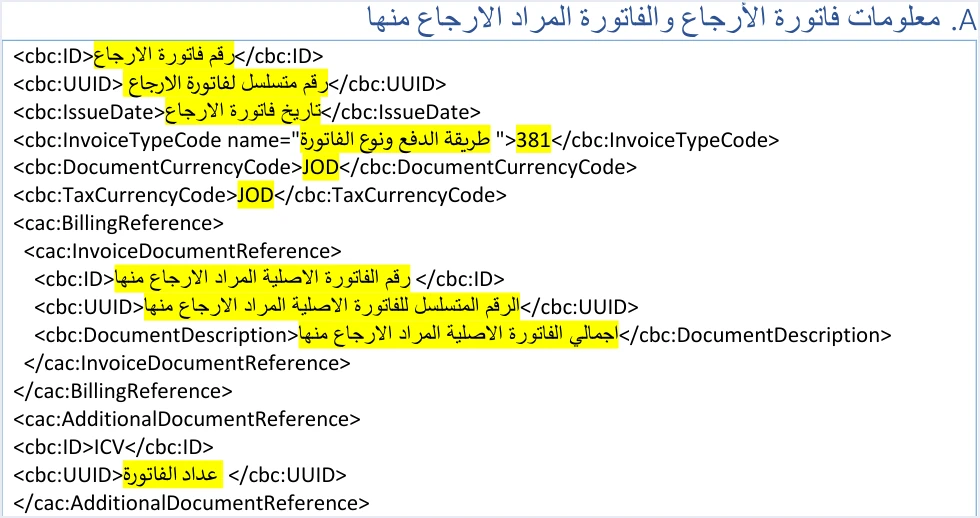
The reference to the original invoice
The return invoice carries a cac:BillingReference block holding the original invoice’s number, its unique identifier (UUID) and its total. This block is what ties the return to the first sale.
The return reason is mandatory
The guide requires a written reason on every return invoice. It goes in the cbc:InstructionNote element inside a cac:PaymentMeans block with the code 10. In an exchange, the reason is whatever made the customer bring the item back, for example an exchange for another size or an exchange because of a product defect.
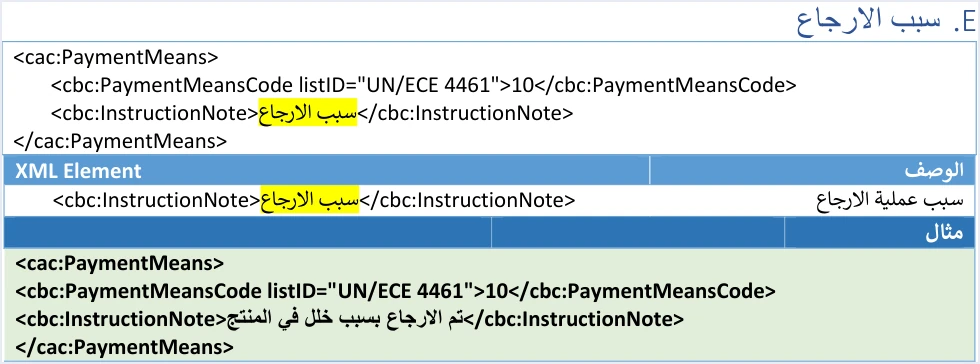
Returns are on quantities, not amounts
The rule behind every return in the guide is that it is made on quantities. You do not return five dinars from the invoice. You return one piece of a specific line. The quantity returned cannot exceed the quantity sold on the original invoice. You may return all of it or part of it, as a whole number or in decimals, across more than one return invoice until the line’s quantity is used up. If a return invoice is rejected because the quantity is more than what was sold, recheck the quantity against what is left on that line.
The line exactly as on the original invoice
The return line carries the line number cbc:ID, the item name cbc:Name and the unit price cbc:PriceAmount as they appeared on the original invoice. Only the quantity, and whatever is calculated from it, changes. Your system therefore needs to keep each line’s number from the moment of sale, because the return is matched against it.
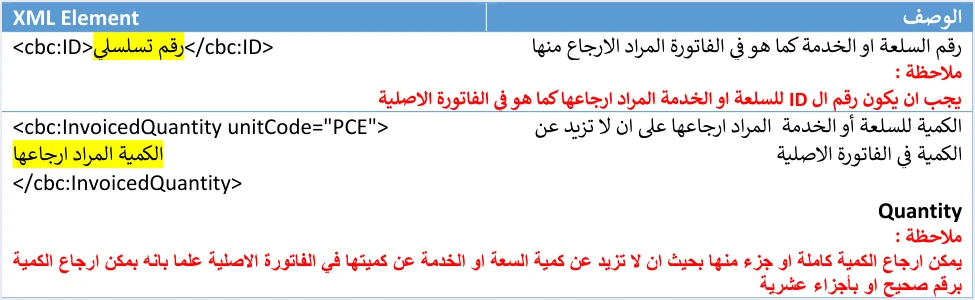
The same buyer
The guide states the rule in these words.
«يجب أن تتوافق بيانات المشتري في فاتورة الإرجاع مع بياناته في فاتورة البيع الأصلية المرتبطة بها»
In English, the guide requires the buyer details on the return invoice to match those on the original sales invoice it is linked to. So if the original invoice was issued to a named customer, do not issue the return to anyone else, even if someone else carries the item back to the shop. Returns where you are the buyer sending goods back to your supplier are a separate topic, covered in our article on purchase returns.
The share of any discount
If the returned line had a discount on the original invoice, the guide says that a return of the full quantity carries the full discount. A return of part of the quantity carries part of the discount, in proportion to the quantity returned (حسب الكمية المرجعة). The guide gives no formula, and the example further down is our own illustration, spreading the discount pro rata by quantity.
Finally, the totals on a return invoice cover only the part returned. Its tax total is the sum of the tax amounts to be returned from the invoice (مجموع قيم الضريبة المراد ارجاعها من الفاتورة).
Document two: a new 388 invoice for the replacement item
As far as JoFotara is concerned, the replacement item is a new sale. Your system issues a new invoice with the value 388 for it, as it would for any invoice. This invoice has its own number, a new unique identifier (UUID), the invoice counter (ICV) and an issue date in the format yyyy-mm-dd. The new invoice does not carry the number of the original invoice or of the return invoice, because the guide’s header template for a new invoice includes no reference block.
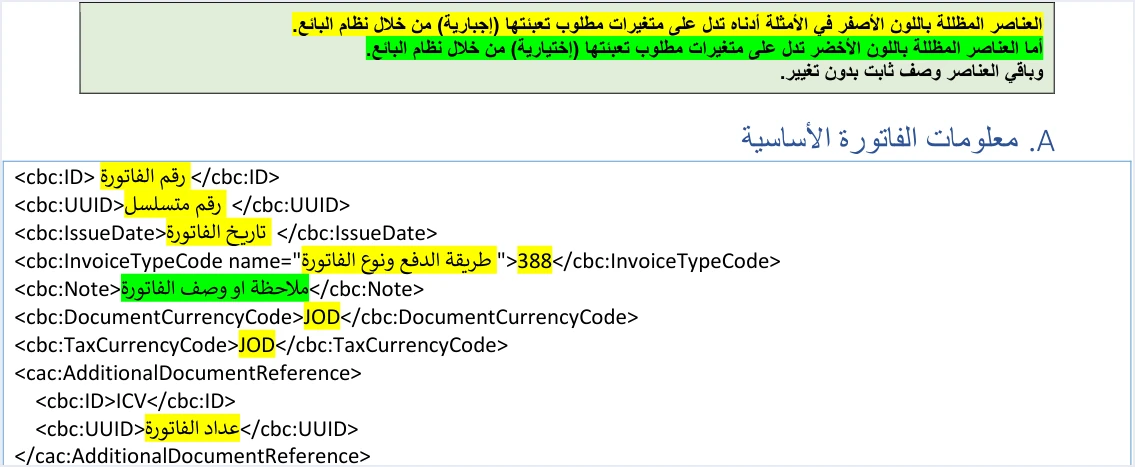
Whatever applies to any new invoice applies to the invoice for the replacement item.
- The invoice type code. The three-digit code in
nameis chosen by trade type, payment method and the tax the seller is subject to, as on any new invoice. It is not copied over from the original invoice, since copying the code is the rule for the return invoice alone. The full set of types is covered in our article Invoice Types in the National Invoicing System. - The invoice time. Article 3 of Regulation No. 34 of 2019 on Organizing and Controlling Invoicing Affairs sets the time and date of a sale as the time and date on which the sale takes place, and Article 5(d) of the same regulation requires the seller to issue the invoice when the sale takes place. The guide states no special rule for exchange invoices.
- The buyer’s name. Article 5(b) of Regulation No. 34 of 2019 requires the buyer’s name to be stated clearly in a deferred sale, an installment sale or a sale paid in stages. That is the rule for every new invoice, not a rule specific to exchanges.
If you want to go over the steps for issuing the new invoice itself on the portal, read our article Issue an Invoice on the JoFotara Portal.
The two documents in an exchange, side by side
Scroll the table sideways to see the remaining columns
The price difference between the two items: three cases
An exchange differs from a simple return in that the customer does not leave empty-handed, so there is a gap between the value of what came back and the value of what was taken. The rule is the same in all three cases. The return invoice carries the returned item at its original price, and the new invoice carries the replacement item at its current price. Settling the difference in cash with the customer is a business matter between you and the customer, and the technical guide does not address it.
The replacement item costs more
JoFotara has no debit note you could use to add the difference to the original invoice, because the guide defines only 388 and 381. So the first item is returned in full on a return invoice, the replacement item is sold at its full price on a new invoice, and the customer pays the difference.
Illustrative example. A customer bought a shirt for JOD 20.000, plus General Sales Tax (GST) at 16%, which is JOD 3.200, so the original invoice total was JOD 23.200. A day later the customer came back and exchanged it for a jacket priced at JOD 30.000.
- The
381return invoice carries the shirt line with its number from the original invoice, quantity 1, price 20.000, tax 3.200, total JOD 23.200, and the return reason. - The new
388invoice carries the jacket line, quantity 1, price 30.000, tax 4.800, total JOD 34.800. - The difference the customer pays is 34.800 minus 23.200, which is JOD 11.600. This is a commercial figure that appears on neither document.
The replacement item costs less
The method is the same. The return invoice carries the first item at its original price, the new invoice carries the replacement item at its lower price, and the difference goes back to the customer in whatever way the two of you agree. Do not issue a return invoice for the difference alone, because in the guide a return is made on quantities, not amounts.
An identical item at the same price
This is a case the guide does not settle, for example a customer swapping a defective piece for an identical piece of the same item at the same price. The technical guide does not address this case. It does not say that it needs a return invoice and a new invoice, and it does not say that it needs no document. Because the guide is silent, we give no ruling here. If this case comes up often in your business, put the question to the invoicing technical support committee (لجنة الدعم الفني لشؤون الفوترة) at ISTD through its website istd.gov.jo, which is where the guide refers inquiries.
Exchanges with a discount or a partial return
An exchange may not cover the whole invoice. A customer may buy two pieces and exchange one, or the line may carry a discount. The calculation on the return invoice then needs more care.
Illustrative example. An original invoice has one line of two pieces at JOD 15.000 each, which is JOD 30.000, with a JOD 3.000 discount on the line. The customer exchanges one piece.
- The quantity returned is 1 out of 2, so its pro rata share of the discount is JOD 1.500.
- The taxable value on the return line is 15.000 minus 1.500, which is JOD 13.500, and its tax at 16% is JOD 2.160.
- One piece remains on the original invoice. It may be returned later on a second return invoice against the same original invoice.
- The replacement piece is sold at its own price on a new invoice. If you give it a discount, that is a discount on the new sale, not a carry-over of the original invoice’s discount.
The pro rata split here is our reading of the guide’s phrase about the quantity returned (حسب الكمية المرجعة), not a formula issued by ISTD.
The order and timing of the two documents
The title of this article puts the return first and the new invoice second. That is a practical order we suggest, not a rule in the guide. The guide does not say which one is issued first, and it does not link the two through any element. We suggest it because the return invoice depends only on the original invoice. If it is rejected for an error in the reference or the quantity, you find out before handing over the replacement item, and you can correct the return without affecting the new sale.
Each of the two invoices has its own status, which the system returns after processing it, so read the status of each one separately. If you resend an invoice whose response did not arrive, resend it with the same UUID and do not generate a new one, because the guide warns that a new identifier on retry causes duplicate invoices.
Exchanges on the web portal
If you issue your invoices on the JoFotara web portal rather than from software linked to it, the exchange is still two documents. ISTD’s questions and answers guide states that the platform lets you return invoices sent through it in all cases, whether or not the business has linked a system.
The steps for issuing a return invoice on the portal are not in ISTD’s current guides. What we have comes from the user guide for the National Invoicing System platform (2024), prepared by a software vendor, not ISTD. In that guide the return starts from the Return invoice option (فاتورة ارجاع), then you enter the original invoice’s electronic number (الرقم الالكتروني للفاتورة), then the reason for issuing the note (سبب اصدار الإشعار), then the quantity to return (الكمية المراد ارجاعها), and only the quantity can be changed on the line. Check these labels on the portal itself before you rely on them. The full walkthrough is in our article Return an Invoice on the JoFotara Portal. After the return, the invoice for the replacement item is issued from the Issue an invoice tile (تنظيم فاتورة) like any new invoice.
What the technical guide does not document about exchanges
Shop owners ask these questions about exchanges, and neither version 1.5 of the technical guide nor the ISTD guides we reviewed answers them. We list them so that the gap is not filled with guesswork.
- Netting the price difference on one document. The guide documents no document that combines the return and the new sale and carries only the difference.
- Exchanging for an identical item at the same price. The guide does not say whether this needs two documents or not.
- Linking the new invoice to the return invoice. The guide documents no element that ties the new invoice to the return that came before it.
- The payment method on the new invoice when part of it is paid with the value of the return. The second digit of the
namecode sets cash or receivable, and the guide does not say how to treat a sale that is partly paid out of the value of a returned item. - A deadline for sending the two invoices. No official source we reviewed gives a number of hours or days.
Checklist before issuing the two exchange documents
- Identify the original invoice for the returned item, and keep its number, its UUID and its total.
- Make sure the quantity returned does not exceed what is left on the line after any earlier return.
- Copy the line number, name and price from the original invoice exactly as they are.
- Write the return reason in
cbc:InstructionNote. - Match the buyer details on the return to the original invoice.
- Work out the returned quantity’s share of the discount if the line had one.
- Issue the new invoice for the replacement item at its full price, with a new number and identifier.
- Do not put a negative line, or a price difference in place of the item, on either invoice.
- Check the status of each invoice separately after it is sent.
How Qoyod helps
Building the return invoice and keeping what it needs from the original invoice is work for the seller’s system, and your accounting software takes care of it if it is linked to the National Invoicing System. In Qoyod for Jordan, the document types are the four that JoFotara defines, the income invoice, the general sales tax invoice, the special tax invoice and the return invoice (credit note). There is no debit note in it, because the system does not define one.
- Building the file and sending it. Qoyod builds the invoice file in UBL 2.1 format with its unique identifier (UUID) and sends it to the National Invoicing System without any manual intervention.
- An alert before sending. Qoyod checks each invoice at field level as it is created, covering the tax number, the document type and payment method, the General Sales Tax rate and whether the lines are complete, and alerts you to any error before the invoice is sent, to reduce rejections.
- Every document’s status in view. ISTD returns the invoice status and any error message, and Qoyod shows them in its status panel. You see the return invoice and the new invoice each with its own status.
- Resending with the same identifier. The status panel lists invoices that were not sent and need to be resent, and when you resend one it keeps the same UUID.
For a wider view of the system and how to connect your business to it, read our article Jordan’s National E-Invoicing System. You can also see how Qoyod works with the National Invoicing System.
E-invoicing and full accounting in one system
Qoyod is integrated with the National Invoicing System (JoFotara). You issue your invoice in Jordanian dinars from Qoyod, it is booked to your ledgers automatically and sent to the system, and once it is accepted it comes back with a QR code from the Income and Sales Tax Department.
Frequently asked questions
Is there an exchange invoice in JoFotara?
There is not. Version 1.5 of the technical guide defines only two values for the invoice type code, a new invoice 388 and a return invoice 381, so an exchange is made with a return invoice for the returned item and a new invoice for the replacement item.
Do I issue a debit note if the replacement item costs more?
JoFotara has no debit note. The first item is returned on a return invoice, the replacement item is sold at its full price on a new invoice, and the customer pays the difference outside the two documents.
Can I put the replacement item on the return invoice itself?
You cannot. The lines on a return invoice must carry the line number, name and price exactly as they are on the original invoice, and the replacement item was not on the original invoice.
Can I show the price difference as a negative line on the new invoice?
You cannot. JoFotara rejects a negative quantity or a negative price on a line, and a return is made with a return invoice on quantities, not with a negative line.
What do I do if a customer swaps a defective piece for an identical one at the same price?
The technical guide is silent on this case. It does not say that it needs two documents, and it does not say that it needs none. Put the question to ISTD’s invoicing technical support committee before you settle on a fixed method.
Must the buyer on the new invoice be the same as on the return invoice?
The guide requires the buyer details to match between the return invoice and the original invoice. The new invoice follows the rules of any new invoice, and the guide states no matching requirement between it and the return.
References
- Income and Sales Tax Department (ISTD), technical guide for integrating with the National Invoicing System through the API, version 1.5 (in Arabic), pp. 13, 26, 29, 30, 33, 46 to 50, 55 and 104.
- Regulation No. 34 of 2019 on Organizing and Controlling Invoicing Affairs, as amended, consolidated text (in Arabic), Articles 3 and 5.
- Income and Sales Tax Department (ISTD), questions and answers guide for the National Invoicing System, 2026 (in Arabic).




