




Every business owner who uses accounting software, and who knows that the portal of the National Invoicing System (JoFotara) can issue invoices, ends up asking the same question. Is linking accounting software to JoFotara mandatory? The answer does not come from an opinion or an advertisement. It comes from two official texts, the regulation on invoicing and the questions and answers guide published by the Income and Sales Tax Department (ISTD).
The short answer comes from ISTD. Its questions and answers guide says that a business that has an accounting system must link that system with the invoicing system. The regulation, for its part, recognizes an invoice issued by the national system or by a program linked to it, and provides for direct linking according to a timetable for which it gives no date.
This article sets out both texts as they were issued, explains the two official paths for joining, shows the limits of a request to unlink devices, and says what to do if you have accounting software. It does not compare the cost of the portal with that of software, and it does not cover the technical linking steps, because each of those has its own article.
Is linking accounting software to JoFotara mandatory? The answer in three points
- ISTD’s published position. The questions and answers guide states that a business that has an accounting system must link that system with the invoicing system.
- The text of the regulation. Article 4(a) of Regulation No. 34 of 2019 recognizes the electronic invoice issued by the national system or by a program linked to it. Article 4(b) of the same regulation provides for direct linking according to the timetable set for that purpose.
- What neither text says. Neither ISTD’s note nor Article 4 of Regulation No. 34 of 2019 gives a date for linking, a grace period, or a penalty specific to not linking.
So if you have accounting software, ISTD’s published position is that you link it. If you do not have software, you issue your invoices on the portal through a sub-user, which is an official path in its own right in the joining guide.
What ISTD says in its questions and answers guide
The sentence in question appears as a note under the steps for requesting the cancellation of device linking. Its exact wording, in ISTD’s questions and answers guide for the National Invoicing System, 2026 (p. 6), is the following.
«طلب فك ربط الأجهزة يكون فقط لمن ليس لديه نظام محاسبي ويكون قام بالربط عن طريق الخطأ اما من يمتلك نظام محاسبي يلزمه ربط نظامه مع نظام الفوترة.»
In English, ISTD says that a request to unlink devices is only for a business that has no accounting system and linked by mistake, and that a business that has an accounting system must link that system with the invoicing system. The English here is our rendering, and the Arabic text is the authority.

The note has two distinct parts.
- The first part is about unlinking. The request is limited to a business that has no accounting system and linked by mistake.
- The second part is about a business that has an accounting system. Its wording is that such a business must link its system with the invoicing system.
There are three things this sentence does not carry, so do not add them when you pass it on. It gives no date, no grace period and no penalty. It is ISTD’s published position in its guidance document, and it should be attributed to that document as such.
The note also does not define what counts as an accounting system. If you are unsure how to describe the software you use, ISTD is the authority on that point.
What Article 4 of Regulation No. 34 of 2019 says
The legal basis is Regulation No. 34 of 2019 on Organizing and Controlling Invoicing Affairs, as amended. It was issued under paragraph (F) of Article 23 of Income Tax Law No. 34 of 2014. The article that matters here is Article 4 of Regulation No. 34 of 2019, in both of its paragraphs.
Paragraph (a): two sources of a recognized invoice
«تعتمد الفاتورة الالكترونية الصادرة عن برنامج الفوترة الوطني الالكتروني أو الصادرة عن برنامج تم ربطه ببرنامج الفوترة الوطني الالكتروني»
In English, Article 4(a) of Regulation No. 34 of 2019 recognizes the electronic invoice issued by the national electronic invoicing program or by a program that has been linked to it. No official English translation of this regulation was found; the English here is our rendering, and the Arabic text is the authority.
The text sets two sources for a recognized electronic invoice, the national program itself and any program linked to it. An invoice issued by your accounting software falls under the second source once the software is linked.
Paragraph (b): direct linking according to a timetable
«تتولى الدائرة إصدار الفاتورة وتنظيمها بموجب أحكام هذا النظام من خلال برنامج الفوترة الوطني الالكتروني أو الربط المباشر مع البرنامج وفقاً للخطة الزمنية المعدة لهذه الغاية»
In English, Article 4(b) of Regulation No. 34 of 2019 gives ISTD the task of issuing and organizing the invoice under the regulation, through the national electronic invoicing program or through direct linking with it, according to the timetable prepared for that purpose. No official English translation of this regulation was found; the English here is our rendering, and the Arabic text is the authority.
The closing words of Article 4(b) of Regulation No. 34 of 2019 tie direct linking to a timetable prepared for that purpose. The text of the regulation, however, gives neither the date of that timetable nor its content. ISTD’s 2026 guides on joining, on issuing an invoice, and its questions and answers guide do not give them either.
That is why Article 4 of Regulation No. 34 of 2019 cannot be read as setting a final deadline for linking, and no date should be quoted from it.
How to read the two texts together
Each text does its own job. Article 4 of Regulation No. 34 of 2019 is the framework. It recognizes the invoice issued by the national program and the invoice issued by a program linked to it, and it provides for direct linking according to a timetable. ISTD’s note is its published position toward a business that has an accounting system, which is that the business links it.
The practical outcome depends on your situation.
- You have no accounting software. The portal is an official path in the joining guide, and an invoice issued by the national program is recognized under Article 4(a) of Regulation No. 34 of 2019. You issue your invoices through a sub-user.
- You have accounting software. ISTD says that a business that has an accounting system must link it. You link your software through the device linking option (ربط الأجهزة).
- You linked by mistake and have no software. Unlinking is available by request to ISTD for this case alone, as explained below.
As for fines, Article 15 of Regulation No. 34 of 2019 refers the penalty for anyone who does not issue the invoice in line with the regulation to the penalties set out in the Income Tax Law, and it sets no amounts itself. We do not tie any fine to not linking in particular here, because neither ISTD’s note nor Article 4 of Regulation No. 34 of 2019 does so.
The two official paths in the joining guide
ISTD’s procedures guide for joining the Jordanian National Electronic Invoicing System, 2026 edition, sets out six steps. The first four are the same for everyone. You go to ISTD’s website, log in to the e-services, move to the National Invoicing System, and create an account.
Next comes a heading about choosing the right path (اختيار المسار المناسب), and under it sit steps five and six. These two steps are alternative paths, not consecutive stages. Step five is issuing invoices through the platform, and step six is the device linking path (مسار ربط الأجهزة). Do not read them as two stages that every business goes through.
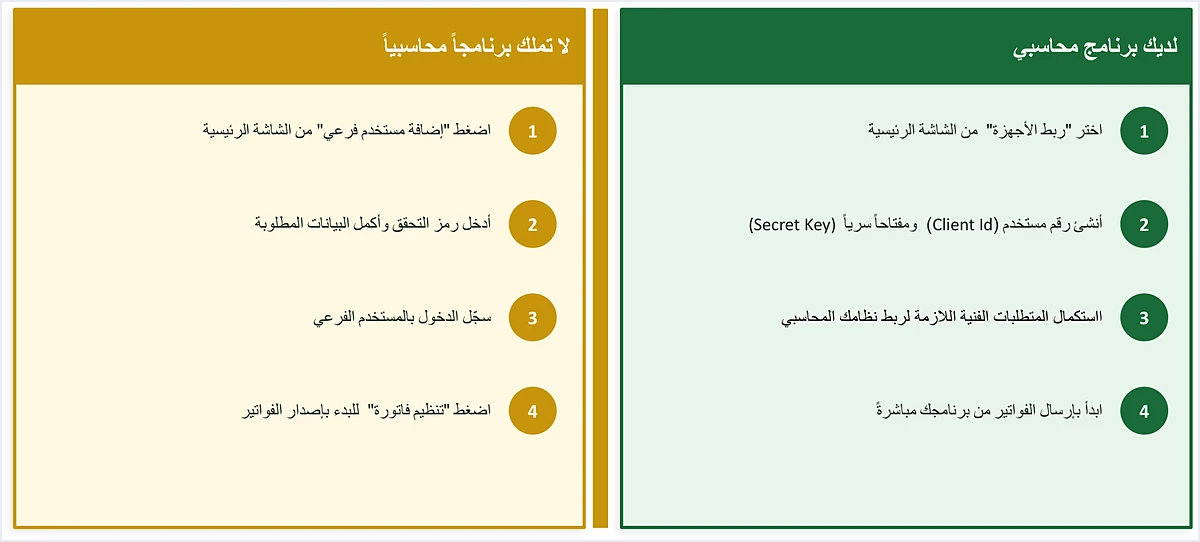
Path one: you have accounting software
- Choose device linking (ربط الأجهزة) from the home screen.
- Create a Client ID and a Secret Key.
- Complete the technical requirements needed to link your accounting system.
- Start sending invoices directly from your software.
Path two: you have no accounting software
- Click Add a sub-user (إضافة مستخدم فرعي) on the home screen.
- Enter the verification code sent to your phone and complete the required details.
- Log in as the sub-user.
- Click Issue an invoice (تنظيم فاتورة) to start issuing invoices.
The main user is the account that sees the device linking option on its screen, along with Add a sub-user (إضافة مستخدم فرعي), View invoices (عرض الفواتير) and Settings (إعدادات). The Issue an invoice tile (تنظيم فاتورة) does not appear on the main user’s screen, because issuing on the portal goes through the sub-user. The portal steps are in our article Issue an Invoice on the JoFotara Portal: The Steps.
If you have no accounting software and are asking whether the portal suits the number of invoices you issue, that is a question of fit, not of obligation. Our article on when the free portal is enough answers it.
Unlinking devices: a request for those who linked by mistake, not a way back
Choosing device linking has an effect you can see on the portal. The questions and answers guide says that the reason a sub-user cannot see the Issue an invoice tile (تنظيم فاتورة) is that someone clicked the device linking option.
If you linked by mistake and have no accounting system, the fix is not a button in the settings, and it is not a reset you carry out yourself. It is a request you submit to ISTD through the e-services, and ISTD decides on it. The guide sets out the request in these steps.
- Log in to your account on ISTD’s website with your tax number and password.
- Choose Internal services (الخدمات الداخلية).
- Choose Send an internal service request (ارسال طلب خدمة داخلية).
- Choose the invoicing-system support request (طلب دعم فني لنظام الفوترة) from the list, then click Next (التالي).
- In the Taxpayer notes box (ملاحظات المكلف), write a request to unlink the devices (ارجو فك ربط الأجهزة), stating your reasons and undertaking that you have no accounting system.
- Send the request.
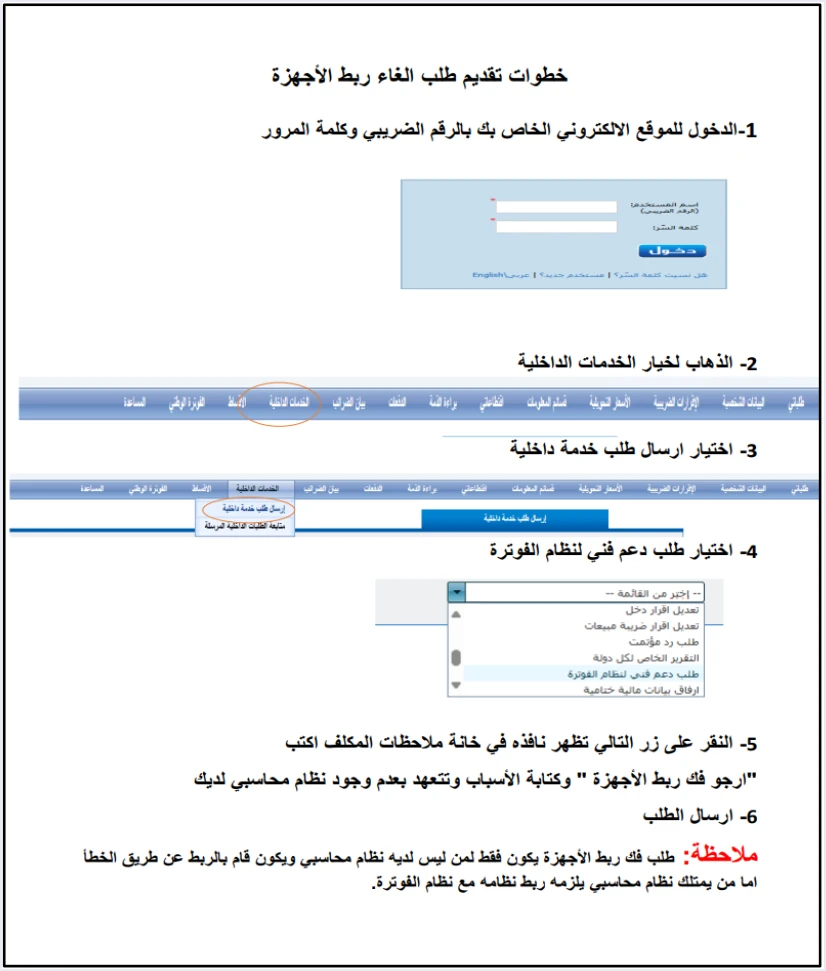
The condition is written into the note itself. The request is only for a business that has no accounting system and linked by mistake. The applicant also undertakes in writing, in the notes, that it has no accounting system.
So unlinking is not a route for a business that has accounting software and wants to go back to issuing on the portal. ISTD’s position toward that business is the second part of the same note, which is that it must link its system.
If you have accounting software, what to do now
- Check that your registration is complete. Linking comes after you create your account on the National Invoicing System through ISTD’s e-services, not before.
- Coordinate with your software provider. The joining guide directs the taxpayer to coordinate with the system’s programmer or the technical solutions provider it works with, to complete the technical requirements.
- Create the linking credentials from the main user account. In device linking (ربط الأجهزة) you enter a username and select the income-source sequence, and the system generates the Client ID and Secret Key. This screen is explained in detail in our article JoFotara Client ID and Secret Key: Device Linking Steps.
- Keep the credentials somewhere safe. In the joining guide, ISTD reminds taxpayers to keep the linking credentials in a safe place and not to share them with anyone.
- Enter the credentials in your software and start sending. The details are in our article on the technical linking steps, one by one.
Note that the income-source sequence is not a field that belongs to the portal alone. A business that links its software selects it on the device linking screen, and it is a required element in every invoice sent through the API.
Before you pass on a claim about linking
Three statements about linking accounting software have no basis in the two texts set out above. If you come across one of them, ask for its official source before you base a decision on it.
- A final deadline for linking. It appears neither in Article 4 of Regulation No. 34 of 2019 nor in ISTD’s note.
- A fine for not linking in particular. Neither text contains one, and the fines set by law are a separate subject.
- Unlinking as a way back to the portal. ISTD limits it to a business that has no accounting system and linked by mistake.
Where to go next
- The full picture of the system. How it works and who runs it, in our article Jordan’s National E-Invoicing System.
How Qoyod helps you link your accounting software
If you are going to link your software, Qoyod brings e-invoicing and full accounting together in one system. Qoyod is integrated with the National Invoicing System (JoFotara). This is what it does when an invoice is sent.
- Qoyod builds the invoice file in UBL 2.1 format with its unique identifier (UUID) and sends it to the National Invoicing System without any manual intervention. The taxpayer needs no digital certificate or signature of their own to send invoices through Qoyod.
- Once ISTD accepts the invoice it returns a QR code, and Qoyod shows that code on the invoice.
- Qoyod checks each invoice at field level as it is created, covering the tax number, the document type and payment method, the General Sales Tax rate and whether the lines are complete, and alerts you to any error before the invoice is sent, to reduce rejections.
- ISTD returns the invoice status and any error message, and Qoyod shows them in its status panel. The status panel lists invoices that were not sent and need to be resent, and when you resend one it keeps the same UUID.
- Qoyod books the invoice to your ledgers automatically, so you do not enter it a second time in another system.
To be precise, Qoyod does not create your account on the National Invoicing System, and it does not generate the Client ID and Secret Key. You complete both of those steps on ISTD’s portal in your own name, and Qoyod’s part begins after them.
E-invoicing and full accounting in one system
Qoyod is integrated with the National Invoicing System (JoFotara). You issue your invoice in Jordanian dinars from Qoyod, it is booked to your ledgers automatically and sent to the system, and once it is accepted it comes back with a QR code from the Income and Sales Tax Department.
Frequently asked questions
Is linking accounting software to JoFotara mandatory?
ISTD’s questions and answers guide says that a business that has an accounting system must link that system with the invoicing system. Article 4(a) of Regulation No. 34 of 2019 recognizes the invoice issued by the national program or by a program linked to it.
Is there a deadline for linking accounting software?
Article 4(b) of Regulation No. 34 of 2019 gives no date and provides for direct linking according to the timetable prepared for that purpose. ISTD’s note in the questions and answers guide gives no date or grace period either. If you read a specific deadline somewhere, ask for its official source.
I have no accounting software. How do I issue my invoices?
You issue them on the portal through a sub-user. The main user creates it from Add a sub-user (إضافة مستخدم فرعي) after entering the verification code, and you then log in with it and click Issue an invoice (تنظيم فاتورة). This is an official path in the joining guide, and an invoice issued by the national program is recognized under Article 4(a) of Regulation No. 34 of 2019.
I linked devices by mistake and have no accounting system. What should I do?
You submit an internal service request of the invoicing-system support request type (طلب دعم فني لنظام الفوترة) through ISTD’s e-services. In your notes you ask ISTD to unlink the devices, state your reasons and undertake that you have no accounting system. ISTD decides on the request.
Can I unlink and go back to the portal if I have accounting software?
No, according to the questions and answers guide. ISTD limits the unlinking request to a business that has no accounting system and linked by mistake, and the applicant undertakes that it has no accounting system. The same note adds that a business that has an accounting system must link that system.
Who handles the technical requirements for linking?
The joining guide directs the taxpayer to coordinate with the system’s programmer or the technical solutions provider it works with. The Client ID and Secret Key, however, are generated by the taxpayer from device linking (ربط الأجهزة) after logging in as the main user.
References
- Income and Sales Tax Department (ISTD), questions and answers guide for the National Invoicing System, 2026 (in Arabic), p. 6.
- Income and Sales Tax Department (ISTD), procedures guide for joining the Jordanian National Electronic Invoicing System, 2026 edition (in Arabic), pp. 3, 9, 10 and 13.
- Regulation No. 34 of 2019 on Organizing and Controlling Invoicing Affairs, as amended, consolidated text (in Arabic), Articles 4 and 15.
- ISTD’s National Invoicing System guides (in Arabic)




