




The JoFotara income source sequence is a value attached to your business’s account at the Income and Sales Tax Department (ISTD). In the National Invoicing System (JoFotara) you select it from a list when you link your accounting software or add a sub-user, and every invoice you issue then carries it. Registration depends on it, and it appears in linking, in issuing and in error messages. That is why a mistake in it can stop you at more than one point.
This article brings together what ISTD’s guides say about this value. It explains what the value is, why registration stops without it, where you see it on each screen and in the invoice file, what happens when a wrong value is sent, and how to request an active sequence if you do not have one.
What the JoFotara income source sequence is
The income-source sequence is a value that ISTD holds in the taxpayer’s file. In JoFotara it appears as a list you select from. It is not a field you type into, and it is not a number the system generates. When you link devices, the system generates only two values, the Client ID and the Secret Key. You select the sequence from the list before that.
ISTD’s technical guide describes this field with the following words.
«تسلسل مصدر الدخل (النشاط) للمكلف (البائع)»
In English, the guide calls it the income-source sequence of the taxpayer (the seller), with the word for activity added in parentheses. ISTD publishes this guide in Arabic only; the English here is our rendering, and the Arabic text is the authority.
The name you see on every screen, though, is income-source sequence (تسلسل مصدر الدخل). ISTD’s guides contain no separate number under an activity label. So if you come across an activity label while setting up a link, the field you are looking for on the screens is the income-source sequence. For the other Arabic portal terms and their English renderings, see our article JoFotara Terminology: Arabic to English Quick Glossary.
ISTD’s guides give this value three properties, and the rest of this article builds on them.
- The sequence must be active. Without an active income-source sequence, registration in the system stops at the very start.
- Each link and each sub-user is tied to one sequence. Every Client ID and Secret Key pair is tied to one income-source sequence, and every sub-user is tied to the sequence selected when it was created.
- The sequence is sent in every invoice through the API. It is a mandatory field inside the invoice file, not a setting you configure once and forget.
An account condition before either path: an active sequence
ISTD’s questions and answers guide describes a case in which the taxpayer tries to register and is returned to the invoicing home page without getting any further. The official cause the guide gives for this case is that there is no active income-source sequence. The guide’s heading for the fix describes it as the steps to request the addition of an active income-source sequence. So the obstacle is the absence of an active sequence, not the absence of any sequence at all.
The guide does not tie this case to one path rather than the other. It comes before your choice between issuing on the portal and device linking, because it keeps you from reaching the account in the first place. The technical guide, for its part, makes the sequence a mandatory field in every invoice sent through the API, and the sub-user form asks for it on the portal path. The sequence is therefore a condition at account level. A business that issues on the portal needs it, and so does a business that links its accounting software.
The registration steps themselves, from entering e-services to creating the account, are in our article JoFotara Registration and the Registration Document. How to request an active sequence is covered at the end of this article.
Where to find the JoFotara income source sequence
The sequence appears in five places. Four of them are screens on the portal, and one is inside the invoice file. Knowing which of them you are looking at makes any later diagnosis easier.
Scroll the table sideways to see the remaining columns
The practical rule that follows from the table is that the reliable reference for the sequence value is what the portal itself shows, in the dropdown list or in the linked devices list. Copy the value from there when you set up your software. Do not type it from memory or from an old document.
In device linking: one sequence for each pair of credentials
Device linking is the path for a business that has accounting software. On this path the main user logs in to JoFotara and chooses device linking (ربط الأجهزة) on the home screen. The main user then enters a username and selects the income-source sequence, and the system generates the Client ID (رقم المستخدم) and the Secret Key (المفتاح السري).
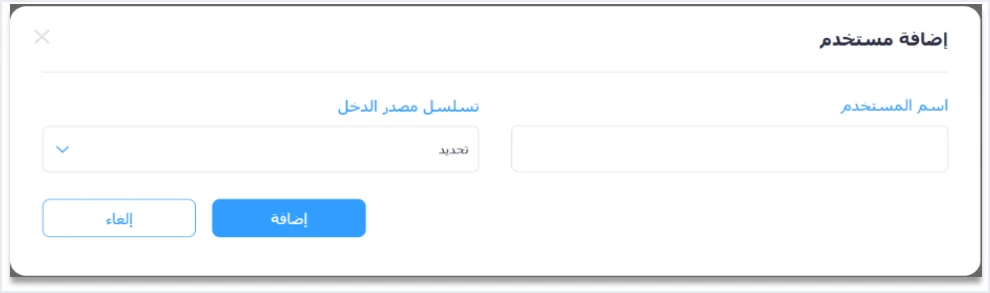
What matters in this step is that the selection comes before the generation. The two generated values come out tied to the sequence you selected, and according to the technical guide each set of credentials is tied to one income-source sequence. The linked devices list, as it appears in the guide’s screenshots, shows an income-source sequence column next to the Client ID and the Secret Key in the same row.
One practical consequence follows. It is our inference from this link between credentials and sequence, not a statement in the guide. If your business has more than one income-source sequence, an invoice that carries a given sequence is sent with the credentials tied to that sequence and no other. Do not assume that one pair of credentials covers all your income sources.
The steps for creating and saving the Client ID and Secret Key are explained in our article JoFotara Client ID and Secret Key: Device Linking Steps. Keep in mind that ISTD makes the taxpayer alone responsible for any unauthorized use of these two values.
The sub-user and the income-source sequence
The sub-user is the account that issues invoices on the portal, on the path for a business with no accounting software. The main user creates it after entering a verification code sent to the registered phone. The creation form has an income-source sequence list next to the username and the password, and a trade name field (الاسم التجاري) that is filled in automatically and read-only.
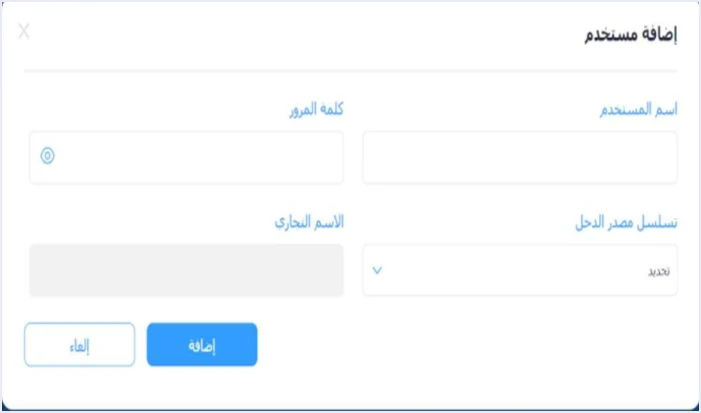
ISTD’s guides state that the sub-user is tied to one income-source sequence, selected when it is created. Every invoice this user issues on the portal carries that sequence. It appears on the invoice form under Seller details, and the sub-user cannot change it.
The 2024 user guide for the platform goes further. That guide was prepared by a software vendor and is not one of ISTD’s official guides. Where a business has more than one sequence, it says to add a sub-user for each income-source sequence. The same guide says that the main user sees all the invoices of the tax number across the sequences, while a sub-user sees only the invoices it issued. The current interface may differ from what that guide describes, so check it in your own account before you rely on it.
The full difference between the two users is explained in our article JoFotara Sub-User vs Main User: Roles and Permissions. The creation steps, from the verification code to logging in as the new user, are in our article Add a Sub-User in JoFotara: Step by Step.
The income-source sequence inside the invoice file
When your accounting software sends an invoice through the API, it places the sequence in a block of its own for the seller, cac:SellerSupplierParty, inside the cbc:ID field. The technical guide gives this block a heading that describes it as the data of the seller’s (taxpayer’s) income-source sequence. It shades the value in yellow, the color the guide uses to mark mandatory fields in its tables.
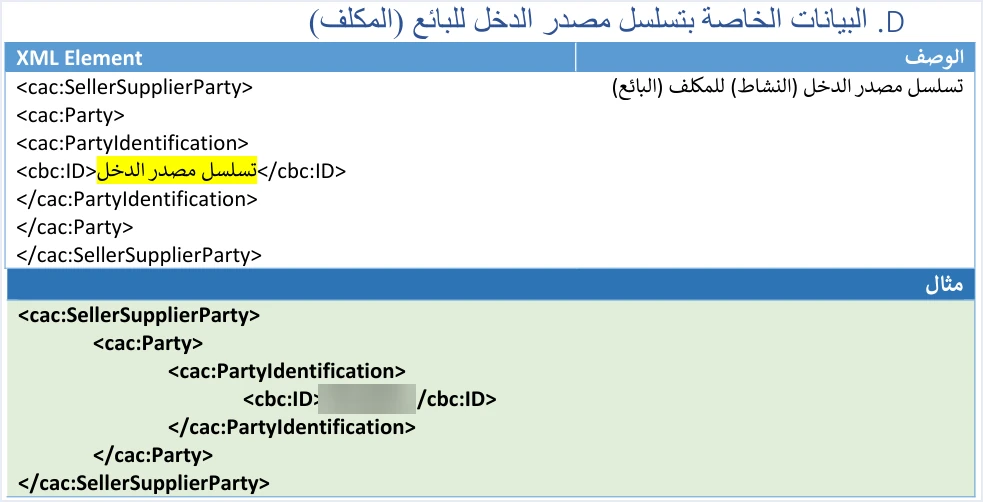
Three points here deserve attention.
- The block is separate from the seller’s main details. The seller’s tax number is sent in another block, and the income-source sequence has its own. A correct tax number does not mean the sequence is correct.
- The value is the same in every invoice from the same sequence. The sequence does not change from one invoice to the next as long as they come from the same source. A mistake in it can therefore be expected to show up in every invoice, not in one invoice only. This is our inference from the structure of the file, not a statement in the guide.
- The reference is the sequence tied to the credentials in use. The value you put in
cbc:IDmust match the sequence shown next to the Client ID and Secret Key your software sends the request with.
When the sequence is wrong: code 500 and the not-authorized message
A sequence error shows up in two different responses from the system. One line on each is enough to tell you where to look.
Code 500. The technical guide (version 1.5, p. 101) describes the causes of this code in the following text.
«خطأ في الرقم الضريبي أو تسلسل مصدر الدخل وبدرجة أقل يكون الخطأ في ال Client_ID أو ال Secret_Key ويمكن ان تكون نسبة الضريبة الموجودة في ملف ال XML ليست ضمن نسب الضريبة المعتمدة لدى الدائرة».
In English, the guide gives the causes as an error in the tax number or the income-source sequence, less often an error in the Client_ID or the Secret_Key, and possibly a tax rate in the XML file that is not among the tax rates ISTD accepts. ISTD publishes this guide in Arabic only; the English here is our rendering, and the Arabic text is the authority.
In ISTD’s text, then, the sequence comes with the tax number among the first causes.
Code 400 with the not-authorized message. This message, This user is not authorized to submit this type of invoice, arrives when the taxpayer sends an invoice of the type the guide describes in these words.
«نوع فاتورة لا يتناسب مع رقمه الضريبي او تسلسل مصدر الدخل الخاص به»
In English, the guide means an invoice type that does not match the taxpayer’s tax number or income-source sequence. ISTD publishes this guide in Arabic only; the English here is our rendering, and the Arabic text is the authority. An example is an income invoice sent by a taxpayer registered for General Sales Tax (GST), or the reverse. The fix lies in the type of invoice you send.
After any fix, resend the invoice with the same number and the same unique identifier (UUID), as ISTD recommends. Do not treat it as accepted until it comes back with its QR code.
How to add an active income-source sequence: the Opening a new income source and group request
Adding a sequence is not a setting in JoFotara. It is a request sent to ISTD through the e-services website. ISTD’s questions and answers guide gives the steps as follows.
- Log in to your account on the website with your tax number and password.
- Choose Internal services (الخدمات الداخلية) from the services bar.
- Choose Send an internal service request (ارسال طلب خدمة داخلية).
- From the list, choose the request type Opening a new income source and group (فتح مصدر دخل ومجموعة جديدة), then press Next (التالي).
- In the Taxpayer notes box (ملاحظات المكلف), write the text the guide suggests, shown below.
- Press Send the request (ارسال الطلب).
«ارجو التكرم بإضافة تسلسل مصدر دخل فعال لأتمكن من التسجيل في نظام الفوترة الوطني»
In English, the suggested note asks ISTD to kindly add an active income-source sequence so that the taxpayer can register in the National Invoicing System. ISTD publishes this guide in Arabic only; the English here is our rendering, and the Arabic text is the authority.
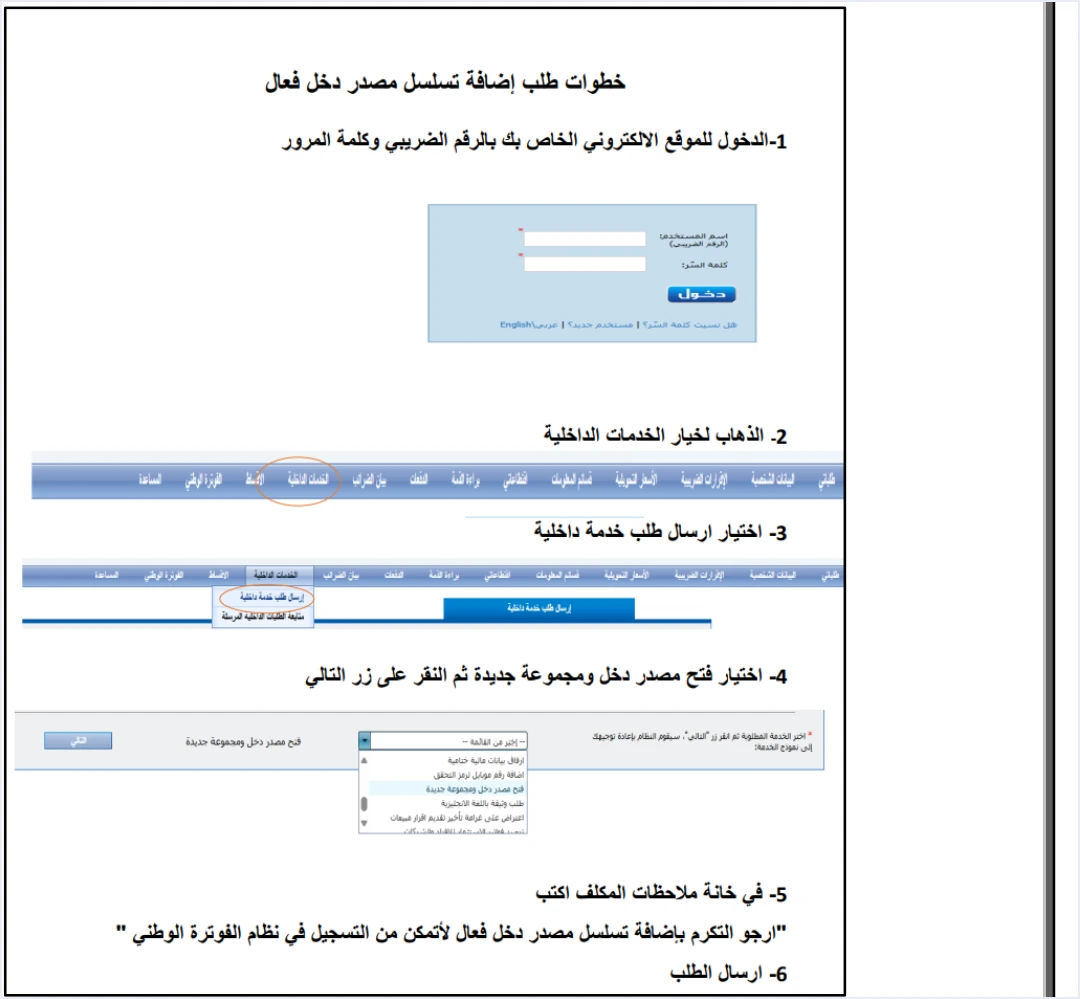
The same section has a Follow up on sent internal requests option (متابعة الطلبات الداخلية المرسلة), where you track the status of your request after sending it. The decision on the request is ISTD’s. The guide sets no response time.
The guide gives this request as the fix for one specific case, being unable to register because there is no active sequence, and the suggested note is written for that case. If your need is different, for example an additional sequence for a business that is already registered, ask ISTD which request type fits before you send anything. Do not assume the same text works for your case.
Checklist before your first submission
Before you link your software or create a sub-user, go through these points in order.
- An active sequence exists. If you are returned to the home page each time you try to register, start with the Opening a new income source and group request.
- A known sequence for each link. Open the linked devices list and note the sequence shown next to each Client ID.
- A copied value, not a typed one. Put the sequence into your software’s settings exactly as the portal shows it, character for character.
- Credentials that match the sequence. Make sure the Client ID and Secret Key your software sends with come from the row that carries the sequence sent in the invoice.
- An invoice type that fits your registration. Do not send an income invoice if your tax number is registered for General Sales Tax, and do not do the reverse.
- Each sub-user on the right sequence. If you issue on the portal, make sure each sub-user was created on the sequence it will issue invoices under.
- Linking credentials kept safe. ISTD recommends keeping the linking credentials in a safe place and not sharing them with anyone.
For a wider view of the system and how to connect your business to it, read our article Jordan’s National E-Invoicing System. You can also see Qoyod’s page on its integration with the National Invoicing System.
E-invoicing and full accounting in one system
Qoyod is integrated with the National Invoicing System (JoFotara). You issue your invoice in Jordanian dinars from Qoyod, it is booked to your ledgers automatically and sent to the system, and once it is accepted it comes back with a QR code from the Income and Sales Tax Department.
Frequently asked questions
What is the income-source sequence in JoFotara?
It is a value held by the Income and Sales Tax Department in the taxpayer’s file. The taxpayer selects it from a list when linking devices or creating a sub-user, and it is sent in every invoice through the API in the cbc:ID field of the cac:SellerSupplierParty block.
Does the system generate the income-source sequence when you link?
It does not. The taxpayer selects the sequence from the list, and the system then generates only two values, the Client ID and the Secret Key, and ties them to the selected sequence.
Why does registration send me back to the invoicing home page?
ISTD’s questions and answers guide gives an official cause for this case, which is that there is no active income-source sequence. The fix is an internal service request of the type Opening a new income source and group (فتح مصدر دخل ومجموعة جديدة), sent through the e-services website.
Can one Client ID and Secret Key be used for more than one sequence?
The technical guide ties each pair of credentials to one income-source sequence. Each sequence’s invoices are therefore sent with the credentials tied to it, and you can see this link in the linked devices list.
How is the income-source sequence related to error 500?
The technical guide lists an error in the tax number or the income-source sequence first among the causes of code 500. Less often, the cause is an error in the Client ID or the Secret Key, or a tax rate outside the rates ISTD accepts.
Where do I track my request to add an income-source sequence after sending it?
You track it from the Follow up on sent internal requests option (متابعة الطلبات الداخلية المرسلة) in the Internal services section of the e-services website. It is the same section you sent the request from.
References
- Income and Sales Tax Department (ISTD), technical guide for integrating with the National Invoicing System through the API, version 1.5 (in Arabic).
- Income and Sales Tax Department (ISTD), procedures guide for joining the Jordanian National Electronic Invoicing System, 2026 edition (in Arabic).
- Income and Sales Tax Department (ISTD), questions and answers guide for the National Invoicing System, 2026 (in Arabic).




