




A JoFotara invoice discount is not sent as a separate discount on the invoice total. It is sent as a discount on each line. The technical guide that the Income and Sales Tax Department (ISTD) published for the National Invoicing System (JoFotara) says the system does not accept a discount on the invoice as a whole, and it asks anyone whose software calculates the discount on the total to spread it across the goods and services before the invoice is sent. The discount you see in the file header is only the sum of the line discounts.
This article explains the discount rules as they appear in version 1.5 of the technical guide. It covers where the discount is written in the XML file, why its value is always positive, how it enters the line amount formula, and what the guide says about spreading an invoice-total discount and what it leaves unsaid. It also walks through the guide’s numeric examples for the income invoice, the General Sales Tax (GST) invoice and the Special Sales Tax (SST) invoice. It is written for the accountant who gives customers a discount on the whole invoice and for the developer who builds the invoice file from a business’s software.
For a wider view of the system and how to connect your business to it, read our article Jordan’s National E-Invoicing System. The line elements one by one are in our article Invoice Lines and Their Rules.
What a JoFotara invoice discount is
The invoice file in JoFotara knows one kind of discount, the one given on a specific good or service inside a line. The guide describes the header element that carries the discount as the total value of the goods discount (its Arabic wording is «مجموع قيمة خصم السلع»), and it explains why by saying the system does not accept a discount on the invoice as a whole. Below that description it adds, in red, the rule this article is built on.
«في حال كان نظام المكلف يحسب الخصم على اجمالي الفاتورة يجب ان يتم توزيع الخصم على السلع و الخدمات قبل ترحيل البيانات الى نظام الفوترة».
In English, the guide says that if the taxpayer’s system calculates the discount on the invoice total, the discount must be distributed across the goods and services before the data is sent to the invoicing system. This English is our rendering of the guide’s Arabic, which is the text to rely on.
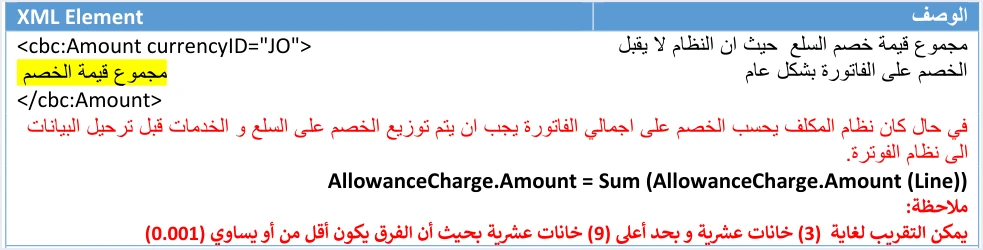
The passage carries three rules. First, a discount on the total does not reach the system in its original form. Second, turning it into line discounts is the job of the seller’s system, and it happens before sending, not after. Third, the number written in the invoice header is taken from the lines with the formula AllowanceCharge.Amount = Sum (AllowanceCharge.Amount (Line)), so it is a sum, not a value the seller picks.
None of this means a business is barred from giving its customer a discount on the whole invoice. Granting a discount is a commercial decision between seller and buyer, and the guide does not address it. What the guide governs is how that discount appears in the invoice file, which is spread across the lines.
Where the discount sits in the invoice file
The discount appears in the invoice file in three places, one in each line and two in the invoice header. The table below lists them with the rule the guide sets for each.
Scroll the table sideways to see the remaining columns
The table shows that the two header positions carry the same value. The cac:AllowanceCharge element in the header and the AllowanceTotalAmount element inside cac:LegalMonetaryTotal both equal the sum of the line discounts. Filling in only one of them is not enough. They are two separate elements in the file, and the guide asks for the same sum in each.
For the discount block in the invoice header, the guide uses two elements with fixed values, cbc:ChargeIndicator with the value false, and cbc:AllowanceChargeReason with the value discount in its example. Only cbc:Amount varies, and the seller’s system fills it with the sum of the line discounts.
The line discount: a positive value subtracted from the line amount
The line discount is the base on which every other discount position is built. It is written in the cbc:Amount element inside the cac:AllowanceCharge block of the line, and the guide describes it as the discount value for the good or service. Two conditions are written below it in red.

The first condition is that the discount value is positive only. The discount is written as a positive number, and the formula is what subtracts it. If your software writes the discount with a minus sign, believing the sign expresses the subtraction, it breaks this condition. The second condition is that the discount accepts up to 9 decimal places.
How the discount enters the line calculation is set by the formula for the line amount before tax, cbc:LineExtensionAmount.

The guide writes the formula as LineExtensionAmount = (quantity * unitPrice) - Discount and explains it in Arabic as the total amount for the good or service being (unit price × quantity) minus the item discount. The discount is subtracted from quantity times unit price, and the result is the line amount after the discount and before tax.
The formula has a direct effect on tax. In a GST invoice, the guide calculates the line tax as (quantity × unit price − discount) × tax rate, which is on the line amount after its discount. The line amount and its tax are then added together in cbc:RoundingAmount. So a line discount lowers both the line amount and its tax, except in the consumer price case, which comes later in this article.
Spreading an invoice-total discount across the lines: what the guide says and what it does not
The guide requires a discount on the invoice total to be spread across the lines, but it does not set the method of spreading. It mentions no spreading in proportion to line value, none in equal parts, none onto one chosen line, and it gives no formula for it. Any spreading formula you see attributed to the National Invoicing System is not from the technical guide.
What the guide does set is the conditions the result must meet, whatever method your software chooses.
- Every discount share is positive. The share that falls on any line is written as a positive number, under the positive-only condition.
- Every line amount follows the formula. After the spread, the line amount equals quantity times unit price minus that line’s share of the discount.
- The total matches the header. The sum of the line shares equals the
cac:AllowanceChargevalue in the invoice header, and it equalsAllowanceTotalAmount. - Tax is calculated after the spread. The tax of each line is calculated on its amount after its share of the discount, not on its amount before the spread.
We add one note of our own to these conditions. It is an inference from the formulas, not text in the guide. When an invoice combines lines with different tax rates, or a taxable line with an exempt one, the total tax changes depending on which line receives the discount share. The illustration below is ours, not the guide’s, and it uses the numbers of the guide’s GST invoice example to show the effect.
Scroll the table sideways to see the remaining columns
In both cases the invoice total before the discount stays at 116.000 and the discount stays at 2.000, but the total tax moves from 4.480 to 4.620, and the payable amount moves with it. The guide does not say which of the two is correct, and it does not address the tax effect of choosing the line that carries the discount. So we think the choice of spreading method is a decision for the business to take with its accountant or tax adviser, based on the real nature of the discount it gave, and then to apply consistently in its software across all invoices. This is our recommendation, not a rule from the guide.
Rounding also stays in play when you spread. Under every amount, the guide repeats a note that allows rounding to 3 decimal places with a difference of no more than 0.001. If your software divides a discount across several lines, check after rounding that the sum of the shares equals the discount in the invoice header.
The guide’s examples: the discount in the totals
On page 19, the guide gives an example of the totals of an income invoice that has two lines, each with a discount. The image below reproduces the example as it is.
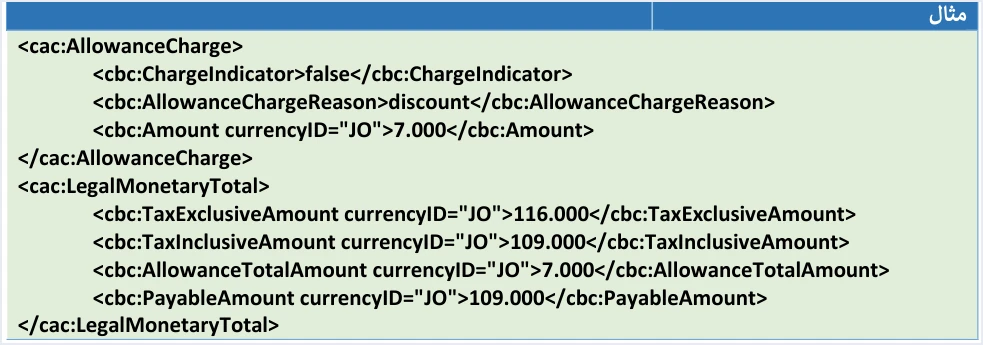
The example rests on two lines on pp. 19 to 21 of the guide. The first line has quantity times unit price of 66 and a discount of 2, so its amount is 64. The second line has 50 and a discount of 5, so its amount is 45. The header totals come out of those two lines as follows.
TaxExclusiveAmountequals 116.000, the sum of quantity times unit price for the two lines before the discount (66 + 50).AllowanceTotalAmountequals 7.000, the sum of the two line discounts (2 + 5).cac:AllowanceChargein the header also equals 7.000, which is the same value.TaxInclusiveAmountandPayableAmountequal 109.000, the sum of the two line amounts after the discount (64 + 45), because the lines of an income invoice carry no tax block.
The example points out that TaxExclusiveAmount is the total before the discount, not after it. The discount appears in the header as a separate element and is then subtracted in the payable amount. The example has two discounts on two lines totaling 7.000, and the guide does not say whether those discounts arose on the lines in the first place or were spread from a discount on the total, so no spreading method can be inferred from it.
The same pattern repeats in the other two invoice types. The table below gathers the discount numbers from the guide’s three examples.
In the Special Sales Tax invoice, the guide writes the total formula in words (in Arabic, «اجمالي الفاتورة = (اجمالي الفاتورة قبل الخصم − مجموع قيمة الخصم + مجموع الضريبة الخاصة + مجموع قيمة الضريبة العامة)»). In English, the invoice total is the total before the discount, minus the total discount, plus the total Special Sales Tax, plus the total General Sales Tax amount. So the discount is subtracted from the pre-discount total, and then the two taxes are added. The Special Sales Tax itself is detailed in our article The Special Sales Tax Line.
Discount with the consumer price: a case where the discount does not lower the tax base
Version 1.5 of the guide added the consumer price element, cac:ItemPriceExtension, which is the final price to the consumer used as the tax base. It is used only under a permission granted at the taxpayer’s request, it is available to those registered for GST or SST, and it applies to all lines of the invoice. Who needs it and how it is calculated is covered in our article Consumer Price in JoFotara: Who Needs It, How to Calculate.
When the consumer price is higher than the unit price, tax is calculated on quantity times the consumer price, so a line discount does not lower it. The line amount LineExtensionAmount is still calculated with the usual formula, quantity times unit price minus the discount. The guide’s examples show the difference.
- Consumer price equals unit price. A line with quantity 10, unit price 5.000 and a discount of 10.000 has a line amount of 40.000, tax of 6.400 and a total of 46.400.
- Consumer price higher than unit price. With a consumer price of 6.000, the tax is 10 × 6 × 16% = 9.600, even though the discount of 10.000 is still subtracted from the line amount, and the total is 49.600.
So anyone working with the consumer price checks the line tax on that basis and does not assume that every discount lowers the tax.
The discount in the invoice form on the National Invoicing System portal
The same rule shows up for anyone who issues invoices straight from the portal, without linked software. In the invoice form shown in the procedures guide for issuing an invoice in the Jordanian National Electronic Invoicing System (2026 edition), the Discount value field (قيمة الخصم) sits in the Goods or services details section (معلومات او بيانات الخدمة او السلعة), next to the description, quantity, unit price and General Sales Tax rate, and its default value is 0.
So the discount in the form is entered with each good or service before pressing the Add button (إضافة), and the guide shows no field in the form for a discount on the invoice total. The practical result, as we read the form, is that someone who wants to give a discount on the whole invoice spreads it across the goods themselves before entering them. The full steps for filling in the form are in our article Issue an Invoice on the JoFotara Portal: The Steps.
Related cases outside this article
Some discount questions are related to this topic but are explained elsewhere, and we only point to them here.
- Discount in a partial return invoice. The guide sets a special rule for the line discount when the buyer returns part of the quantity. It is outside this article.
- Rounding. The details of the decimal-places note and the 0.001 difference are outside this article. It is enough here that the sum of the shares after rounding must match the header.
- The mixed invoice. Choosing the right category for each line, whether taxable, exempt or zero-rated, is explained in our article on tax categories S, Z and O.
Discount checklist before sending
Go through these points on every invoice that carries a discount before you send it to the National Invoicing System.
- There is no discount on the total in the file. Every discount you gave on the whole invoice is spread across the lines.
- Every line discount value is positive, with at most 9 decimal places.
- Every line amount equals quantity times unit price minus the line discount.
- The tax of every line is calculated on its amount after the discount, unless you work with a consumer price higher than the unit price.
- The
cac:AllowanceChargeelement in the header equals the sum of the line discounts. - The
AllowanceTotalAmountelement equals the same value. TaxExclusiveAmountequals the sum of quantity times unit price before the discount.- The sum of the shares after rounding equals the discount in the header, and the difference in any amount is no more than 0.001.
- The method of spreading a discount on the total is fixed in your software and recorded on your side as your business’s choice, not as a rule from the guide.
How Qoyod helps when the invoice is sent
When you issue the invoice from accounting software that is linked to the system, you do not write the file elements by hand. Qoyod builds the invoice file in UBL 2.1 format with its unique identifier (UUID) and sends it to the National Invoicing System without any manual intervention, through Qoyod’s integration with the National Invoicing System.
- Check before sending. Qoyod checks each invoice at field level as it is created, covering the tax number, the document type and payment method, the General Sales Tax rate and whether the lines are complete, and alerts you to any error before the invoice is sent, to reduce rejections.
- Every invoice’s status in view. ISTD returns the invoice status and any error message, and Qoyod shows them in its status panel.
- Resending with the same identifier. The status panel lists invoices that were not sent and need to be resent, and when you resend one it keeps the same UUID.
The pre-send check is an alert, not a guarantee. It covers the four checks listed above, and whether an invoice is accepted remains a decision for the National Invoicing System alone. To see how Qoyod connects your business to the system, visit our National Invoicing System page.
E-invoicing and full accounting in one system
Qoyod is integrated with the National Invoicing System (JoFotara). You issue your invoice in Jordanian dinars from Qoyod, it is booked to your ledgers automatically and sent to the system, and once it is accepted it comes back with a QR code from the Income and Sales Tax Department.
Frequently asked questions
Does JoFotara accept a discount on the invoice total?
No. The technical guide says the system does not accept a discount on the invoice as a whole. Anyone whose software calculates the discount on the total must spread it across the goods and services before sending the invoice.
How do I spread a total discount across the invoice lines?
The technical guide leaves the method to the seller’s system. It requires the spread but gives no method or formula for it. What it asks is that every share is positive, that the sum of the shares equals the discount written in the invoice header, and that the tax of each line is calculated after its share.
Do I write the discount in the invoice file with a minus sign?
No, the discount value is always written as a positive number. The guide says the discount value is positive only, and the formula is what subtracts the discount from quantity times unit price.
What is the difference between cac:AllowanceCharge and AllowanceTotalAmount in the invoice header?
Each is a separate element in the file. The first is the discount block in the invoice header, and the second is part of the totals inside LegalMonetaryTotal. The guide asks for both to equal the sum of the line discounts, so they carry the same value.
Is TaxExclusiveAmount calculated before or after the discount?
It is calculated before the discount. Its formula in the guide is the sum of quantity times unit price across all lines. In the income invoice example it equals 116.000 although the discount is 7.000, and the discount is then subtracted in the payable amount.
Does a line discount always lower General Sales Tax?
It lowers the tax on a standard line, because the tax is calculated on the line amount after the discount. If the taxpayer works with a consumer price higher than the unit price, the tax is calculated on quantity times the consumer price, and the discount does not lower it.
References
- Income and Sales Tax Department (ISTD), technical guide for integrating with the National Invoicing System through the API, version 1.5 (in Arabic), pp. 18 to 21, 40, 43 and 44, 65, 66 and 69 to 71.
- Income and Sales Tax Department (ISTD), procedures guide for issuing an invoice in the Jordanian National Electronic Invoicing System, 2026 edition (in Arabic).
- ISTD’s National Invoicing System guides (in Arabic)




