




JoFotara UBL 2.1 is the structure that the XML file of an e-invoice must follow before it is sent through Jordan’s National Invoicing System (JoFotara) to the Income and Sales Tax Department (ISTD). Version 1.5 of ISTD’s technical guide for linking to the system adopts the UBL 2.1 Invoice standard as the structure of the e-invoice. It makes compliance with that standard the first of its ten guidelines, and it states that any flaw in the structure of the file leads to the invoice being rejected.
This article explains what the standard means in practice for a business that links its accounting system to JoFotara. You will see how every invoice file begins, what the fixed value of ProfileID is, how to read the templates in the guide, which blocks make up the file, and what is checked once the structure passes. The finer rules of each block have their own articles in this series.
The article is written for the developer who builds the invoice file, and for the accountant who follows the system’s responses and wants to understand why an invoice was rejected. A business that issues its invoices directly on the system’s portal fills in the invoice form on screen instead, and the steps for that are in our article Issue an Invoice on the JoFotara Portal: The Steps.
What the JoFotara UBL 2.1 standard is
UBL 2.1 is a specification for writing an invoice as an XML file. XML is text divided into elements, and each element has a set name and a set position inside another element. ISTD chose this standard as the structure of JoFotara invoices, and the technical guide says so on page 10.
«تم اعتماد معيار (UBL 2.1 Invoice) كهيكل للفاتورة الإلكترونية، والعناصر أدناه تمثل بداية ملف XML والمراجع اللازمة لمعالجة هذا الملف بحسب معيار (UBL 2.1)».
In English, the guide states that the UBL 2.1 Invoice standard has been adopted as the structure of the e-invoice, and that the elements it lists next are the start of the XML file and the references needed to process that file under the UBL 2.1 standard. ISTD publishes this guide in Arabic only; the English here is our rendering, and the Arabic text is the authority.
In practice, the invoice that an accounting system sends through the API is a file whose elements follow the names and structure of the standard. ISTD checks that file before it accepts the invoice. So the standard is not a layout for showing the invoice to the buyer. It is a shared language between the seller’s system and the National Invoicing System.
Element names in the guide’s templates start with prefixes, and two of them matter most. Elements that hold a single value, such as the invoice number cbc:ID and the invoice date cbc:IssueDate, start with the prefix cbc. Blocks that contain other elements, such as the seller block cac:AccountingSupplierParty and the item line cac:InvoiceLine, start with the prefix cac. Each of these prefixes is tied to a namespace that the file declares at its start, as the next section shows.
The start of the file: the declaration line, the Invoice element and ProfileID
The technical guide sets the lines that every invoice file starts with, and shows them in this order.
<?xml version="1.0" encoding="UTF-8"?>
<Invoice xmlns="urn:oasis:names:specification:ubl:schema:xsd:Invoice-2" xmlns:cac="urn:oasis:names:specification:ubl:schema:xsd:CommonAggregateComponents-2" xmlns:cbc="urn:oasis:names:specification:ubl:schema:xsd:CommonBasicComponents-2" xmlns:ext="urn:oasis:names:specification:ubl:schema:xsd:CommonExtensionComponents-2">
<cbc:ProfileID>reporting:1.0</cbc:ProfileID>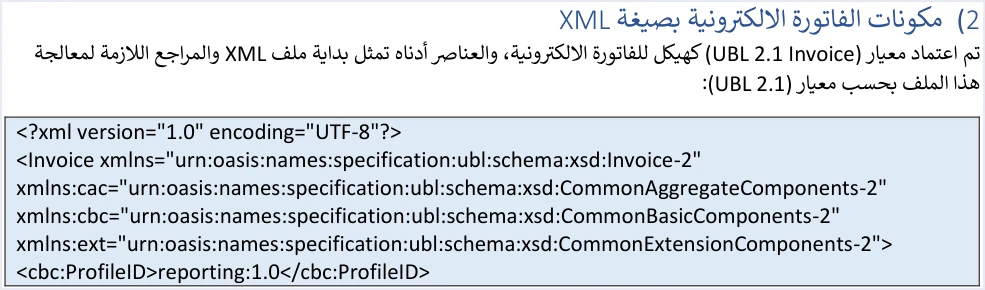
Each of these lines has a clear role.
- The declaration line. It states that the file is XML version 1.0 and that its character encoding is
UTF-8. - The Invoice root element. It wraps the whole invoice. Its opening tag declares four namespaces, the core invoice namespace
Invoice-2, thencac,cbcandext. - The ProfileID element. Its value is
reporting:1.0on every invoice. It does not change between an income invoice and a sales invoice, or between a new invoice and a return invoice.
These lines are fixed text, copied as they are without any change. The only formatting condition the guide documents for them is that the opening Invoice tag stays on a single line. If it does not, the response comes back with the message Invalid Invoice Minification. We show the tag over more than one line in the box above only because the screen is narrow. In the file itself, it is written as one line.
What the technical guide requires: compliance with the data standard
In its final pages, the technical guide lists ten operating guidelines. The first is headed compliance with the data standard (الالتزام بمعيار البيانات), and it reads as follows.
«يجب أن يكون ملف الفاتورة بصيغة XML مطابق لمعيار UBL 2.1، وأي خلل في البنية يؤدي إلى رفض الفاتورة».
In English, the guideline states that the invoice file in XML format must conform to the UBL 2.1 standard, and that any flaw in the structure leads to the invoice being rejected. ISTD publishes this guide in Arabic only; the English here is our rendering, and the Arabic text is the authority.

The wording is general. It does not set the type or the size of the flaw, and it does not exempt a small flaw from rejection. So treat the structure as a condition with no room for tolerance. Build the file from the correct template for your invoice type, and do not settle for a file that only looks close to it.
How the standard check shows up in the system’s response
After every submission, JoFotara returns a response with an EINV_RESULTS element. It holds three lists, INFO, WARNINGS and ERRORS. In the example of a successful response that the guide shows, the INFO list carries the result of the standard check itself.
"INFO": [{
  "type": "INFO",
  "status": "PASS",
  "EINV_CODE": "XSD_VALID",
  "EINV_CATEGORY": "XSD validation",
  "EINV_MESSAGE": "Complied with UBL 2.1 standards"
}]
The result code is XSD_VALID, its category is XSD validation, and its message says that the file complies with the UBL 2.1 standards. In other words, compliance with the standard is a result that the system states explicitly in its response. It is not an assumption you draw from the fact that the invoice was accepted.
When an invoice is rejected, the value of EINV_STATUS is NOT_SUBMITTED. The QR code, the UUID and the invoice number come back as null, and the status code is not 200. The reason for the rejection appears in the EINV_MESSAGE message inside the errors list. For the rejection messages and what causes them, see our article JoFotara Error Codes: Why an Invoice Is Rejected and How to Fix It.
The rule the guide repeats in its fourth guideline is to judge the invoice by the value of EINV_STATUS, not by the connection status code alone.
Shaded elements and fixed text in the guide’s templates
For each invoice type, the guide shows a color-coded XML template. An element shaded yellow is a mandatory variable that the seller’s system fills in. An element shaded green is an optional variable. Anything not shaded is fixed text. Reading this shading element by element is the subject of a separate article in this series.
From the standard’s point of view, the working rule is that you fill in the variables only and copy the fixed text exactly as it is. Literal values such as reporting:1.0, ICV and VAT are part of the template, and the guide says the template is to be copied without change.
Elements of the standard that do not appear in the template are not documented by the guide. The general standard is wider than the Jordanian template, but the guide limits itself to the elements it shows. So do not build your file on an element the guide does not include.
Note that the XML examples in the guide are illustrative. Some of them carry UUIDs in an invalid format. Some of the Special Sales Tax templates carry doubled quotation marks that make the file malformed if it is copied as it is. Use the examples to understand the order of the elements, and build the values from your own invoice data.
Invoice templates by taxpayer type
The guide does not give one template for every invoice. It divides invoices by the taxpayer’s tax registration, and it gives each group two templates, one for creating the invoice and one for returning it.
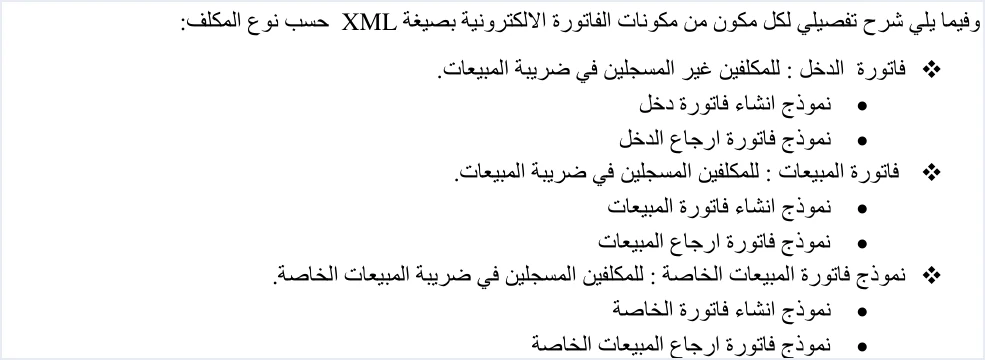
The system reads the invoice type from the cbc:InvoiceTypeCode element. Its value is 388 for a new invoice and 381 for a return invoice, which counts as a credit note. The name attribute is a three-digit code. The first digit shows the trade type, such as local or export. The second shows the payment method, cash or receivable. The third shows the tax type, as in the table. The tax categories used on a sales invoice are explained in a separate article in this series.
The file declares the type, but it does not decide it alone. What this code may carry is decided by the taxpayer’s registration at ISTD, the income-source sequence and the reality of the transaction. If a taxpayer sends a type that does not match its registration, the response comes back with the message This user is not authorized to submit this type of invoice.
A return invoice reuses the name code and the currency of the original invoice. It refers to the original by its number, its UUID and its total value, and it carries a return reason that cannot be left empty.
The invoice file blocks as the technical guide presents them
After the opening lines, the invoice file is made up of main blocks. The table below summarizes six of them and the key elements of each, without covering their detailed rules.
Scroll the table sideways to see the remaining columns
The key that identifies an invoice in the system is the invoice number cbc:ID and the UUID cbc:UUID together, not the invoice number alone. The date is written in the format yyyy-mm-dd, as in every XML example in the guide, although the descriptive text, when copied from the PDF, may show the date parts in a different order on some pages.
Each of these blocks has its own article in the technical documentation series, among them the seller details, the buyer details, the invoice lines (InvoiceLine) and the UUID.
How the invoice file reaches the system
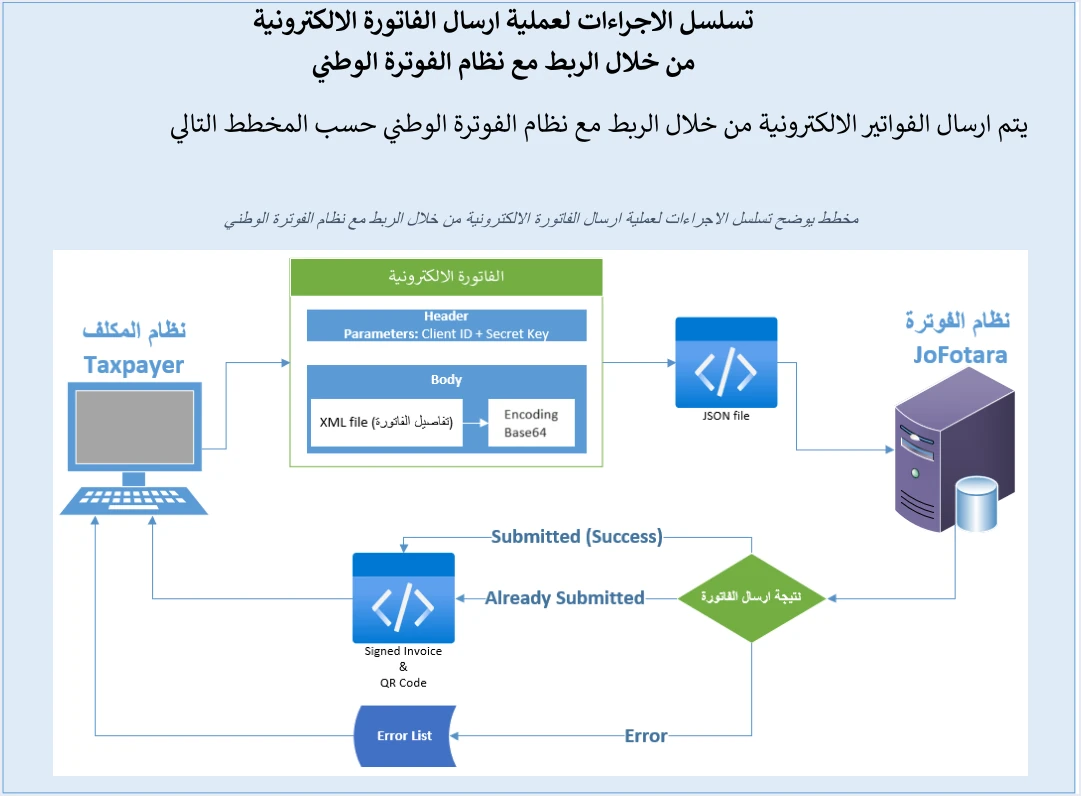
The XML file is not sent as it is. It is converted with Base64 encoding, and the resulting text is placed in a JSON file under the key invoice. The Client ID and the Secret Key travel with it in the request header, not inside the file, and how to create them is explained in our article JoFotara Client ID and Secret Key: Device Linking Steps. The system then returns the result of the submission. That is either an acceptance, with a QR code coming back with it, a notice that the invoice was already sent with the same number and UUID, or a list of errors. The details of this journey are in the article on Base64 encoding in this series.
What is checked after the file structure
Compliance with the UBL 2.1 standard is a condition for accepting the invoice, but it is not enough on its own. The second guideline asks you to check the totals, the taxes, the taxpayer’s tax number, the buyer’s number and the mandatory fields before sending. The guide documents rejection messages that concern the values rather than the structure, including the following.
- Totals. If the invoice total does not equal the sum of its lines, the response comes back with the message
Total General Amount is Not Correct. - Line number. Each line number must be unique within the invoice. Otherwise the message
The ID number must be uniquecomes back. - Tax rate. At a 0% rate, category
Sis not used. A rate that is not among the rates approved by ISTD is listed in the guide among the causes of error 500. - Postal code. If you send it, it must not exceed 5 characters. Otherwise the message
Postal code length is incorrectcomes back. - Invoice type. It must match the taxpayer’s tax number and income-source sequence, as covered in the templates section above.
So a file with a sound structure can still be rejected for a wrong value, and a file with correct values can be rejected for a flaw in its structure. A good check before sending covers both sides.
Pre-submission checklist for the invoice file
This list brings together what the guide requires of the structure and the guidelines connected to it. Go through it before you send the first invoice from your system, and again after any change to how the file is built.
- The file starts with the declaration line, with
UTF-8encoding. - The opening
Invoicetag is on a single line and declares the four namespaces as the guide gives them. - The value of
ProfileIDisreporting:1.0. - The template used matches the invoice type, income, sales or special sales, for creation or for a return.
- Every variable shaded yellow in the template has a value, and the fixed text is copied without change.
- The date is in the format
yyyy-mm-dd, and each line number is unique within the invoice. - The UUID is stored before sending, and the same UUID is reused with the same number when you resend after a failure or a dropped connection.
- The result is judged by
EINV_STATUS, and the invoice number, the UUID, the QR code and the invoice status are stored.
If an invoice is rejected, log the error details internally as the sixth guideline asks, fix the cause, then resend with the same two identifiers. For questions the guide does not answer, the guide refers you to ISTD’s technical support committee for invoicing affairs.
How Qoyod builds the invoice file
When you issue an invoice from Qoyod, you do not write the XML file by hand, and you do not check the declaration line and the namespaces yourself. That is the job of Qoyod’s integration with the National Invoicing System. Qoyod builds the invoice file in UBL 2.1 format with its unique identifier (UUID) and sends it to the National Invoicing System without any manual intervention.
- A check before sending. Qoyod checks each invoice at field level as it is created, covering the tax number, the document type and payment method, the General Sales Tax rate and whether the lines are complete, and alerts you to any error before the invoice is sent, to reduce rejections.
- The status of each invoice in view. ISTD returns the invoice status and any error message, and Qoyod shows them in its status panel.
- Resending with the same identifier. The status panel lists invoices that were not sent and need to be resent, and when you resend one it keeps the same UUID.
The pre-send check is an alert, not a guarantee. It covers the four fields listed above, and accepting the invoice remains a decision for JoFotara alone. Once ISTD accepts the invoice it returns a QR code, and Qoyod shows that code on the invoice. For a wider view of the system and how to connect your business to it, read our article Jordan’s National E-Invoicing System.
E-invoicing and full accounting in one system
Qoyod is integrated with the National Invoicing System (JoFotara). You issue your invoice in Jordanian dinars from Qoyod, it is booked to your ledgers automatically and sent to the system, and once it is accepted it comes back with a QR code from the Income and Sales Tax Department.
Frequently asked questions
What is JoFotara UBL 2.1?
It is the structure that ISTD adopted for the XML file of the e-invoice in JoFotara. Version 1.5 of the technical guide states that the invoice file must conform to this standard, and that any flaw in the structure leads to the invoice being rejected.
What happens if the invoice file does not follow the UBL 2.1 standard?
The invoice is rejected, under the first guideline in the technical guide. In the rejected response, the value of EINV_STATUS is NOT_SUBMITTED, no QR code comes back, and the reason appears in the EINV_MESSAGE message.
What is the value of ProfileID in a JoFotara invoice?
Its value is reporting:1.0 on every invoice. That holds for an income invoice, a sales invoice or a special sales invoice, whether it is new or a return.
Do I copy the start of the XML file exactly as it appears in the guide?
Yes. The declaration line, the Invoice tag with its four namespaces and the ProfileID element are fixed text, copied without change. The opening Invoice tag must stay on a single line, or the message Invalid Invoice Minification comes back.
How do I know the invoice passed the standard check?
A successful response says so explicitly in the INFO list, with the code XSD_VALID, the category XSD validation and the message Complied with UBL 2.1 standards. The final verdict on the invoice, though, comes from the value of EINV_STATUS.
Is it enough for the file to conform to the standard for the invoice to be accepted?
That alone is not enough, because the system also checks the values. The guide documents rejection messages for incorrect totals, a repeated line number, the tax rate, and an invoice type that does not match the taxpayer’s registration.
References
- Income and Sales Tax Department (ISTD), technical guide for integrating with the National Invoicing System through the API, version 1.5 (in Arabic), pp. 9, 10 and 104.
- ISTD’s National Invoicing System guides (in Arabic)




