




When your business runs more than one activity in the National Invoicing System (JoFotara), the question you face at setup is not about the activity itself. It is about the income-source sequences registered for your business with the Income and Sales Tax Department (ISTD). Every link to accounting software and every sub-user is bound to one sequence, and every invoice carries one sequence. So in a multiple activities JoFotara setup, more sequences mean more issuing accounts.
The term itself and its English rendering are in our article Arabic to English terminology for JoFotara. This article looks at the case from the side of a business with several activities. It shows how to find the sequences available to you, how to request an active sequence, and how to arrange sub-users and linking credentials around each sequence. At each step it separates what ISTD’s guides state from what they leave out, because most of this case is not documented.
Activity and sequence: what ISTD’s guides tie together and what they do not
The first thing to know is that ISTD’s guides do not say that each licensed activity has its own income-source sequence. They describe the sequence as a value held by ISTD in the taxpayer’s file, which the taxpayer selects from a list when linking devices or when creating a sub-user. They do not explain how ISTD decides to open a new sequence, whether each activity matches one sequence, or whether one sequence can cover more than one activity.
So do not start planning from the list of activities in your commercial register or professional license and assume that a sequence is waiting for each one in the system. Start from the sequences the system actually shows in your account, then decide how to spread your issuing across them. If you think your activities need sequences you cannot see, that is a question for ISTD, not a decision you make on your own.
One more point can cause confusion at setup. The invoice form shown in ISTD’s 2026 procedures guide for issuing an invoice has a field called national activity classification (التصنيف الوطني للأنشطة). It is a dropdown at the level of each goods or service line, and it carries no mandatory-field mark. This field is not the income-source sequence. The sequence appears under Seller details (بيانات البائع), filled in automatically and read-only. The guide does not list the values of the national activity classification field or say where they come from, and the technical guide for the API has no matching field. So do not treat the two fields as one, and do not base any part of how you spread your activities on the classification field. Every section of the form is covered in our article invoice form fields in JoFotara.
Multiple activities JoFotara setup: what repeats for each sequence
If your business has more than one active sequence, some parts of the account stay single and some repeat for each sequence. The tax number is one, and the main user is tied to that tax number. What is tied to the sequence is summarized in the table below, with the source of each row.
The last two rows come from the 2024 user guide for the platform, which a software vendor prepared and which is not one of ISTD’s official 2026 guides. The current interface may differ from what it describes, so check it in your account before you rely on it.
The practical result of the table is that the number of sequences, not the number of activities, sets how many issuing accounts you need. A business with two sequences that issues on the portal needs at least one sub-user on each sequence. A business with two sequences that links its accounting software needs a link for each sequence.
Step one: find the active sequences in your account
Before any request or setup, log in to JoFotara as the main user and look at what the system shows. Sequences appear in two places that the main user reaches from the home screen.
- The income-source sequence list (تسلسل مصدر الدخل) in the Add a sub-user window. You open it from the Add a sub-user option (إضافة مستخدم فرعي), and the sequences listed there are the ones a new sub-user can be bound to.
- The income-source sequence list in the device linking window. It appears next to the username field when you choose New link (ربط جديد). The list of linked devices also has a column showing the sequence tied to each Client ID and Secret Key.
One important warning before you try anything. ISTD’s questions and answers guide says that clicking the device linking option makes the Issue an invoice tile (تنظيم فاتورة) disappear for the sub-user. It does not say whether opening the option is enough or whether the link has to be completed, as explained below. If you only want to see the sequences, the Add a sub-user window is enough, and you can close it without adding anyone. Do not open device linking (ربط الأجهزة) just to look.
We found no screen in ISTD’s guides that lists all the sequences with the activity that matches each one. If you do not know which sequence belongs to which of your activities, ask ISTD before you create sub-users or linking credentials, because every invoice will carry the sequence you select now.
The request to open a new income source and group: when it applies
The only procedure ISTD’s guides give for adding a sequence is an internal service request of the type opening a new income source and group (فتح مصدر دخل ومجموعة جديدة). The questions and answers guide gives it as the fix for one specific case, where a taxpayer who tries to register is taken back to the invoicing home page. The cause the guide gives for that case is that there is no income-source sequence, and the guide’s heading for the procedure is steps to request the addition of an active income-source sequence. Registration itself is covered in our article registration and the registration document in JoFotara.
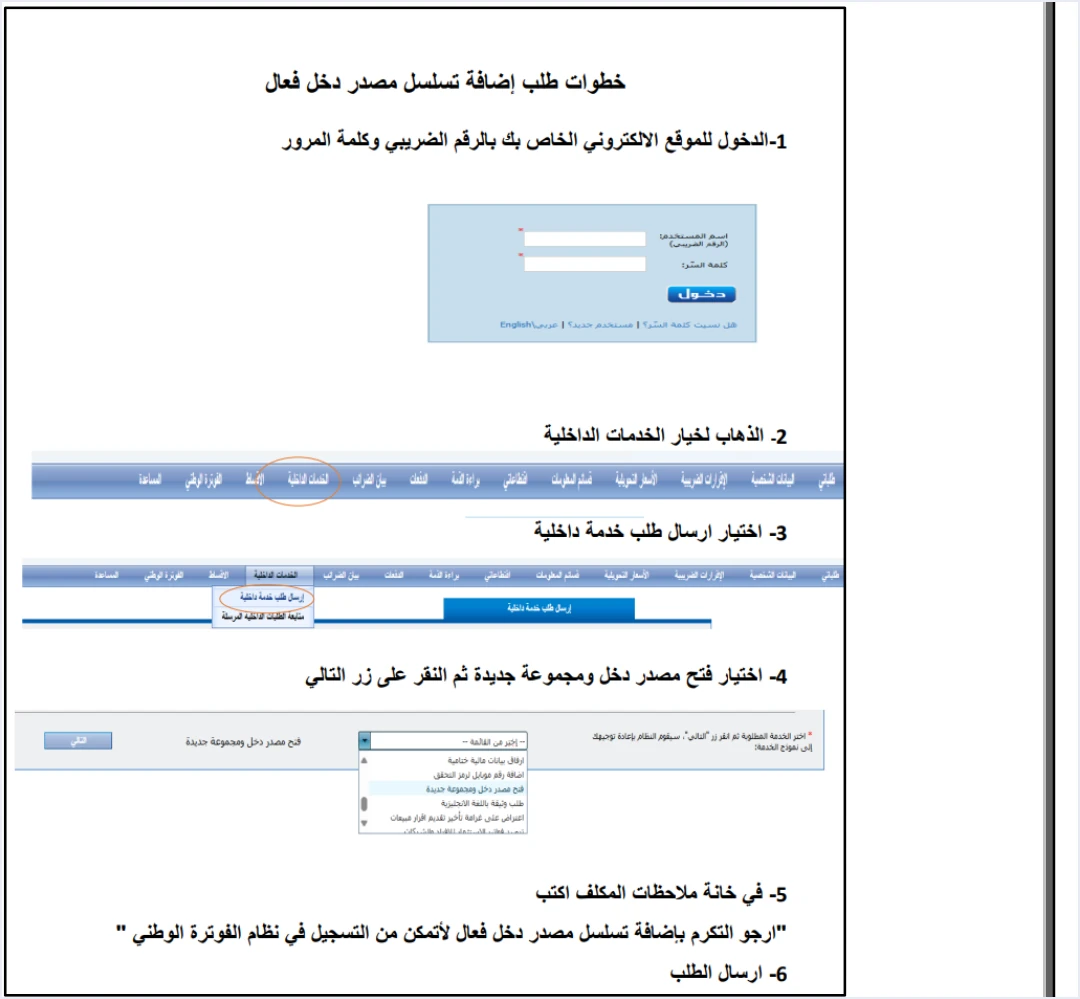
The request is sent from the e-services website, not from JoFotara itself. You sign in with the tax number and password, go to internal services (الخدمات الداخلية), then to send an internal service request (ارسال طلب خدمة داخلية). You then choose the request type, write your text in the taxpayer notes box (ملاحظات المكلف) and send it. The text the guide suggests is this.
«ارجو التكرم بإضافة تسلسل مصدر دخل فعال لأتمكن من التسجيل في نظام الفوترة الوطني»
In English, the note asks ISTD to add an active income-source sequence so that the taxpayer can register in the National Invoicing System. The English here is our rendering, and the Arabic text is the authority. The six steps and how to follow up on the request are in our article the ISTD internal service request.
A business with several activities may be in a case the guide does not describe directly. It is registered in the system, it has an active sequence, and it wants a sequence for another activity. ISTD’s guides leave three points open here.
- Can the same request type be used to add a sequence after registration? The name of the request suggests so, but the guide gives it only for the registration case.
- What does “new group” mean in the name of the request? The guide does not explain the word.
- What documents or details does ISTD ask for? The guide names no attachments for this request and no response time.
If what you need is an additional sequence, write it clearly in the taxpayer notes box instead of copying the suggested text, because that text was written for the registration case. Say that you are registered in the National Invoicing System and that you are asking for an active income-source sequence to be added for a specific activity, which you name. The decision on the request is ISTD’s, so do not build your issuing plan on the new sequence until it appears in your account.
If you issue on the portal: one sub-user on each sequence
On the portal path, invoices are issued only by a sub-user, because the main user does not see the Issue an invoice tile (تنظيم فاتورة). The main user creates each sub-user after a verification code (OTP) arrives at the registered phone, and selects one income-source sequence for it from the list.
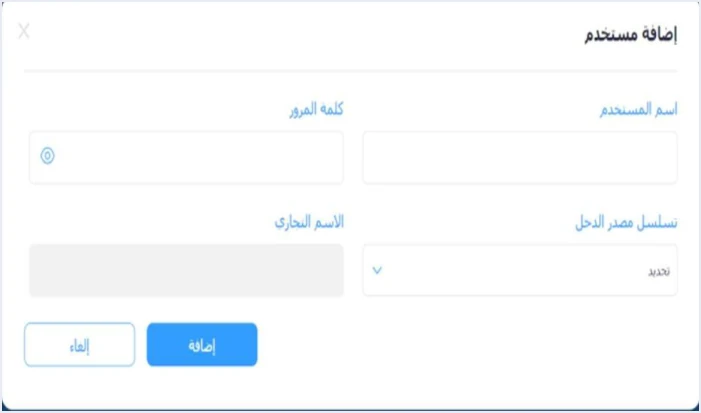
Because the sub-user is bound to one sequence, every invoice it issues carries that sequence under Seller details, and the sub-user cannot change it. For a business with two sequences, this means that whoever issues invoices for both activities needs two sub-user accounts and has to log in with the account tied to the right sequence before each invoice. The 2024 user guide for the platform goes further and calls for adding a sub-user for each income-source sequence where there is more than one. That description comes from the vendor’s guide, and it agrees with ISTD’s rule.
Here are three practices we suggest for organizing the accounts. They are our suggestion, not text from the guides.
- A username that names the activity. Choose a name that sets apart the account tied to each sequence, so that an employee does not issue an invoice for one activity from another activity’s account.
- One account per person on each sequence they work on. The main user can suspend a sub-user and reactivate it. If each employee has their own account, one account can be suspended without affecting the others.
- An internal record linking each account to its sequence and activity. Keep it outside the system, because the guides describe no screen that brings this information together.
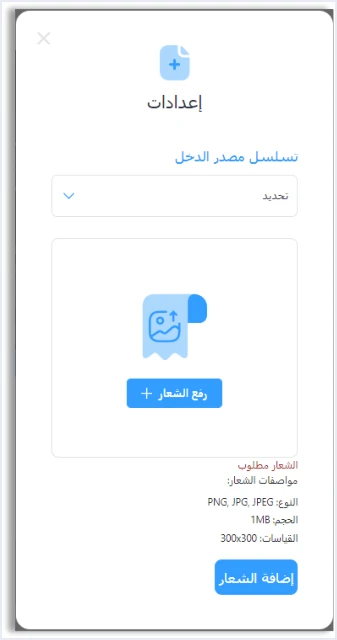
The 2024 guide also describes uploading a logo for each income-source sequence from the Settings option (إعدادات). The Settings option still appears on the main user’s screen in the 2026 guides, but ISTD has not confirmed the logo specifications shown in the screenshot.
The full difference between the two accounts is in our article the sub-user and the main user in JoFotara. The creation steps, from the verification code to logging in with the new account, are in our article adding a sub-user in JoFotara.
If you link accounting software: one link for each sequence
On the device linking path, the main user chooses device linking (ربط الأجهزة) and then New link (ربط جديد), enters a username and selects the income-source sequence. The system then generates the Client ID (رقم المستخدم) and the Secret Key (المفتاح السري). According to the technical guide, each pair of credentials is tied to one income-source sequence.
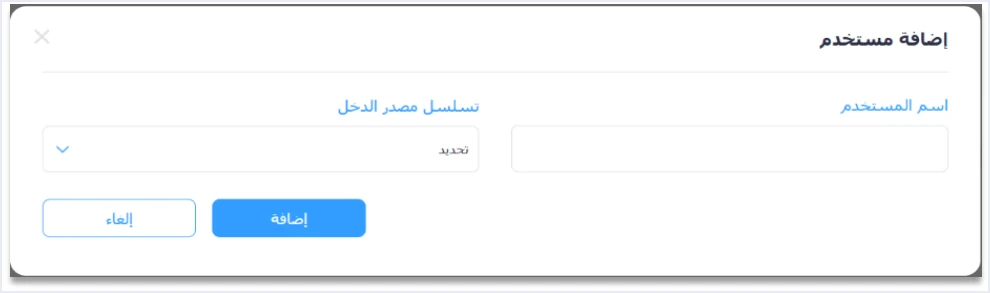
It follows from this tie, as our inference and not as text in the guide, that a business sending invoices for more than one sequence from its software needs a link for each sequence. The software has to send each sequence’s invoices with the credentials tied to that sequence. It also has to put the same value in the cbc:ID field inside the cac:SellerSupplierParty block, which is a mandatory field on every invoice.
If things get mixed up and the software sends one activity’s invoice with another activity’s sequence, or with linking credentials that belong to another sequence, the technical guide lists an error in the tax number or the income-source sequence as the first cause of code 500. The codes and their causes are covered in our article error codes in JoFotara. How to create and store the linking credentials is in our article the Client ID and Secret Key in JoFotara.
When you set up the software for a business with several activities, check three points with the software provider.
- Can the software store more than one pair of credentials for the same tax number?
- How does the software decide which sequence each invoice carries? Does it tie it to the activity, to the point of sale, or to an option the user selects?
- Does the software match the sequence in the invoice file with the credentials it sends the request with?
Can a business combine both paths for two different activities?
A business with several activities may consider issuing one activity’s invoices on the portal and linking its accounting software for another activity. ISTD’s guides do not cover this case, and what they do document calls for caution before you plan for it.
The questions and answers guide states that the sub-user loses the Issue an invoice tile (تنظيم فاتورة) if the device linking option is clicked. The guide does not say whether this affects the whole account or only the sequence that was linked. The 2024 guide for the platform shows a warning at the linking step, which reads as follows.
«لن يتمكن المكلف من تنظيم الفواتير باستخدام المنصة اذا قام بالربط مع الاجهزة»
In English, the warning says that the taxpayer will not be able to issue invoices on the platform after linking devices. The English here is our rendering, and the Arabic text is the authority. The wording speaks of the taxpayer, not of a particular sequence, but it is a screen from the vendor’s guide, not text from ISTD.
Unlinking is not a setting you control. It is a technical support request sent to ISTD, an invoicing-system support request, and the guide limits it to a business that has no accounting system and linked by mistake. In the same place the guide adds the following.
«اما من يمتلك نظام محاسبي يلزمه ربط نظامه مع نظام الفوترة»
In English, the guide says that a business that has an accounting system must link that system with the invoicing system. The English here is our rendering, and the Arabic text is the authority. This sentence and its limits are discussed in our article whether linking accounting software to JoFotara is mandatory.
The bottom line is that linking for one activity may cost you portal issuing for your other activities, and the guides neither confirm nor rule this out. Ask ISTD before you press New link (ربط جديد) if you plan to keep an activity on the portal.
The tax side: what the invoicing guides do not document
The National Invoicing System guides explain how an invoice is issued and sent. They do not explain the tax treatment of a business with more than one activity. You will not find in them how income tax is calculated across several activities, or whether one activity can be subject to General Sales Tax (GST) while another is not, under the same tax number.
The only rule in the guides that ties the invoice type to the sequence comes in the explanation of the rejection message This user is not authorized to submit this type of invoice. The technical guide says the message appears when the taxpayer sends the following.
«نوع فاتورة لا يتناسب مع رقمه الضريبي او تسلسل مصدر الدخل الخاص به»
In English, the guide gives the cause as the taxpayer sending an invoice type that does not match their tax number or their income-source sequence. The English here is our rendering, and the Arabic text is the authority. One example is an income invoice sent by a taxpayer registered for General Sales Tax, or the reverse.
The invoice type in the file carries its tax family in the third digit of a three-digit code, where 1 is income, 2 is General Sales Tax and 3 is Special Sales Tax. The fact that the message names the sequence suggests that the accepted invoice type may depend on the sequence, and not only on the tax number. That is our inference, though. The guide does not say that the sequences of one tax number can differ in the invoice types they accept.
So for the tax side, rely on your registration with ISTD and on your tax adviser, not on what appears in the invoicing system. If an invoice for one activity is rejected with the not-authorized message, ask ISTD which invoice type is allowed on that sequence before you change the type yourself.
Checklist for a business with multiple activities
Before you start issuing for more than one activity, go through these points in order.
- Find the sequences you can see. Open the Add a sub-user window as the main user and note the sequences shown in the list.
- Find what each sequence matches. If you do not know which activity each sequence belongs to, ask ISTD before any setup.
- Request what is missing. If you need a sequence you cannot see, send an internal service request, state what you need clearly, and track it under follow up on sent internal requests (متابعة الطلبات الداخلية المرسلة).
- Choose the path before linking. Decide whether you will issue on the portal or link your software, and ask ISTD before you combine the two paths.
- Create one account for each sequence. A sub-user on each sequence on the portal path, or a link for each sequence on the accounting software path.
- Match each invoice to its account. Make sure every invoice is issued from the account, or with the linking credentials, tied to its activity’s sequence.
- Keep the linking credentials safe. ISTD recommends keeping the linking credentials in a safe place and not sharing them with anyone, and the technical guide makes the taxpayer responsible for any unauthorized use of them.
- Keep the tax question separate. The tax treatment of your activities is settled with ISTD and your adviser, not from the invoicing system’s screens.
For a wider view of the system and how to connect your business to it, read our article Jordan’s National E-Invoicing System. You can also see Qoyod’s page on integration with the National Invoicing System.
E-invoicing and full accounting in one system
Qoyod is integrated with the National Invoicing System (JoFotara). You issue your invoice in Jordanian dinars from Qoyod, it is booked to your ledgers automatically and sent to the system, and once it is accepted it comes back with a QR code from the Income and Sales Tax Department.
Frequently asked questions
Does each activity have its own income-source sequence in JoFotara?
ISTD’s guides do not say so. They describe the sequence as a value held in the taxpayer’s file that the taxpayer selects from a list, and they do not explain how it matches the business’s activities. Ask ISTD which sequence belongs to each activity.
How do I request a new income-source sequence for another activity?
The questions and answers guide names an internal service request of the type opening a new income source and group (فتح مصدر دخل ومجموعة جديدة), sent through the e-services website. The guide gives it for the case where there is no active sequence at registration. If your business is already registered and wants an additional sequence, state what you need clearly in the taxpayer notes box (ملاحظات المكلف).
Is one sub-user enough to issue invoices for every activity?
A sub-user is bound to one income-source sequence, selected when it is created, and all its invoices carry that sequence. If your business has more than one sequence, create a sub-user on each sequence you issue from.
Do I use one Client ID and Secret Key for all sequences?
The technical guide ties each pair of credentials to one sequence. So you need a link for each sequence your software sends from, and each sequence’s invoices are sent with the credentials tied to it.
Can I issue one activity’s invoices on the portal and link my software for another?
ISTD’s guides do not cover this case. The questions and answers guide states that the sub-user loses the Issue an invoice tile (تنظيم فاتورة) after device linking is clicked, without saying whether this covers the whole account, so ask ISTD before you link.
Do the invoicing guides explain the tax of a business with more than one activity?
They do not. The guides explain only how an invoice is issued and sent. The closest they come is a rejection message that appears when the invoice type does not match the tax number or the income-source sequence, and the tax treatment is settled with ISTD.
References
- Income and Sales Tax Department (ISTD), questions and answers guide for the National Invoicing System, 2026 (in Arabic).
- Income and Sales Tax Department (ISTD), procedures guide for joining the Jordanian National Electronic Invoicing System, 2026 edition (in Arabic).
- Income and Sales Tax Department (ISTD), procedures guide for issuing an invoice in the Jordanian National Electronic Invoicing System, 2026 edition (in Arabic).
- Income and Sales Tax Department (ISTD), technical guide for integrating with the National Invoicing System through the API, version 1.5 (in Arabic).
- User guide for the National Invoicing System platform (2024), prepared by a software vendor (secondary source) (in Arabic).




