




The JoFotara special tax invoice XML example is the sample that the technical guide to the National Invoicing System (JoFotara), published by the Income and Sales Tax Department (ISTD) in version 1.5, gives in its special sales invoice section, from page 57 to page 71. The sample shows the whole invoice file in six blocks, from the invoice header down to the lines. Two places set it apart most clearly from the general sales tax invoice example, the invoice type code and the two tax blocks on every line.
This article maps the file at the level of the whole document. It shows what each block holds, what kind of value goes in it and the rule that governs it as the guide states it, then points to the article that covers each block in detail. It is not a file ready to copy. The snippets here are an illustrative build with descriptive values, and none of them has been tried on JoFotara, because the guide mentions no test environment available to taxpayers or software developers.
It is written for the developer who connects an accounting system or an enterprise resource planning (ERP) system to JoFotara. Who issues this invoice and when is covered in our article Special Sales Tax Invoice in JoFotara: When to Issue It.
The JoFotara special tax invoice XML example, block by block
The guide divides the example into six blocks, marked with the letters A to F, in the same order it uses in its income invoice and general sales tax invoice examples. The table shows where each block sits in the guide and what it carries in a special tax invoice.
Scroll the table sideways to see the remaining columns
Before the six blocks come the XML declaration line, then the root tag <Invoice …> with its namespaces, then a cbc:ProfileID element with the value reporting:1.0. These lines are shared by all invoice types, and the root tag must be written on one line. They are covered in our article JoFotara UBL 2.1: What It Is and What It Requires.
The file structure in one annotated snippet
The snippet below is our own illustrative build that condenses the whole file into one page. It is not a copy of the guide. The three dots stand for a value from your own invoice, or for a block that has its own article, and the comments mark the block and the rule behind each line.
<?xml version="1.0" encoding="UTF-8"?>
<Invoice xmlns="…" xmlns:cac="…" xmlns:cbc="…" xmlns:ext="…">  <!-- root tag on one line -->
<cbc:ProfileID>reporting:1.0</cbc:ProfileID>

<!-- A: basic invoice information -->
<cbc:ID>…</cbc:ID>                          <!-- invoice number -->
<cbc:UUID>…</cbc:UUID>                      <!-- identifier your system generates and stores -->
<cbc:IssueDate>…</cbc:IssueDate>            <!-- date in yyyy-mm-dd format -->
<cbc:InvoiceTypeCode name="013">388</cbc:InvoiceTypeCode>  <!-- third digit 3 = special tax -->
<cbc:Note>…</cbc:Note>                      <!-- optional -->
<cbc:DocumentCurrencyCode>JOD</cbc:DocumentCurrencyCode>
<cbc:TaxCurrencyCode>JOD</cbc:TaxCurrencyCode>
<cac:AdditionalDocumentReference><cbc:ID>ICV</cbc:ID><cbc:UUID>…</cbc:UUID></cac:AdditionalDocumentReference>  <!-- invoice counter -->

<!-- B: seller -->
<cac:AccountingSupplierParty>…</cac:AccountingSupplierParty>
<!-- C: buyer -->
<cac:AccountingCustomerParty>…</cac:AccountingCustomerParty>
<!-- D: income-source sequence -->
<cac:SellerSupplierParty>…</cac:SellerSupplierParty>

<!-- E: invoice totals -->
<cac:AllowanceCharge>…</cac:AllowanceCharge>       <!-- total of the line discounts -->
<cac:TaxTotal>…</cac:TaxTotal>                     <!-- total of the general tax alone -->
<cac:LegalMonetaryTotal>…</cac:LegalMonetaryTotal>

<!-- F: lines, one block per line -->
<cac:InvoiceLine>
  <cbc:ID>…</cbc:ID>                        <!-- line number, not repeated within the invoice -->
  <cbc:InvoicedQuantity unitCode="PCE">…</cbc:InvoicedQuantity>
  <cbc:LineExtensionAmount …>…</cbc:LineExtensionAmount>
  <cac:TaxTotal>
    <cbc:TaxAmount …>…</cbc:TaxAmount>              <!-- general tax alone -->
    <cbc:RoundingAmount …>…</cbc:RoundingAmount>    <!-- line + special tax + general tax -->
    <cac:TaxSubtotal>…</cac:TaxSubtotal>            <!-- first: OTH, no Percent -->
    <cac:TaxSubtotal>…</cac:TaxSubtotal>            <!-- second: VAT, with Percent -->
  </cac:TaxTotal>
  <cac:Item><cbc:Name>…</cbc:Name></cac:Item>
  <cac:Price>…</cac:Price>                  <!-- unit price before tax and the line discount -->
</cac:InvoiceLine>
</Invoice>
Two places stand out in the snippet. The first is the type code in the header, and the second is the pair of cac:TaxSubtotal blocks inside every line.
The invoice header and type code 013
What marks a special tax file first is the type code. The value of the cbc:InvoiceTypeCode element is 388 because the invoice is new, and its name attribute carries a number of three digits. The first digit is the trade type, the second is the payment method (1 for cash, 2 for receivable), and the third is the tax family. The third digit is 3 in special tax invoices, against 1 for the income invoice and 2 for the general sales tax invoice.
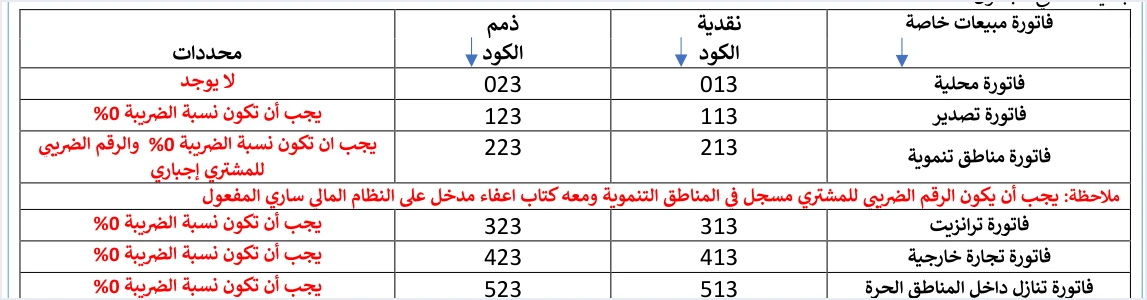
The guide’s example uses the code 013, which is a local cash invoice. On page 59 the guide adds one-line examples for other types, 323 for transit on a receivable invoice, 513 for assignment within free zones on a cash invoice, and 423 for foreign trade on a receivable invoice. The guide has no full example of a receivable invoice or of any non-local type.
The local invoice has no condition in the guide’s table. For the other five types, the guide requires the tax rate to be 0%, and for development zones it adds that the buyer’s tax number is mandatory. Under the General Sales Tax rate element, the line table on page 69 repeats the note from page 42 that the value O is filled in for all goods in these five types.
The other header elements carry the following data.
- Invoice number and unique identifier.
cbc:IDandcbc:UUIDtogether form the primary key of the invoice. Your system generates the identifier and stores it, so that it can reuse it when it resends the invoice. The details are in our article JoFotara UUID: Why It Comes Back With the ID. - Invoice date. It is written in yyyy-mm-dd format, as in every XML example in the guide. The details are in our article JoFotara Invoice Date Format: yyyy-mm-dd.
- Note. The
cbc:Noteelement is optional, which the guide’s template shows by highlighting it in green. - Currency. The default value in both currency elements is JOD, and the guide states that the currency can be changed at the level of the whole invoice only.
- Invoice counter.
cac:AdditionalDocumentReferencecarries the identifier ICV and the counter value. The guide describes it as a counter that the taxpayer creates for electronic invoices, running in sequence from 1 without an upper limit. The details are in our article JoFotara ICV: The Invoice Counter Explained.
Seller, buyer and income-source sequence
Block B carries the seller details, which are the country code JO, the tax number in cbc:CompanyID, the tax scheme VAT and the seller’s name as registered with ISTD. The fields are covered in our article JoFotara Seller Details: Fields and Rules.
Block C carries the buyer details. The type of the ID goes in the schemeID attribute, and it is NIN for the national number, PN for the personal number of a non-Jordanian, or TN for the tax number. The postal code is no longer than 5 characters, and the governorate code is written from the guide’s list. The buyer’s name is always required on a receivable invoice, and on a cash invoice worth more than JOD 10,000 or its equivalent in foreign currency. The block is covered in our article JoFotara Buyer Identification: NIN, PN and TN.
Block D is a single element, cbc:ID inside cac:SellerSupplierParty, and its value is the seller’s income-source sequence. Among the causes of an HTTP 500 error, the guide lists on page 101 an error in the tax number or the income-source sequence, and, less often, an error in Client_ID or Secret_Key. It adds that the tax rate in the file may be one that is not among the tax rates approved by ISTD. This element is covered in our article JoFotara Income Source Sequence: Where to Find It.
The type code should agree with the taxpayer’s registration with ISTD. According to the guide, a taxpayer who sends an invoice type that does not fit their tax number or income-source sequence receives the message This user is not authorized to submit this type of invoice.
Invoice totals in block E
Block E gathers three elements at invoice level, the discount, the tax and the totals. The guide sets the content of each one with a formula, as the table shows.
Scroll the table sideways to see the remaining columns
The point in this block that belongs to the special tax is that the invoice-level cac:TaxTotal carries the total of the general tax on the lines alone, and the special tax does not enter it. The special tax does enter the invoice total. The guide writes the invoice total as the invoice total before discount, minus the total discount, plus the total special tax, plus the total general tax, and this equals the sum of cbc:RoundingAmount on the lines.
The guide’s example is an invoice of two lines with identical figures. Its header shows a general tax total of 101.000 and an invoice total of 1111.000. The full calculation steps are in our article JoFotara Special Tax OTH: The Special Sales Tax Line. The system does not accept a separate invoice-level discount. The discount in the header is the sum of the line discounts, so a seller who discounts the invoice total spreads that discount across the lines before sending. Our article JoFotara Invoice Discount: Line and Invoice Level explains how.
Under every amount the guide repeats the same rounding note. The guide allows rounding to 3 decimal places and up to 9, provided the difference is no more than 0.001. If an invoice is rejected because its totals do not match, compare them with the formulas above. The message Total General Amount is Not Correct is the one that points to the totals math, and rejection messages are covered in our article JoFotara Error Codes: Why an Invoice Is Rejected and How to Fix It.
The OTH block before the general tax block on every line
Block F carries the lines, and cac:InvoiceLine repeats for each good or service. The order of the line elements in the template is the line number, then the quantity, then cbc:LineExtensionAmount, then the tax block, then the item name, then the price and the line discount. The general rules for a line are in our article JoFotara InvoiceLine: Invoice Lines and Their Rules.
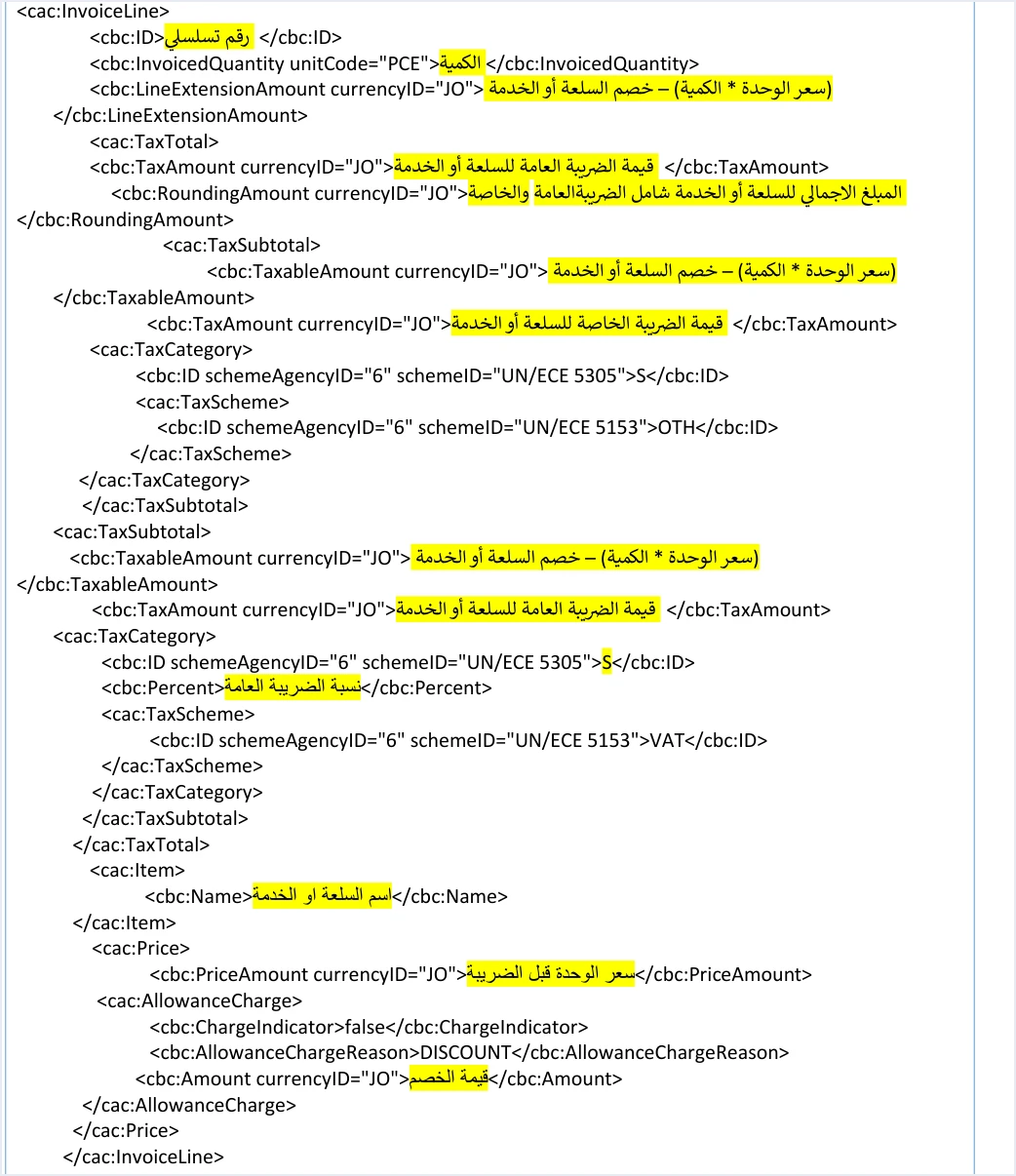
The whole difference is inside the tax block cac:TaxTotal. It holds two sub-blocks of type cac:TaxSubtotal instead of one, and the first of them is for the special tax.
- The first block is for the special tax. The special tax amount for the line goes in
cbc:TaxAmount, with the categorySand the tax schemeOTH. The block has nocbc:Percentelement. - The second block is for the general tax. The General Sales Tax amount, the category and the general tax rate in
cbc:Percentgo here, with the tax schemeVAT.
The guide settles the nature of the special tax in a sentence that it repeats on pages 68 and 81. In that sentence, the special tax is an amount that is entered without any calculation. So the file carries no rate for the special tax. It carries an amount that the seller’s system works out and writes as it is.
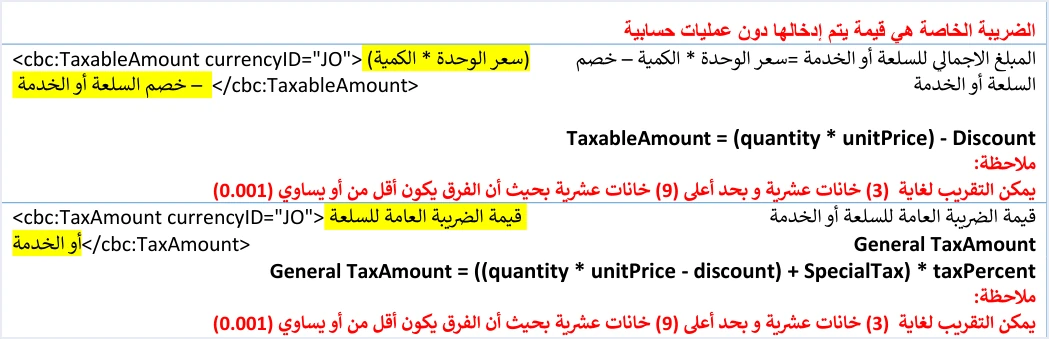
The general tax is then calculated on the line value plus the special tax. The guide writes the formula as follows.
taxAmount = ((LineExtensionAmount + Special Tax) * taxPercent)
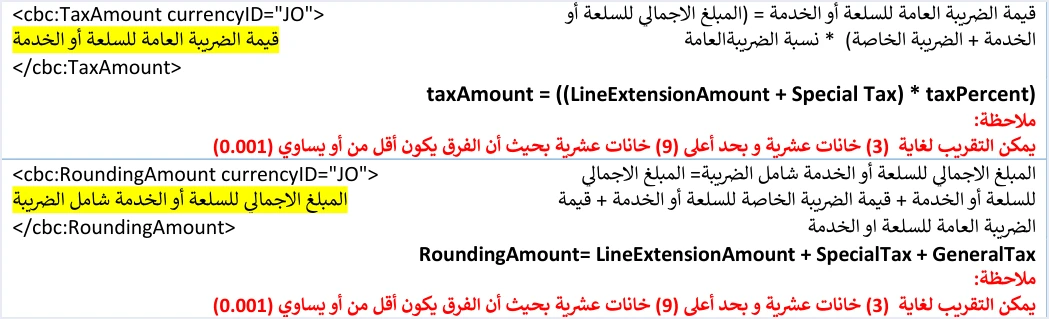
Two things follow for the head of the tax block inside the line. cbc:TaxAmount carries the general tax alone, and cbc:RoundingAmount carries the total amount of the line including both taxes, that is LineExtensionAmount + SpecialTax + GeneralTax. Both blocks are explained element by element, with the numbers of the guide’s example, in our article JoFotara Special Tax OTH: The Special Sales Tax Line.
As for the category in the general tax block, it is S at any rate other than zero, and at a rate of 0% S is not used, as our article JoFotara Tax Categories: S, Z and O Explained shows. The rate that applies to each good is set by the General Sales Tax law, not by the list of values that the API accepts in the field. And if the taxpayer uses the consumer price permission and the consumer price is higher than the unit price, the general tax formula on the line changes. That is covered in our article Consumer Price in JoFotara: Who Needs It, How to Calculate.
What differs from the general sales tax invoice example
A developer who builds the general sales tax invoice file first and then moves on to special tax has to change six places in the file. The table sums them up according to the guide’s templates.
Scroll the table sideways to see the remaining columns
The general sales tax invoice example and the example for returning a special tax invoice are each covered separately in this Developer Center series.
What not to copy from the guide’s example
The guide’s examples are illustrative, not tested files that are ready to send. The special tax example has specific places that stop you copying it as it is.
- Repeated quotation marks. On page 68 the currency attribute in the special tax value is written as
currencyID="JO"", and in the examples on page 69 the quotation marks aroundschemeAgencyIDandschemeIDare repeated. An XML file in this form is not well-formed. - The value of the currency attribute. The guide’s examples use the value
JOincurrencyIDon every amount, and the guide does not say whether another value is accepted. Do not build on an assumption that the guide does not state. - The unique identifier. Do not take the example’s identifier. Generate an identifier for each invoice in your system and store it.
- Seller and goods data. Replace the example’s names and numbers with the data of your own business and of your goods as registered with ISTD.
- The general tax rate in the example. The rate of 10 in the example is there to illustrate, and it is not a ruling on any particular good.
The guide mentions no official test environment, and none of the snippets in this article has been tried on the system. Check the file and its totals in your own software before you send it for real.
How Qoyod handles the invoice file
When the invoice is issued from accounting software linked to the system, you do not build the XML file by hand. Qoyod builds the invoice file in UBL 2.1 format with its unique identifier (UUID) and sends it to the National Invoicing System without any manual intervention. Read more about Qoyod’s integration with the National Invoicing System.
- Check before sending. Qoyod checks each invoice at field level as it is created, covering the tax number, the document type and payment method, the General Sales Tax rate and whether the lines are complete, and alerts you to any error before the invoice is sent, to reduce rejections.
- Every invoice’s status in view. ISTD returns the invoice status and any error message, and Qoyod shows them in its status panel.
- Resending with the same identifier. The status panel lists invoices that were not sent and need to be resent, and when you resend one it keeps the same UUID.
The pre-send check is an alert, not a guarantee. It covers the four fields listed above, and accepting the invoice remains a decision for the National Invoicing System alone. For a wider view of the system and how to connect your business to it, read our article Jordan’s National E-Invoicing System.
Steps for building the invoice file from this example
If you build the file in your software, this is a practical order that follows the guide’s blocks and puts the checks for the special tax in their places.
- Write the declaration line and the root tag. Put the tag with its namespaces on one line, then
cbc:ProfileIDwith the valuereporting:1.0. - Fill in the header. Enter the invoice number, a new unique identifier that you store, the date in yyyy-mm-dd format, the type code with 3 as its third digit and the value 388, the currency and the invoice counter.
- Add the seller, the buyer and the income-source sequence. Make sure the income-source sequence is the one tied to the linking credentials you use, and that the buyer’s name is present where the guide requires it.
- Build each line. Work out the line value after discount, write the special tax amount in the
OTHblock without a rate, then calculate the general tax on the line value plus the special tax. - Review the head of the tax block on the line. The general tax alone goes in
cbc:TaxAmount, and both taxes together with the line value go incbc:RoundingAmount. - Total block E from the lines. Take the discount from the line discounts, the general tax from the lines, and the invoice total from the sum of
cbc:RoundingAmount. - Encode the file and send it. Convert the file to Base64 encoding, put it in the body of a JSON request, and send it with the two linking-credential headers. Then judge the result by
EINV_STATUS, not by the HTTP status code alone.
E-invoicing and full accounting in one system
Qoyod is integrated with the National Invoicing System (JoFotara). You issue your invoice in Jordanian dinars from Qoyod, it is booked to your ledgers automatically and sent to the system, and once it is accepted it comes back with a QR code from the Income and Sales Tax Department.
Frequently asked questions
Is the special tax invoice XML example in the technical guide ready to send?
No, the example is not ready to send as it is. It is illustrative, and it has repeated quotation marks on pages 68 and 69 that make the file not well-formed if it is copied word for word. Build the file with your own business data and follow the structure of the six blocks.
Where does the special tax block come inside the line?
The special tax block, with the scheme OTH, comes first inside cac:TaxTotal on the line, and the general tax block with its tax-scheme code follows it. Both are of type cac:TaxSubtotal.
Does the OTH block carry a rate for the special tax?
No, the OTH block carries no rate element. The guide states that the special tax is an amount that is entered without any calculation, so its amount is written in cbc:TaxAmount as it is.
What does TaxTotal carry in the header of a special tax invoice?
It carries the total of the general tax on the lines alone, and the special tax does not enter it. The invoice total includes both taxes, and it equals the sum of cbc:RoundingAmount on the lines.
What is the invoice type code in the guide’s example?
The example uses the code 013 in the name attribute with the value 388, which is a new local cash invoice. The third digit, 3, marks the special tax family.
Is there an official test environment for trying this file?
Version 1.5 of ISTD’s technical guide does not state a test environment available to taxpayers or software developers. So none of the snippets in this article has been tried on the system, and it is wise to check the file and its totals in your own software before you send it for real.
References
- Income and Sales Tax Department (ISTD), technical guide for integrating with the National Invoicing System through the API, version 1.5 (in Arabic), pp. 57 to 71 and 101.
- ISTD’s National Invoicing System guides (in Arabic)




