




Building the JoFotara API request for an invoice takes six steps in sequence. It starts with an XML file in the UBL 2.1 standard and ends with a JSON request that your software sends by POST to Jordan’s National Invoicing System (JoFotara) at the Income and Sales Tax Department (ISTD). Each step has an input and an output, and one mistake in the order is enough for the system to receive a different file from the one you meant.
This article is for developers who connect accounting software or an enterprise resource planning (ERP) system to the invoicing system. It puts the steps in an order based on the technical guide that ISTD issues (version 1.5), says after each step what is worth recording in your own system’s log, and then points to the article that explains that step in detail. It describes the steps and the shape of the request and gives no ready-made code, because the guide mentions no open test environment where code could be tried before a real submission.
Order of steps for building the JoFotara API request
The technical guide draws the submission path in one diagram (p. 9). The request leaves the taxpayer’s system with a header that carries the Client ID and the Secret Key, and a body that holds an XML file passed through Base64 encoding and placed in a JSON file. The result comes back as one of three outcomes. Submitted and Already Submitted each come with the signed invoice and the QR code, and Error comes with a list of errors.
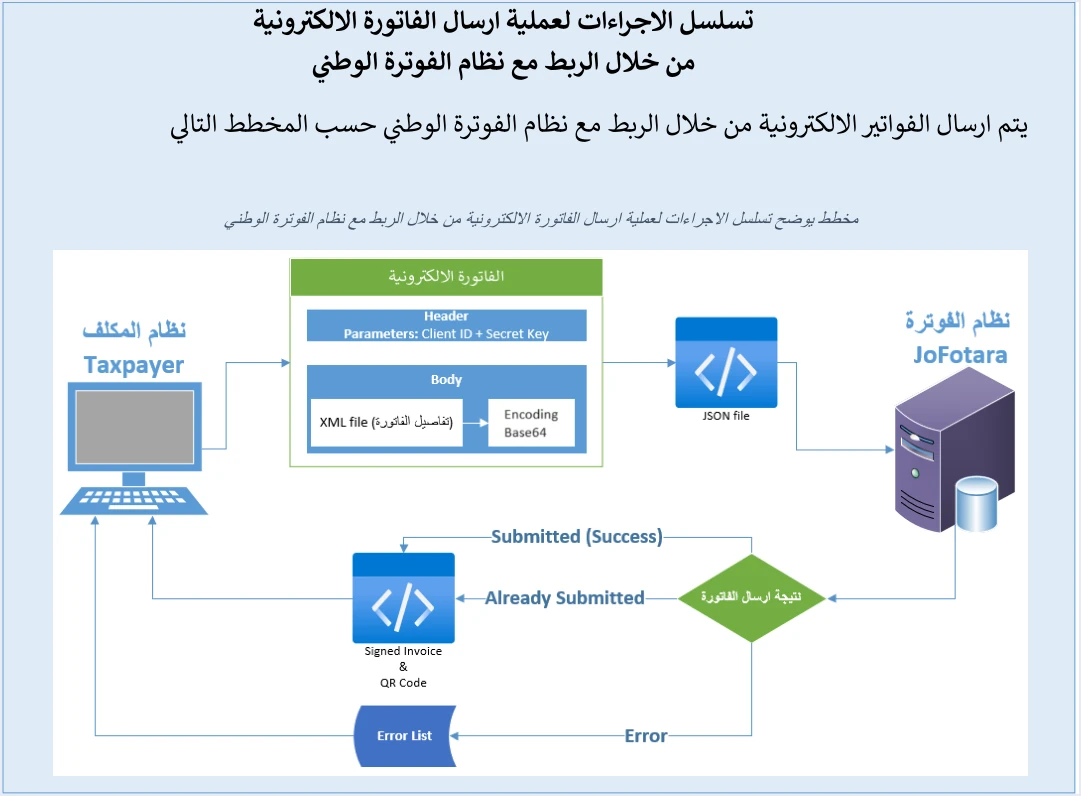
Read together with what the guide says elsewhere, the diagram gives this order.
- Generate the invoice file in UBL 2.1 XML format, with the declaration line and the root element as on p. 10.
- Write the root tag
<Invoice …>on one line. - Save the file in UTF-8 encoding, which the declaration line announces.
- Encode the whole file in Base64.
- Put the result in a JSON body under the key
invoice, and prepare the headers. - Send by POST, then read the value of
EINV_STATUSin the response.
The order is not a matter of style. Encoding, for example, applies to the file as it is at the moment you encode it, and any correction made afterward does not reach the system unless you encode again. We cover the address and the request headers themselves in a separate article.
Before you build: what must already be fixed in your system
Three things come before the first step. The first is the Client ID and the Secret Key, which the taxpayer obtains from the device linking option (ربط الأجهزة) in the invoicing system. Each pair is tied to one income-source sequence that the taxpayer selects when creating it. The full path from the taxpayer’s side is explained in our article on how to connect your business step by step, and the Client ID and Secret Key article covers the device linking steps.
The second is the invoice number cbc:ID and its unique identifier cbc:UUID. The primary key of an invoice in the system is the two together, the taxpayer’s system generates the UUID, and the guide warns that generating a new identifier on a retry may lead to a duplicate invoice. The third is the invoice counter (ICV), which starts at 1, runs in sequence and is created by the taxpayer.
What to log. Record the number and the unique identifier as soon as the invoice is created in your system, before any submission attempt. This is our recommendation, not text from the guide. The reason is that resending with the same two values after a connection drop is possible only if they were stored before the first send. The two values are detailed in our article on the unique identifier (UUID).
Step 1: Generate the invoice file in UBL 2.1 format
The guide (p. 10) asks that the file begin with the declaration line that sets the UTF-8 encoding, then the root element Invoice with its four namespaces, then the element cbc:ProfileID with the value reporting:1.0 in every invoice.
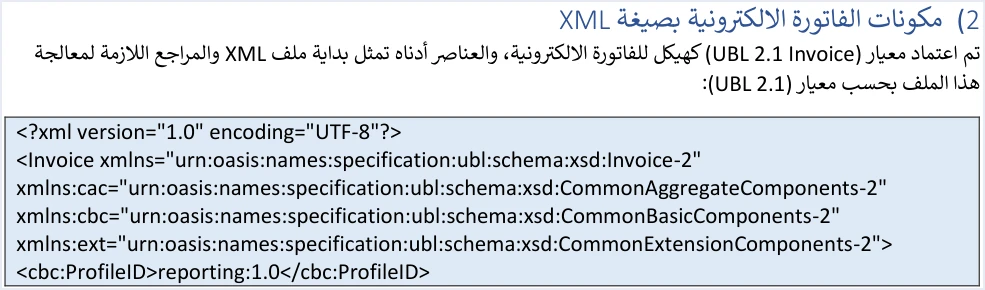
After the start come the seller, buyer, line and totals blocks, according to the invoice type, and the date takes the form yyyy-mm-dd as in all the XML examples in the guide. The second of ISTD’s guidelines asks you to check the totals, the taxes, the tax number, the buyer number and the mandatory fields before sending. Do not copy the guide’s examples as they are, because some of them have documented defects.
What to log. The result of your internal check before sending, and any field that stopped the invoice. The full structure of the file is in our article on the UBL 2.1 standard in JoFotara.
Step 2: Write the root tag on one line
The guide (p. 102) requires the opening tag of the Invoice element to be written on one line, with spaces between its parts. If it is spread over more than one line, the error Invalid Invoice Minification comes back.

The text speaks about the first tag only and does not ask you to compress the whole file onto one line. So make this step a specific check on the opening tag after the file is generated, and add no changes the guide did not ask for.
What to log. The result of the check on the opening tag, so that if the error comes back you know the fault came after this point. The limits of what the guide requires here are in our article on XML minification in JoFotara.
Step 3: Save the characters in UTF-8
The declaration line states encoding="UTF-8", and the guide asks for it as written. Our advice, which is a general remark of ours and not a rule from ISTD, is to actually save the file in UTF-8 before moving to the next step. If the file declares UTF-8 and your software saves it in another character encoding, what the file declares about its encoding contradicts the encoding it was saved in. The guide does not mention this case or any error message specific to it.
What to log. Keep the final version of the file exactly as it is before encoding it. This is what you go back to when you ask what was actually sent for a particular invoice.
Step 4: Encode the file in Base64
The guide sums this step up in one sentence (p. 96). After the invoice is prepared as XML, the file is Base64-encoded and inserted into a JSON file, together with the Client ID and the Secret Key.

The sentence in the image uses a different word for this step. What it means is an encoding, which changes how the file is written and does not make it confidential. The encoding applies to the whole XML file, from the declaration line to the closing tag, and not to the JSON text.
What to log. That the encoding was made from the final version saved in the previous step, not from an older copy. The step and its errors are explained in our article on Base64 encoding in JoFotara.
Step 5: The JSON body and the request headers
The request body carries one key, so it takes the form {"invoice": "…"}, where the full Base64 string replaces the dots. The guide says (p. 10) that the JSON file has three components, the Client ID, the Secret Key and the invoice. The submission example (p. 96), however, puts the first two in the request header and only the invoice in the body.
The headers in the guide’s example are three, Client-Id, Secret-Key and Content-Type: application/json. In other texts the guide writes the two names with an underscore, Client_ID and Secret_Key. The example also adds a fourth header that carries a session value captured from ISTD’s own session, so do not send it and do not copy the example as it is.
What to log. The Client ID the request was sent with, without the Secret Key. The seventh guideline asks you to protect both values and not to store them exposed in the code, and the guide puts full responsibility for any unauthorized use of them on the taxpayer. Leaving the key out of the log is our own application of that guideline.
Step 6: Send the request and read the response
The request is sent by POST to the address the guide gives, https://backend.jofotara.gov.jo/core/invoices/. The response is then read at two levels, the technical status code and then the value of EINV_STATUS, which is the deciding status of the invoice according to the fourth guideline. Code 200 means the request was received and processed technically. The value says whether the invoice was accepted (SUBMITTED), was accepted earlier (ALREADY_SUBMITTED) or was rejected (NOT_SUBMITTED).
JoFotara approves each invoice once it is sent. We call this its real-time approval model, which is our term and not ISTD’s wording, and our article on real-time approval in JoFotara explains it. When the invoice is accepted, the QR code comes back in EINV_QR, and the guide asks for it to be shown on the seller’s invoice.
What to log. The fifth guideline sets the minimum, which is the number, the unique identifier, the QR code and the value of EINV_STATUS. The sixth guideline adds that errors should be logged in detail internally, with a simplified message shown to the user.
What to log at each step: one table for your log
The table below gathers the above in one place. The last column shows whether an item comes from the text of the guide or is our recommendation, so that a judgment call is not read as a rule from ISTD.
Scroll the table sideways to see the remaining columns
The ninth guideline asks for a uniform time format to avoid processing differences between systems, and one way to apply it, which is our suggestion, is to write the time of every log line in the same format. The tenth guideline asks for a full log of every submission, response and resend, which makes the table above one chain for each invoice. All the guidelines are explained in our article JoFotara Guidelines for Linked Systems: All Ten Explained.
If the request is rejected: which step to fix first
The value of the order above is that it turns an error message into a specific step. The meaning of each code below comes from the guide’s explanation of error codes (pp. 101 and 102), and the step each one points to is our mapping.
- The message
Invalid Invoice Minificationsends you back to step 2, the opening tag of theInvoiceelement. - Code 400 indicates errors in the values of the XML file, detailed in
EINV_MESSAGE, and sends you back to step 1. - Code 403 indicates an error in the Client ID or the Secret Key and sends you back to the headers in step 5.
- Code 500 is linked by the guide to an error in the tax number or the income-source sequence, and less often in the Client ID or the Secret Key, or to a tax rate that is not among the rates approved by ISTD. It sends you back to step 1 or step 5.
- Code 504 indicates that the system could not be reached, because of the taxpayer’s firewall or the system’s own site, and keeps you at step 6.
If the fault is in the invoice values, correct the file and then repeat steps 2 to 6 in order, sending with the same number and unique identifier. If the connection drops before the response arrives, the eighth guideline asks you to retry without generating a new identifier. For the wider list of messages and their fixes, see our article JoFotara Error Codes: Why an Invoice Is Rejected and How to Fix It.
What the technical guide does not specify on this path
- Test environment. Version 1.5 of ISTD’s technical guide does not state an open test environment for taxpayers or software providers. The only submission address in it is the one given above.
- Taxpayer signature. The guide does not ask the taxpayer for a signature or a digital certificate. The signed invoice comes back from ISTD in the field
EINV_SINGED_INVOICE(as spelled in the guide). - Structure of the QR code and the signed invoice. The guide does not explain their structure after decoding, so store them as they arrived and do not build logic on them in your software.
- Time limit after the sale. Version 1.5 of ISTD’s technical guide does not state a number of hours or days between the sale and the submission.
Building the submission request when you issue invoices from Qoyod
If you use Qoyod’s integration with the National Invoicing System, you do not need to build the request yourself. Qoyod builds the invoice file in UBL 2.1 format with its unique identifier (UUID) and sends it to the National Invoicing System without any manual intervention. The taxpayer needs no digital certificate or signature of their own to send invoices through Qoyod.
Qoyod checks each invoice at field level as it is created, covering the tax number, the document type and payment method, the General Sales Tax rate and whether the lines are complete, and alerts you to any error before the invoice is sent, to reduce rejections. ISTD returns the invoice status and any error message, and Qoyod shows them in its status panel. The status panel lists invoices that were not sent and need to be resent, and when you resend one it keeps the same UUID. Correct the cause before you resend.
For a wider view of the system and how to connect your business to it, read our article Jordan’s National E-Invoicing System.
E-invoicing and full accounting in one system
Qoyod is integrated with the National Invoicing System (JoFotara). You issue your invoice in Jordanian dinars from Qoyod, it is booked to your ledgers automatically and sent to the system, and once it is accepted it comes back with a QR code from the Income and Sales Tax Department.
Frequently asked questions
What is the order for building the JoFotara API request?
The order starts with generating the UBL 2.1 XML file, then writing the root tag on one line, then saving the file in UTF-8, then encoding it in Base64, then placing it in a JSON body under the key invoice, then sending it by POST and reading the value of EINV_STATUS.
Do I send the Client ID and the Secret Key inside the JSON body?
The guide’s example on p. 96 puts them in the request header under the names Client-Id and Secret-Key and leaves the body to the encoded invoice alone, although p. 10 counts them among the three components of the JSON file.
What should I store for each invoice after submission?
The fifth guideline asks you to store the invoice number, its unique identifier, the QR code and the value of EINV_STATUS, and the tenth guideline asks for a full log of every submission, response and resend.
Do I rebuild the request from the start after an invoice is rejected?
You correct the file first, then encode it again, place it in the body and send it, with the same number and unique identifier. The guide warns that generating a new identifier on a retry may lead to a duplicate invoice.
Is code 200 enough to conclude that the invoice was accepted?
Code 200 only means the request was received and processed technically. The deciding status is the value of EINV_STATUS, and the invoice is not counted as accepted unless the QR code comes back with it.
Can I try the request in a test environment before a real submission?
Version 1.5 of ISTD’s technical guide does not state an open test environment for taxpayers or software providers. The only address it gives for submission is https://backend.jofotara.gov.jo/core/invoices/.
References
- Income and Sales Tax Department (ISTD), technical guide for integrating with the National Invoicing System through the API, version 1.5 (in Arabic), pp. 9, 10, 96, 101, 102 and 104.




