




JoFotara XML minification comes down to one formal condition that ISTD’s technical guide states outright, which is that the first tag in the invoice file must be written on a single line. The file here is the UBL 2.1 invoice file that your software sends to the National Invoicing System (JoFotara) run by the Income and Sales Tax Department (ISTD). Whatever else the word “minification” suggests, the guide says nothing about it in so many words.
This article keeps the two apart. It gives the guide’s text (version 1.5) as written, shows how the root tag appears in the guide’s own example, and then lists the questions the guide leaves unanswered, saying for each one that it is not documented. It closes with safe practical steps to take before the file is encoded in Base64. Anything we present as our own practice is labeled that way, so that it is not read as a rule from ISTD.
What JoFotara XML minification means
The word Minification comes from the idea of making something smaller, and our title borrows it from there. The technical guide never defines the word and gives it no section. It appears once, as part of the error message Invalid Invoice Minification, listed on p. 102 among the rejection messages the system may return. Our article on JoFotara error codes collects those messages in one index.
So in JoFotara the meaning of minification is set by the explanation the guide puts under that message, and not by what the word might suggest to a developer. A reader could assume that the whole file has to be squeezed onto one line, or that every space and line break has to be removed. The guide does not say that, as the next section shows.
The message itself, meaning what comes back in the response when a file breaks this condition and how to fix it, is covered in the error codes article mentioned above. This article stays with the condition itself, which is what the guide asks for and what it does not.
What the technical guide says about the first tag in the invoice file
The guide explains the message in two lines (p. 102). Here is the text as it appears.
«يدل بأن أول Tag موجود في ال XML مكتوب بشكل خاطئ أو مكتوب بأكثر من سطر ويجب أن يكون على سطر واحد بينهما مسافات.»
In English, the guide says the message indicates that the first tag in the XML is written incorrectly or is written over more than one line, and that it must be on a single line with spaces between its parts. ISTD publishes this guide in Arabic only; the English here is our rendering, and the Arabic text is the authority.

The text carries three rulings, and they are easier to read separately.
- The condition applies to the first tag in the file. That means the opening tag of the root element
<Invoice …>, which is the first tag after the declaration line and the one that carries the namespaces. - The error has two causes, not one. The tag is either “written incorrectly” or “written over more than one line.” The guide does not detail what counts as written incorrectly. It does ask on p. 10 that the start of the file appear as it shows it, so the closest reading of the first cause is that the start departs from that text. That is our reading, not a sentence from the guide.
- The required form is one line with spaces between its parts. In our reading, “with spaces between them” means that the element name and the namespaces follow each other on the same line, separated by spaces and not by line breaks. The guide does not say how many spaces.
That is everything the guide says about minification. The text does not go past the first tag to any other element of the file, it gives no file size, and it does not ask for spaces to be removed anywhere else.
How the root tag appears in the example on p. 10
On p. 10 the guide shows the start of the invoice file and asks for it as it is. It is printed in three parts, one after the other.
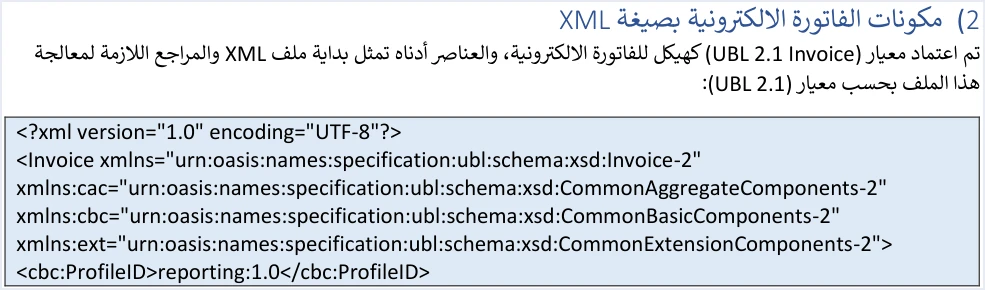
- The declaration line
<?xml version="1.0" encoding="UTF-8"?>on a line of its own. - The opening tag of the
Invoiceelement after it, which the page prints over four lines, one namespace to a line. - The
cbc:ProfileIDelement with the valuereporting:1.0on a line of its own after the tag.
The printed layout of the Invoice tag needs a note. The guide does not say whether those four printed lines are real line breaks in the file or only a wrap of the printed page, and the same four-line layout is printed under the rule on p. 102. Because that rule asks for one line, we read the example as one long tag that wraps on the page. That is our reading, not a statement from ISTD, and it is the reason to check the file you actually send and not the picture of the example.
The four namespaces, the value of ProfileID and the role of each are outside the scope of this article, and you will find them in our article on UBL 2.1 in JoFotara. It is enough here that the guide asks for this start as it is, and that the formal condition it documents on that start is that the Invoice tag stays on one line.
What the guide does not say about XML minification
The word “minification” opens many questions for a developer building the invoice file. Version 1.5 of ISTD’s technical guide answers none of them in so many words. The table below gathers them, and in each row it separates what the guide says from what we suggest in practice.
The table shows that the example on p. 10 itself has line breaks after the Invoice tag, since ProfileID comes on a line of its own. That is not enough to conclude a general rule that line breaks are accepted everywhere. The guide’s examples are illustrative, and some of them carry documented defects, among them doubled quotation marks and unique identifiers in an invalid format. The example shows you the shape of the start of the file, and on its own it is no proof of what the system accepts in the rest of the file.
For that reason this article does not say that the system rejects or accepts leading spaces, or that comments inside the file pass or fail. The guide does not state those rulings, and the article does not infer them on ISTD’s behalf.
Why you should not squeeze the whole file onto one line as a precaution
The easiest fix can look like having the software strip every line break and every space from the file before it is sent, so that the condition is certainly met. The guide does not ask for that, and the approach carries a risk the file does not need. These are general notes from us on handling XML files, not rules from ISTD.
- A space inside a value is part of the value. The buyer’s name, an item description and other texts may contain spaces on purpose. A tool that strips spaces without discrimination may remove some of them and change the value that reaches the system.
- The spaces inside the
Invoicetag itself are needed. The guide’s text asks for spaces between the parts of the tag, and removing all of them takes the tag out of the form the guide shows. - A squeezed file is harder to review. When an invoice comes back with an error in some value, a file you can read line by line is easy to trace, and one long line is not.
So the minimum the guide documents is the root tag on one line. Anything beyond that is a technical decision in your software and not a condition from ISTD, so make it after a test of your own and not on the strength of this article.
Safe steps before Base64 encoding
The guide sums up the first step of sending an invoice in one sentence (p. 96). Once the invoice is prepared in XML, the file is encoded in Base64 and placed in a JSON file together with the Client ID and the Secret Key. The sentence in the image uses a different word for this step, and what it means is encoding, which does not make the file secret.

This order means the file is completed first and encoded afterwards. Encoding corrects nothing in the file. If the Invoice tag comes out split over two lines before encoding, it stays split after it. The steps below follow from that. They are our suggested practice and not text from the guide, except where we attribute something to it explicitly.
- Build the start from the p. 10 text exactly as it is. Put the declaration line first, then the
Invoicetag with its four namespaces on one line, thenProfileID. The guide asks for this start as written. - Check the tag in the output file, not in the code that generates it. Open the file that will actually be sent in an editor that shows line numbers. If the file starts with the declaration line as in the example, the whole
Invoicetag, from<Invoiceto the closing>, must fall on one line, which in the example starts on the line after the declaration. - Watch for automatic formatting tools. Some editors and libraries reformat XML files to make them easier to read, and they may split a long line into several. If the file passes through a tool like that, check the
Invoicetag again afterwards. - Check the values before sending. The second of ISTD’s ten instructions asks you to verify the totals, the taxes, the taxpayer number, the buyer number and the mandatory fields before sending, to reduce 400 errors. All ten are explained in our article on the ten JoFotara guidelines for linked systems.
- Freeze the file, then encode the very copy you checked. What you encode is what reaches the system. If you edit the file after checking it, check it again and then encode from the edited file.
- Put the result in the request body. The encoded text goes in as the value of the
invoicekey in the JSON request body, and the two other values go in its header, as our article on JoFotara Base64 encoding explains.
If the invoice comes back rejected over the first tag
The fix lies in the XML file itself, not in the request body or in the header. The error is in the shape of the file, and changing a number or an amount will not cure it. The order to follow combines the guide’s text with what came earlier in this article.
- Read the error message as it came back in the response, in the
EINV_MESSAGEfield. - Open the file that was actually sent and confirm that the
Invoicetag is on one line and that the start of the file matches the text on p. 10. - Correct the file, then encode it again in Base64 from the corrected file.
- Resend with the same invoice number and the same unique identifier, as ISTD’s third instruction asks. The primary key of an invoice in the system is the number and the unique identifier together, and the reason is explained in our article on the unique identifier (UUID) in JoFotara.
- Judge the result by the value of
EINV_STATUSin the response and not by the status code alone.
The full detail of this message, from its text to how to verify the fix, is in our article on JoFotara error codes.
JoFotara XML minification when you issue your invoices from Qoyod
If you use Qoyod’s integration with the National Invoicing System, you do not write the XML file yourself and you do not prepare the request body. Qoyod builds the invoice file in UBL 2.1 format with its unique identifier (UUID) and sends it to the National Invoicing System without any manual intervention. The taxpayer needs no digital certificate or signature of their own to send invoices through Qoyod.
Qoyod checks each invoice at field level as it is created, covering the tax number, the document type and payment method, the General Sales Tax rate and whether the lines are complete, and alerts you to any error before the invoice is sent, to reduce rejections. If an invoice is rejected, ISTD returns the invoice status and any error message, and Qoyod shows them in its status panel. Correct the cause first. The status panel lists invoices that were not sent and need to be resent, and when you resend one it keeps the same UUID.
For the wider picture of the system itself and who must comply with it, read our article Jordan’s National E-Invoicing System.
E-invoicing and full accounting in one system
Qoyod is integrated with the National Invoicing System (JoFotara). You issue your invoice in Jordanian dinars from Qoyod, it is booked to your ledgers automatically and sent to the system, and once it is accepted it comes back with a QR code from the Income and Sales Tax Department.
Frequently asked questions
What does XML minification mean in JoFotara?
It means that the first tag in the invoice file, the opening tag of the root element Invoice, is written on a single line with spaces between its parts, as the technical guide explains on p. 102.
Must the whole invoice file be on one line?
The technical guide does not ask for that. The condition it states concerns the first tag alone, and the example on p. 10 itself puts the declaration line and the ProfileID element each on a line of its own.
Does the system reject leading spaces or line breaks between other elements?
Version 1.5 of the technical guide states no ruling on them, either to accept or to reject. The safe course is to stay with the start of the file as the guide shows it, and to test anything beyond that in your own software before relying on it.
When should I check the Invoice tag, before encoding or after?
Check it in the XML file before the Base64 encoding, then encode the very copy you checked. Encoding does not change the shape of the file, and a tag that was split over two lines before encoding stays split afterwards.
What should I do if the invoice is rejected over the first tag?
Correct the XML file so that the Invoice tag falls on one line, encode it again, then resend with the same invoice number and the same unique identifier, and judge the result by the value of EINV_STATUS.
Do I need to set this condition up if I issue my invoices from Qoyod?
Qoyod builds the invoice file in UBL 2.1 format and sends it to the National Invoicing System without any manual intervention, so you do not write the file yourself. If an invoice is rejected, Qoyod shows the error message in its status panel so that you can resend it after correcting the cause.
References
- Income and Sales Tax Department (ISTD), technical guide for integrating with the National Invoicing System through the API, version 1.5 (in Arabic), pp. 10, 96 and 102.




