




You send an invoice to Jordan’s National Invoicing System (JoFotara), and the status field in the reply holds a value you did not expect. It is not SUBMITTED, which means acceptance, and it is not NOT_SUBMITTED, which means rejection. It is a third value, the JoFotara ALREADY_SUBMITTED status. The first thing to know about it is that it is neither an error nor a rejection. It means that this same invoice was sent before and accepted.
The short answer is that the technical guide issued by the Income and Sales Tax Department (ISTD) describes this status as an invoice that was already approved. It says the status appears when the invoice is sent again with the same number (ID) and the same unique identifier (UUID), and that the system returns with it the QR code of the original invoice. That makes the status a documented way to recover a code your system did not save on the first submission.
This article places the status among the three response values, explains why it appears on a resend, walks through recovering the QR code with it step by step, and sets out what the guide does not say about it, so that nothing is built on a guess.
What JoFotara ALREADY_SUBMITTED means
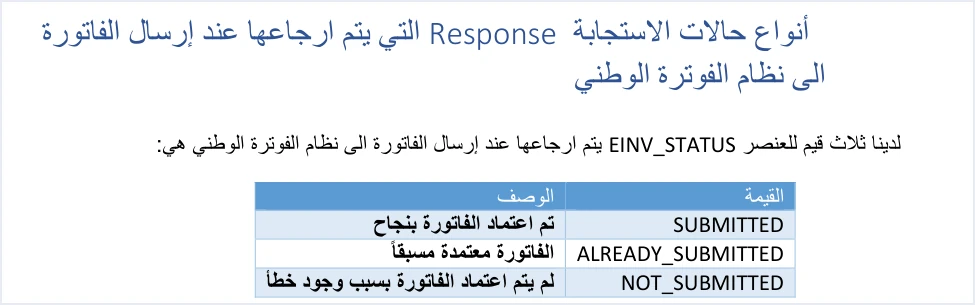
Every reply the system sends after a submission carries an element named EINV_STATUS, and the technical guide (version 1.5, p. 98) gives it three values. On the next page (p. 99) the guide defines the value ALREADY_SUBMITTED in these words.
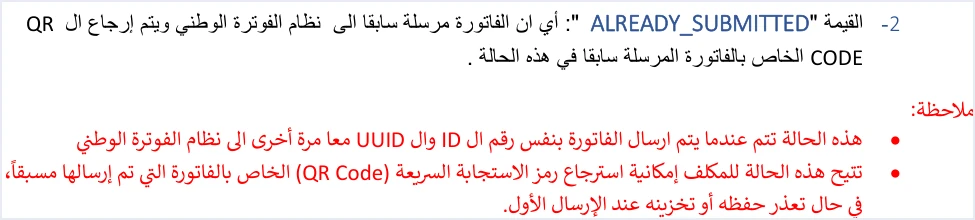
«أي ان الفاتورة مرسلة سابقا الى نظام الفوترة الوطني ويتم إرجاع ال QR CODE الخاص بالفاتورة المرسلة سابقا في هذه الحالة».
In English, the guide says that the invoice was sent to the National Invoicing System before, and that in this case the QR code of the invoice sent earlier is returned. ISTD publishes this guide in Arabic only; the English here is our rendering, and the Arabic text is the authority.
Under the definition the guide adds two notes. The first is about the cause of the status, and the second is about its use.
- The cause. The status occurs when the invoice is sent to the National Invoicing System again with the same ID and the same UUID together.
- The use. The status lets the taxpayer retrieve the QR code of the invoice sent earlier, if the code could not be saved or stored on the first submission.
Three practical points follow from these two passages. First, an invoice with this status was accepted before, so nothing in it needs fixing. Second, the system did not create a new invoice. It recognized one that already exists. Third, the reply carries the original QR code, which is what you need if the first reply was lost.
The status therefore assumes that the earlier submission was accepted. A rejected submission leaves no code to recover, because a rejected invoice comes back with EINV_QR empty.
The three status values and where ALREADY_SUBMITTED sits
The guide puts the three values in one table, and its description of each one is short. The table below sets the guide’s description beside what comes back in the reply in each case, as the guide states it in its pages on the response.
Scroll the table sideways to see the remaining columns
The difference between the first two values is one of timing, not of outcome. In both cases the invoice is accepted and its code is available, but SUBMITTED belongs to the first accepted submission, and ALREADY_SUBMITTED to a later submission of the same invoice. NOT_SUBMITTED alone is the rejection status, and its reason is in EINV_MESSAGE. For the full picture of response codes and rejection messages, read our article JoFotara Error Codes: Why an Invoice Is Rejected and How to Fix It. Each element of the reply is described in our article JoFotara API Response: The EINV Elements.
Why the status appears on a resend with the same ID and UUID
The system identifies an invoice by two values together, the invoice number in cbc:ID and the unique identifier in cbc:UUID. The technical guide (p. 12) describes the two as forming, together, a primary key so that an invoice sent to the system is not duplicated. When the same pair reaches the system a second time, the system does not treat it as a new invoice. It replies that the invoice was already approved. The composite key, and who generates the identifier, are explained in our article JoFotara UUID: Why It Comes Back With the ID.
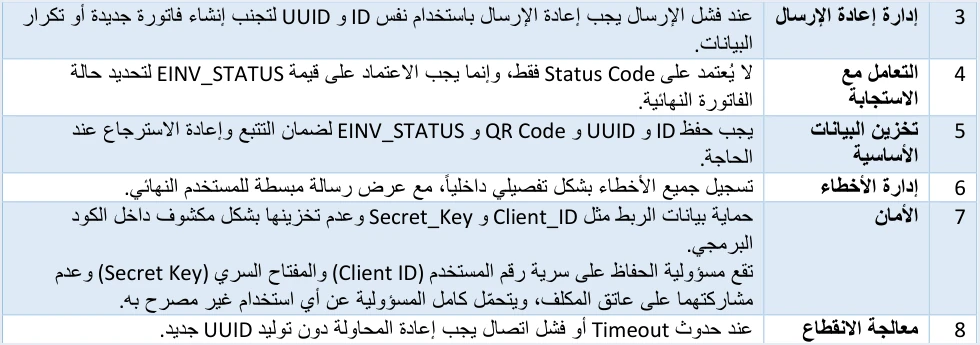
Resending with the same pair is not a mistake to avoid. It is what the guide itself asks for. Two of its operating guidelines (p. 104) lead straight to this status.
- Guideline 3, managing resends. When a submission fails, the invoice must be resent with the same ID and UUID, to avoid creating a new invoice or duplicating data.
- Guideline 8, handling interruptions. On a Timeout or a connection failure, the attempt must be repeated without generating a new UUID.
Picture the situation where the two guidelines meet. Your software sends the invoice, and it reaches the system and is accepted, but the connection drops before the reply gets back to your software. On your side you cannot tell what happened, so you resend with the same number and identifier, as the guide asks. This time the reply comes back with ALREADY_SUBMITTED, and it carries the code you missed on the first attempt. Failing to reach the system at all is a different case, which the guide covers under error code 504.
Had your software generated a new identifier on the second attempt, this status would not have appeared, because the pair would no longer be the first pair. That is exactly what the guide warns against when it asks for retries without a new identifier. All ten guidelines are gathered in one place in our article JoFotara Guidelines for Linked Systems: All Ten Explained.
How to recover the QR code of an invoice whose code you did not save
The way the guide gives to recover the code is the status itself. Its second note on p. 99 says the status lets the taxpayer retrieve the code if it could not be saved or stored on the first submission. The practical steps below rest on the guide’s text.
- Find the invoice number and unique identifier exactly as they were first sent. Recovery rests on the same pair, so if the original identifier was not saved, the system will not recognize the invoice by it.
- Resend the invoice with the same number and identifier. Do not generate a new identifier, and do not change the invoice number.
- Read the value of
EINV_STATUSin the reply. If it isALREADY_SUBMITTED, the invoice was accepted before, and the code in the reply is its original code. - Save the code that came back in
EINV_QR. Guideline 5, storing the basic data, says that the ID, the UUID, the QR Code andEINV_STATUSmust be saved to ensure traceability and retrieval when needed. - Show the code on the seller’s invoice. The guide (pp. 98 and 104) requires the QR code to be shown on the seller’s invoice, and an invoice counts as received and accepted only when a code is present in
EINV_QR.
If the reply in step 3 comes back with SUBMITTED rather than ALREADY_SUBMITTED, the invoice was approved by this very submission. That is what the guide means by its description of that value, that the invoice was approved successfully. The practical result is the same, because you now have a code to save.
The guide does not explain the internal structure of the QR code, so do not try to build or modify it in your system. According to the guide (p. 106), a taxpayer who wants to verify the QR code can do so only by scanning it with the Sanad app, through its digital document verification option (التحقق من المستندات الرقمية). Where the code comes from and how it is retrieved are covered in our article JoFotara QR Code: Where the ISTD QR Comes From.
Judge by EINV_STATUS, not by the technical Response Status Code
Guideline 4 in the guide, handling the response, says not to rely on the Status Code alone, and to rely on the value of EINV_STATUS to determine the final status of the invoice. That guideline matters here for two reasons.
- The guide does not state the technical Response Status Code that comes with this status. It says the code is not 200 when an invoice is rejected, but it does not specify the code that accompanies
ALREADY_SUBMITTED. So do not build your software’s logic on a particular number in this case. - The verdict on the invoice comes from the status. Software that reads only the Response Status Code can misclassify the invoice. Software that reads
EINV_STATUSknows thatALREADY_SUBMITTEDis an accepted invoice.
For the design of the software itself, guideline 6, managing errors, recommends logging errors in detail in the internal log and showing the end user a simplified message. Because ALREADY_SUBMITTED is not an error, the user is better served by seeing it as an earlier acceptance, not as a rejection alert.
What ALREADY_SUBMITTED does not mean
Because the status looks unfamiliar, it is easy to misread. Here are three readings the guide does not support.
- It is not a rejection or an error. Rejection in the guide is a single status,
NOT_SUBMITTED.ALREADY_SUBMITTEDis described as an invoice that was already approved. - It is not a second invoice. The system returns the code of the invoice sent earlier, and the guide does not mention a new invoice being created in this case.
- It is not a way to change an accepted invoice. An invoice cannot be edited once it is issued, and a correction is made with a return invoice (credit note) on quantities. The guide does not describe what happens if the same pair is sent with different content, so do not rely on a resend to change any detail of an accepted invoice. What can and cannot be done after issuing is covered in our article Editing an Issued Invoice in Jordan’s National Invoicing System: What Is Possible and What Is Not.
A note on the response sample on p. 100
On p. 100 the guide shows a sample of the system’s reply under a heading that names the ALREADY_SUBMITTED case, but the sample itself carries the value NOT_SUBMITTED. If you go back to the guide to see what the reply looks like in this case, rely on the definition and the sample on p. 99, which does carry ALREADY_SUBMITTED together with a QR code, and on the table on p. 98. Do not take the p. 100 sample as a model of an ALREADY_SUBMITTED reply. The guide’s samples are illustrative in general, so do not copy them into a real file.
Quick checklist when the status appears
If ALREADY_SUBMITTED appears in the system’s reply, go through these questions in order.
- Was the invoice sent with the same number and unique identifier in an earlier attempt? If so, the status is expected.
- Is the QR code for this invoice saved in your system? If not, save the code that came back in the reply now.
- Is the code shown on the seller’s invoice? The guide requires it to be shown.
- Does your system record the status as an earlier acceptance rather than a rejection? If your software classes it as an error, review the logic that reads the reply.
- Does your system save the unique identifier before every submission? Without that, you will not be able to recover the code this way later.
- Does your system log every submission, reply and resend? That is what guideline 10, tracing operations (Audit Trail), asks for, and it is what shows you that the invoice was accepted before.
How Qoyod handles invoice status and resending
Everything above is work that falls on the taxpayer’s system linked to the National Invoicing System. Qoyod’s integration with the National Invoicing System works on this layer as follows.
- Building the file and the identifier. Qoyod builds the invoice file in UBL 2.1 format with its unique identifier (UUID) and sends it to the National Invoicing System without any manual intervention.
- Every invoice’s status in view. ISTD returns the invoice status and any error message, and Qoyod shows them in its status panel, with states that include sent (مرسلة), previously sent (مرسلة مسبقًا) and not sent (لم تُرسل) together with the error message.
- Resending with the same identifier. The status panel lists invoices that were not sent and need to be resent, and when you resend one it keeps the same UUID.
Resending here is a step you take yourself from the status panel. Once ISTD accepts the invoice it returns a QR code, and Qoyod shows that code on the invoice. For a wider view of the system and how to connect your business to it, read our article Jordan’s National E-Invoicing System, or see how Qoyod works with JoFotara on our National Invoicing System page.
E-invoicing and full accounting in one system
Qoyod is integrated with the National Invoicing System (JoFotara). You issue your invoice in Jordanian dinars from Qoyod, it is booked to your ledgers automatically and sent to the system, and once it is accepted it comes back with a QR code from the Income and Sales Tax Department.
Frequently asked questions
What does the JoFotara ALREADY_SUBMITTED status mean?
It means the invoice was sent before and accepted. ISTD’s technical guide describes it as an invoice that was already approved, and the system returns with it the QR code of the invoice sent earlier.
Is ALREADY_SUBMITTED an error or a rejection of the invoice?
It is neither an error nor a rejection. The only rejection status in the guide is NOT_SUBMITTED, while ALREADY_SUBMITTED means the invoice was accepted on an earlier submission.
When does the ALREADY_SUBMITTED status appear?
It appears when the invoice is sent again with its number (ID) and its unique identifier (UUID) together, as in a resend after a dropped connection. The guide asks for resends with the same two values and without generating a new identifier.
How do I recover the QR code of an invoice whose code I did not save?
Resend the invoice with its original number and unique identifier. If it was accepted before, the reply comes back with ALREADY_SUBMITTED and the original code in the EINV_QR field, which you save and show on the seller’s invoice.
Which technical Response Status Code comes with ALREADY_SUBMITTED?
The technical guide does not state it. That is why the guide asks you to judge the invoice by the value of EINV_STATUS, not by the technical Response Status Code alone.
Does resending with the same number and identifier change the details of an accepted invoice?
You should not rely on it to do so. An invoice cannot be edited once it is issued, and a correction is made with a return invoice (credit note) on quantities. The guide does not describe what happens if the same pair is sent with different content.
References
- Income and Sales Tax Department (ISTD), technical guide for integrating with the National Invoicing System through the API, version 1.5 (in Arabic), pp. 12, 98, 99, 100, 104 and 106.




