




JoFotara error 504 appears when your accounting software sends an invoice to the National Invoicing System (JoFotara) and the request comes back with 504 Gateway Timeout instead of a response that carries the invoice status. According to the technical guide issued by the Income and Sales Tax Department (ISTD), this code means that the National Invoicing System site could not be reached. The problem lies on the way to the system, not in the content of the invoice.
In short, the practical step is to check the firewall on your network, then resend the invoice with the same invoice number and the same unique identifier (UUID), without generating a new identifier. If the first attempt did reach the system and was accepted, resending with the same two values returns the original QR code to you and does not create a second invoice.
This article explains what the guide says about this code, why it does not mean the invoice was rejected, how to resend safely, what to keep in your logs, and when to contact ISTD technical support.

What JoFotara error 504 means
Version 1.5 of the technical guide (p. 101) lists this code among the most common Response Status Code values. It prints the label as 504 : Timout Getway, spelled exactly that way in the guide, and then explains it with this text.
«وهذا الخطأ يدل على عدم القدرة على الاتصال في موقع الفوترة الوطني وتكون المشكلة إما في ال FireWall الخاص بالمكلف او من موقع الفوترة الرئيسي».
In English, the guide says that this error indicates an inability to connect to the National Invoicing System site, and that the problem is either in the taxpayer’s own firewall or in the main invoicing site. ISTD publishes this guide in Arabic only; the English here is our rendering, and the Arabic text is the authority.
The text names two places for the problem and no third.
- The taxpayer’s firewall. This means the network of the business that the send request leaves from.
- The main invoicing site. This means the National Invoicing System’s own side.
The guide gives no third cause, and it sets out no way to tell the two places apart. So the check starts where you have access, which is your own network.
Error 504 does not mean the invoice was rejected
This is the most important point. In JoFotara the verdict on an invoice is carried by the EINV_STATUS field in the system’s response, and ISTD’s operating instructions require the final status of the invoice to be decided from this field and not from the Response Status Code alone. An invoice counts as accepted only when its QR code comes back in the EINV_QR field.
Code 504, on the other hand, means that no response carrying the invoice status arrived at all. You have no status to read, no QR code to show on the invoice, and no error message in EINV_MESSAGE pointing you to a particular field. The practical result is that the fate of the invoice is unknown until you read an actual response from the system.
- Do not treat it as accepted, since no QR code has come back for it.
- Do not treat it as rejected either, since there is no
NOT_SUBMITTEDstatus and no list of errors. - Do not edit its content in search of an error, because the guide does not link this code to any value in the XML file.
Where to look: your firewall or the system’s site
Your software sends the invoice as a request to the API address set out in the technical guide, which is https://backend.jofotara.gov.jo/core/invoices/. If the firewall on your network blocks the connection to this address, the request never reaches the system. The address and the request headers are covered in our article JoFotara API Endpoint and Request Headers.
Start on your side with these steps.
- Ask your network administrator about the firewall rules, and whether they allow the machine your software runs on to connect to the API address above.
- Link the error to any recent change on the network, such as an update to the firewall settings or a move of the software to another server. This is a practical inference from the nature of the cause, not a step the guide mentions.
- Record the time and result of every attempt in the error log, because that is what you will need if the problem goes to technical support.
If you find nothing on your network that blocks the connection, the second place the guide names is the main invoicing site, and that is outside your control. Either way, what you do with the invoice itself does not change, and that is the subject of the next sections.
Error 504 vs error 500 and error 403
The technical guide puts the three codes on a single page, and the difference between them decides where you look. The causes the guide gives for codes 500 and 403 are all data inside the request itself. Code 504 points to a failure to connect to the system, so it does not tell you whether the request arrived or not.
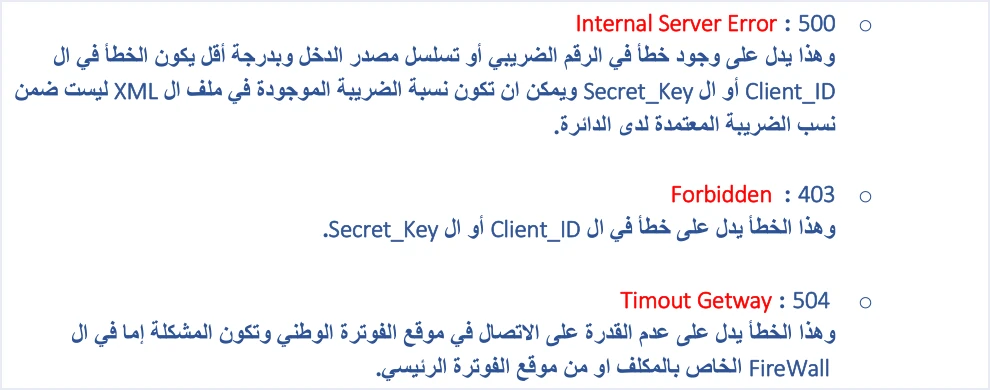
Codes 500 and 403 point back to the request data, as the table shows. Code 400 and the validation messages that come with it, such as Total General Amount is Not Correct, mean that the system read the invoice and found an error in its values. Every code is set out in one place in our article JoFotara Error Codes: Why an Invoice Is Rejected and How to Fix It.
Resending after error 504: the same UUID, not a new one
The technical guide sets out ten operating instructions. One of them, titled outage handling (معالجة الانقطاع), says to retry when a timeout or a connection failure occurs without generating a new unique identifier. The instruction titled resend management (إدارة إعادة الإرسال) backs it up. It requires that, when a send fails, the invoice is resent with the same invoice number and the same unique identifier, and it gives the reason as avoiding the creation of a new invoice or duplicated data.
The reason lies in how the system is built. The system identifies an invoice by its number (cbc:ID) and its unique identifier (cbc:UUID) together, as a primary key, not by the number alone, and the identifier is generated by the taxpayer’s software, not by the system. ISTD warns that generating a new identifier when resending may lead to duplicate invoices.
This is where the rule matters most after error 504, because you do not know what happened to the first attempt. Resending with the same number and identifier gives you one of two clear responses.
- If the first attempt arrived and was accepted, the system returns the status
ALREADY_SUBMITTEDtogether with the original QR code, and it does not create a second invoice. - If it did not arrive, this attempt is the one that gets through, and a response comes back with its status in
EINV_STATUS.
The guide sets neither the number of attempts nor the interval between one attempt and the next, so do not build on a figure ISTD has not published.
What to store and log during an outage
Resending with the same identifier assumes that you saved it before the first attempt. That is why the technical guide requires storing four values for every invoice for tracking and re-retrieval, which are the number, the unique identifier, the QR code and the status.
Three other instructions relate to these records.
- Error management (إدارة الأخطاء). Log errors in detail inside your system, and show the user a simplified message.
- Audit Trail (تتبع العمليات). Keep a full record of sends, responses and resends.
- Time format (التوقيت الزمني). The guide recommends using a Standard Time Format to avoid processing differences between systems, so record the times of your attempts in your log in that one format.
For a 504, this means your log should show that the invoice was sent at a given time and no response came back, that it was then resent with the same identifier, and what response came back after that. How to design that log is covered in our article JoFotara Logging: What to Store and Record.
When the response arrives after the resend, update the four values in your log from that response. If the status comes back as ALREADY_SUBMITTED, it confirms that the first attempt reached the system and was accepted even though its response was cut off, and the code that comes back with it is the original QR code. This is the documented way to recover a QR code you did not save, so save it this time and then show it on the invoice, because the guide requires the QR code to be shown on the seller’s invoice.
If the status comes back as NOT_SUBMITTED, the invoice did arrive this time and was rejected. The response comes back with a Response Status Code other than 200, the QR code and the unique identifier come back empty, and the reason for the rejection appears in EINV_MESSAGE. At that point the problem is no longer the connection. It is a value that the message names and that needs correcting.
When to contact ISTD technical support
Contact technical support once you are sure your network is not blocking the connection and the same code keeps coming back. The technical guide names the contact point in this text.
«لمزيد من الاستفسارات يمكن التواصل مع لجنة الدعم الفني لشؤون الفوترة في دائرة ضريبة الدخل والمبيعات على الرابط التالي: https://istd.gov.jo».
In English, the guide says that for further inquiries you can contact the technical support committee for invoicing affairs at ISTD through https://istd.gov.jo. ISTD publishes this guide in Arabic only; the English here is our rendering, and the Arabic text is the authority.
Before you get in touch, have these ready.
- The invoice number and its unique identifier, and the time of every send attempt.
- The response code as it appeared in the detailed error log.
- What you checked on your network and with its administrator.
Do not send the Secret Key in any message. The guide recommends protecting it and not storing it in the open inside the code. The guide also states that keeping the Client ID and the Secret Key confidential and not sharing them is the taxpayer’s responsibility, and that the taxpayer bears full responsibility for any unauthorized use.
How Qoyod handles an invoice that was not sent
Qoyod builds the invoice file in UBL 2.1 format with its unique identifier (UUID) and sends it to the National Invoicing System without any manual intervention. The result of each send is then in front of you, as described on the page Qoyod’s integration with the National Invoicing System.
- Every invoice’s status in view. ISTD returns the invoice status and any error message, and Qoyod shows them in its status panel.
- Resending with the same identifier. The status panel lists invoices that were not sent and need to be resent, and when you resend one it keeps the same UUID.
In Qoyod, resending is a step you take yourself from the status panel.
Where to go next
- Every error code in one view. See our article JoFotara Error Codes: Why an Invoice Is Rejected and How to Fix It.
- The full picture of the system and how to connect. See our article Jordan’s National E-Invoicing System.
- Connecting with full accounting software. See our National Invoicing System page.
E-invoicing and full accounting in one system
Qoyod is integrated with the National Invoicing System (JoFotara). You issue your invoice in Jordanian dinars from Qoyod, it is booked to your ledgers automatically and sent to the system, and once it is accepted it comes back with a QR code from the Income and Sales Tax Department.
Frequently asked questions
What causes JoFotara error 504?
ISTD’s technical guide attributes it to an inability to connect to the system. The problem is either in the taxpayer’s firewall or in the main invoicing site.
Does error 504 mean my invoice was rejected?
It does not. The code shows that the response did not arrive, so the status of the invoice stays unknown until you read a response from the system in the EINV_STATUS field.
Should I generate a new UUID when I resend after error 504?
Do not generate a new one. ISTD’s technical guide requires you to retry after a connection failure with the same invoice number and the same unique identifier, because generating a new identifier may lead to a duplicate invoice.
What if the invoice did reach the system on the first attempt?
In that case the system returns the status ALREADY_SUBMITTED together with the original QR code, provided you resend with the same invoice number and the same unique identifier.
Should I change the content of the invoice after error 504?
The technical guide does not link this code to any value in the invoice file. The fault is in the connection, and the fix starts on the network, not in the invoice fields.
When should I contact ISTD technical support?
Contact it once you are sure your network is not blocking the connection and the code keeps coming back. The technical guide refers you to the technical support committee for invoicing affairs at the Income and Sales Tax Department through its website istd.gov.jo.
References
- Income and Sales Tax Department (ISTD), technical guide for integrating with the National Invoicing System through the API, version 1.5 (in Arabic).




