




An invoice arrives from a supplier in Amman with a QR code printed in the corner. You open your phone camera, scan the code, and get back a long string of unreadable characters or a message saying the link cannot be opened. Is the invoice forged? Is the code damaged? Almost certainly neither. You used the wrong tool.
The QR code on a National Invoicing System (JoFotara) invoice is not an ordinary link that any scanner app can read. It has one issuing authority and one verification channel, and both were set by the Income and Sales Tax Department. This guide covers e-invoice verification in Jordan from both ends: where the code comes from, and how to read it in the way that actually counts.
Why buyers in Jordan now ask this question every day
Until recently, an invoice in Jordan was a sheet of paper the seller laid out however suited them. That changed with the National Invoicing System, which has been mandatory since 1 April 2025, with enforcement tightening steadily since that date.
The obligation is also broader than most business owners assume. The system requires an invoice from the seller of any good or service worth not less than one dinar, issued in at least two copies, carrying five mandatory data points: the serial number, the seller’s full name and address, the seller’s tax or national number, the date the invoice was drawn up and issued, and the type, quantity, unit value and total value of the good or service.
The practical result is that buyers now receive paper every day that looks like a compliant invoice, some of which went through the system and some of which did not.
The only verification channel: the government Sanad app
When the Income and Sales Tax Department published its verification procedure, it defined a single route: confirm that a QR code is present on the invoice, open the government Sanad app, choose «التحقق من المستندات الرقمية» (Verify digital documents), then scan the code. The app then shows immediately whether the document is valid.
So why is a general QR reader not enough? A general reader decodes the content of the code and displays it to you as it is, and stops there. Judging whether the document is valid, and presenting its core data in readable form, happens through the one channel the Department’s technical integration manual names: the Sanad app, and specifically its «التحقق من المستندات الرقمية» service. The encoded text your camera returns is therefore not a verification result. Nor is a blank screen. The only result an accounting decision can rest on is the one the Sanad app produces.
Where the QR code on the invoice comes from
The seller transmits the invoice electronically to the National Invoicing System from their accounting software. The system checks it, and if it accepts the invoice it returns a response carrying the invoice status, its identifier, and its QR code. That code is issued by the Income and Sales Tax Department, not by the accounting software. The software’s only job at that point is to print the code it received, exactly as it arrived, on the copy handed to the buyer.
The invoice status inside the system’s response is the reference, not the technical success of the connection. A rejected invoice comes back with no code and no identifier even when the call itself succeeded. Hence the rule accountants in Jordan work by today: no QR code, no compliant invoice. If you want the full picture, our guide to how Jordan’s National E-Invoicing System works walks the whole cycle, and the mandatory fields and technical requirements are set out separately.
How a QR code travels from the seller’s software to the buyer’s phone
Verification step by step inside the Sanad app
The procedure itself is short and takes no more than half a minute per invoice. Its brevity does not make the order a minor detail, because each step closes a possibility that would otherwise slip through.
Have the invoice in front of you, either the printed copy or a clear photograph of it, because the final comparison happens between two surfaces: the app screen and the paper in your hand. Check that the code is complete, not folded and not clipped at the edge of the page or by the printer’s cut, because an incomplete code cannot be read even if it was perfectly sound when issued. That alone is a common cause of a failed scan and has nothing to do with the validity of the invoice.
Then run the five steps below in order. Skipping any one leaves a gap in the chain.
- Confirm first that a QR code is present on the invoice. Its absence ends the matter before it starts and turns the question into a request to the supplier for a compliant invoice.
- Open the government Sanad app on your phone.
- Choose «التحقق من المستندات الرقمية» (Verify digital documents) from the service list.
- Point the camera at the printed QR code until the app captures it and shows the result.
- Match the result against the paper in your hand, field by field.
The last step is the one many people skip, and it is the most important. A successful scan is not the goal in itself. The goal is for the data the app displays to match the data printed on the page. Any difference between the two is worth a pause before the invoice is recorded.
The six fields a valid scan returns
According to the technical integration manual issued by the Income and Sales Tax Department, a valid scan opens with the status line «الوثيقة صحيحة» (the document is valid), then returns six core fields that are carried inside the QR code itself, which the app reads directly from the code. This is the invoice’s identity card as the system knows it.
Any one field on its own can repeat across many invoices, but the six of them holding one particular set of values does not repeat.
Reading them, then, is not the point. The point is to place them beside the paper and compare. An invoice that passes that comparison cleanly has proved two things at once: that it was issued by the party you believe issued it, and that the copy in your hand is the same copy the system knows, not one altered after issuance.
The six data points a Sanad invoice verification returns
These fields are carried inside the QR code itself and the app reads them directly from it. Match each one against what is printed on the invoice before you record it.
-
Invoice total
-
Invoice number
-
Total tax on the invoice
-
Invoice date
-
Seller’s tax number
-
Seller’s name
Each field earns its keep at the moment of comparison, not at the moment of reading:
| Field returned by the scan | What you match it against | What a difference means |
|---|---|---|
| Invoice total | The total amount printed on the page | The printed copy does not represent what was sent to the system |
| Invoice number | The printed serial number | A duplicated number, or a copy other than the approved one |
| Total tax on the invoice | The General Sales Tax amount as calculated | A fault in the rate applied or in the line-level calculation |
| Invoice date | The date the invoice was drawn up and issued | The invoice is being recorded in the wrong tax period |
| Seller’s tax number | The tax number printed in the seller’s details | The invoice may have been issued by a party other than the one you deal with |
| Seller’s name | The business name as registered with the Department | A gap between the trade name and the registered name that needs explaining |
- 1Invoice total, in dinars
- 2Invoice number
- 3Total tax, in dinars
- 4Invoice date
- 5Seller’s tax number
- 6Seller’s name
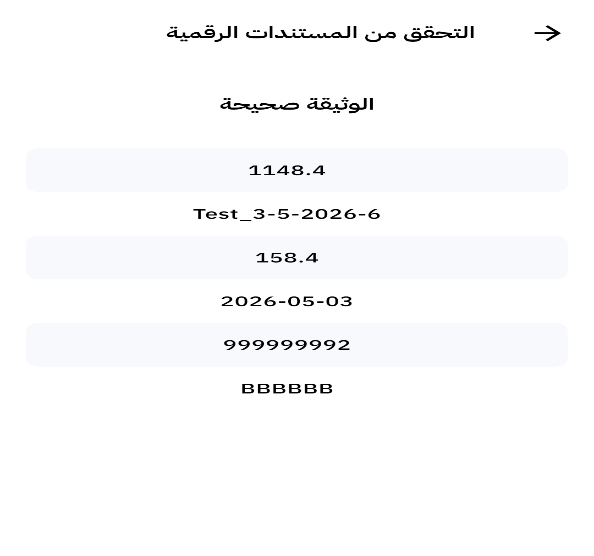
Notice what the list does not include: the buyer’s details, and the line items with their quantities. Verification proves the document is recorded and approved. It does not review the substance of the deal on your behalf. Checking quantities and prices remains an accounting job you do when you match the invoice against the purchase order and the goods received note. The two checks complement each other and neither replaces the other.
This is also why the “total tax” field deserves particular attention. Jordan’s General Sales Tax has a standard rate of 16%, alongside reduced rates, exempt items and zero-rated items. So a gap between what is printed and what the scan returns in this field is usually a wrong tax classification of a line item rather than a simple arithmetic slip. If you want the rate structure in full, see our breakdown of General Sales Tax in Jordan. Errors of this kind accumulate quietly until they surface in a return.
What if you get an error instead of a result?
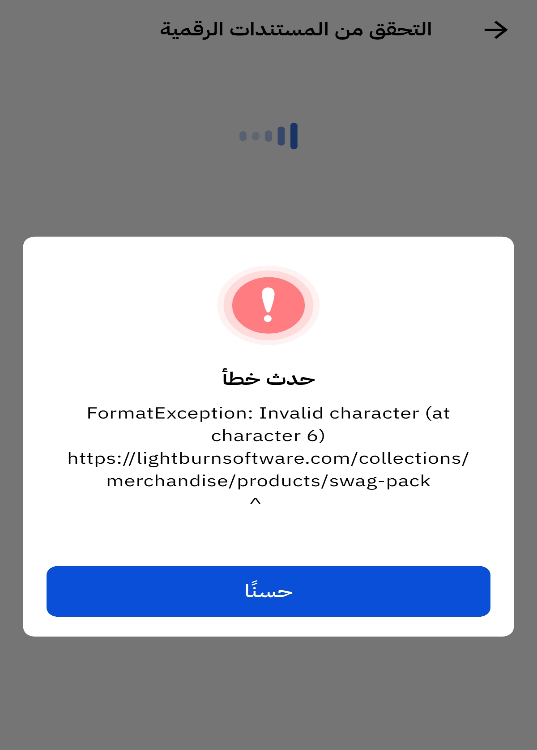
The app returns a negative result when the code is not valid. The dialog it shows carries an exclamation mark, the heading «حدث خطأ» (an error occurred), and a «حسنًا» (OK) button. There are usually one of two reasons behind it, and telling them apart changes your response completely.
Reason one: a code not linked to the system
A QR code printed on paper means nothing by itself. It may be an ordinary code carrying text or a link, placed on the invoice template so the document looks like a compliant one. This is not a rare scenario, particularly with businesses that recently moved to ready-made invoice templates without an actual connection to the system. The technical integration manual names this case explicitly as one of the two causes of a failed verification: a code not linked to the National Invoicing System.
Reason two: a code generated incorrectly
Here the seller is genuinely connected, but the code printed on the page is not the code the system returned. That happens when the software regenerates a code locally instead of printing the one it received, or when a copy of the invoice is printed before approval, or when transmission fails and the first printed copy is kept without a retry.
What to do in both cases
Treat the invoice as incomplete, not as fraud. Ask the supplier to resend it and to give you the copy carrying the correct code. The system allows resending under the same identifier, so the invoice comes back with its original code without creating a new invoice and without a new number. In other words, your request is something the supplier can act on within minutes. It is not a burden and not a reason for friction. Our Jordan FAQ page answers the neighbouring questions buyers raise at this point.
What you must avoid is recording the invoice in your books and waiting for it to be “corrected later”. An invoice that was never approved is not a tax document, and its presence in your books creates a difference that is hard to explain under review. The longer it sits, the harder it becomes for the supplier to trace the transaction at all.
Two different questions: the document and the supplier
Many buyers conflate two checks that run on separate tracks. The first question is whether the paper in your hand is an approved invoice. That is a question about the document, and the Sanad app answers it in the way described above. The second question is whether this supplier is registered in the system at all. That is a question about the entity rather than the paper, and it runs through the Department’s registration lookup service instead.
The relationship between the two is not reciprocal, and that point is worth stopping on. A registered supplier can still hand you paper that never went through the system, whether by oversight or by design. And an invoice carrying a sound code proves that this particular transaction was approved. It says nothing about the supplier’s discipline on their other invoices.
Why this sits on you, not on the seller alone
Many buyers assume responsibility for an invoice ends with whoever issued it. The regulation says otherwise. The regulation governing invoicing affairs and their supervision places responsibility for an invoice matching the actual transaction on the seller and the buyer alike. You are not a neutral recipient of the document. You are a party to whether it is sound. That sentence alone is enough to move verification out of the “nice practice” column and into the internal control column.
Since it is shared, you also owe it to yourself to confirm that what you filed qualifies as a document, because the books reviewed at the end are your books, and the document you are asked to produce is one you produce yourself, not on the supplier’s behalf.
The financial effect of getting this wrong is not abstract either. It reaches three places at once, and each of them is measurable:
- The document’s tax status. The system recognises the electronic invoice issued by the National Invoicing System, or by software connected to it. Paper carrying no approved code does not meet that definition, however compliant it looks.
- Input tax deduction. Building an input tax recovery claim on an unapproved document puts the whole deduction in dispute at review, and turns an apparent saving into a later liability.
- Penalties. The Income Tax Law sets a fine of between 200 and 500 dinars for the cases of default it specifies, doubling on repeat. Failure to issue a proper invoice may also be treated as tax evasion, carrying a compensatory fine equal to the tax difference.
On top of that, retaining source documents is required for four years under the regulation, and National Invoicing System records are accepted in place of keeping the invoice on paper. An approved invoice therefore protects you twice: in proving the expense, and in proving it was retained.
Edge cases that complicate verification
Not every invoice you receive is the ordinary kind. Three cases deserve a rule of their own.
The return invoice
Returns in the National Invoicing System are handled through a return invoice, treated in law as a credit note, linked to the original invoice and based on quantities. So when a return document reaches you, verify it exactly as you verify an invoice, and confirm that it points to the correct original invoice. There is no debit note in the system, so any document that reaches you described as one needs to be reconciled with the supplier before it is recorded.
The zero-rated invoice
Export invoices, development-zone invoices and transit invoices are issued at a zero rate. The absence of a tax amount does not mean the invoice sits outside the system. The same holds for an income invoice, which carries no tax block at all, so the total tax the scan returns is empty rather than wrong. It is a compliant invoice that passed through it and carries its code. The obligation to issue an invoice starts at a value of one dinar, not at the existence of tax.
The foreign-currency invoice
The system accepts currencies other than the Jordanian dinar, and the currency is set for the invoice as a whole rather than per line item. So if an invoice reaches you in a foreign currency, match the total in the currency stated on the invoice itself, not after you have converted it in your books.
Where verification belongs in your workflow
Verification that happens “when needed” mostly does not happen. Tie it to a fixed point.
On receipt, not at closing
Check the invoice the moment it arrives with the goods or from the delivery driver. At that moment contact with the supplier is easiest, correction is fastest, and the details are fresh for both sides. Discovering the problem at month end means chasing old invoices and suppliers who have forgotten the transaction.
On the invoices with the biggest effect
If your daily invoice volume is high, verifying every sheet by hand is not practical. Start with high-value invoices, with new suppliers, and with any invoice whose format differs from the usual. Note also that where an invoice exceeds 10,000 dinars in value, the regulation obliges the seller to prove the buyer received it, a threshold that works well as a mandatory checkpoint of your own. If you also sell online, the same discipline applies upstream: see how to connect an online store to the National Invoicing System so the codes on your own outgoing invoices are the ones the Department issued.
Inside the accounting firm’s review
In the Jordanian market an external accounting firm keeps the books for a great many businesses. Agree with your firm that checking a sample of purchase invoices is part of the monthly review, rather than a task requested after a problem appears. A small, regular sample exposes the undisciplined supplier before their invoices pile up in the accounts payable ledger. The same firm handles your annual filings, and our Jordan income tax calculator is a quick way to sanity-check the figures they hand back.
Five recurring mistakes when verifying
The mistakes below usually come from misplaced confidence rather than carelessness. What they share is that they produce the feeling that the procedure was carried out, while nothing of value was actually done.
That is what makes them more dangerous than skipping verification entirely. Someone who does not verify knows they do not verify, and stays alert. Someone who believes they verified when they did not records the invoice and moves on reassured, and only discovers the problem at a review that may arrive years later.
Read the list as an audit of your current habit rather than a general warning. If one of them describes what you do today, the correction rarely costs more than adjusting a single step in a procedure you already run. The fault is usually not in the whole list but in one step that crept in through repetition.
- Settling for the presence of the code without scanning it. The shape of a code proves nothing. A code printed from an image, or copied from another invoice, looks perfectly sound to the eye.
- Scanning with the phone camera. It returns text, not verification. The recognised result comes from the Sanad app alone.
- Reading the result without matching it. Data appearing on the screen is the start of the procedure, not the end of it.
- Confusing the apps. Government apps and electronic services in Jordan are many, and each has its own function. Digital document verification is the function of the Sanad app specifically, and it is the only channel the Department’s technical integration manual names for it.
- Assuming an exemption is permanent. Certain activities are excluded within defined annual caps, the exclusion is tied to actually practising that activity, and the Director may impose the obligation where there is evidence the cap was exceeded. Never build a purchasing policy on the assumption that your supplier is exempt forever. Our guide to who must use e-invoicing in Jordan sets out the obligated and the excluded activities.
How Qoyod helps with this specific problem
Verifying your supplier’s invoice happens in the Sanad app, outside the scope of any accounting software. The other half of the equation sits squarely inside it: making sure your own tax invoice is verifiable by the other party without argument.
That half decides your commercial reputation in practice. A customer who scans your invoice and gets a clean result does not come back with a question, hold up payment, or ask for a replacement copy. An invoice that fails at their end opens correspondence, delays collection, and seeds doubt about invoices you have not issued yet.
Qoyod for Jordan is built for exactly that half: JoFotara compliance and full Arabic-native cloud accounting in one platform. Connection to the National Invoicing System and the books that sit behind it live in the same place, so there is no double entry between a compliance tool and separate accounting software. These are the points it covers:
- Direct integration with the National Invoicing System. Qoyod transmits the invoice to the system and receives its status and its code, so your invoice reaches your customer carrying the code the Department issued. The JoFotara integration is live.
- A ready Jordanian invoice template. It carries the tax number and the mandatory fields in Arabic and English, so no copy needs manual editing.
- The invoice identity is kept with you. The invoice number, its unique identifier, its status and its code stay attached to the invoice inside Qoyod, so when a customer asks about an old invoice you go straight to it, and a resend under the same identifier is a lookup rather than an investigation.
- A Jordanian General Sales Tax engine. The 16% standard rate with the reduced rates, the exempt items and the zero-rated items, so the “total tax” field comes out matching what the scan returns.
- The return invoice as a credit note. Linked to the original invoice and based on quantities, so the document chain stays connected at any review. There is no debit note in the system, and Qoyod does not manufacture one.
- Full accounting on the same platform. Invoicing, journal entries and reports in one system, instead of a separate compliance tool bolted on top of separate accounting software. When a review asks you to walk from the invoice to the ledger entry to the report, the walk is one system deep.
You can see how the compliance side is presented in the product on the JoFotara compliant page, and if you would rather check your own readiness first, the JoFotara readiness check takes a couple of minutes.
For the full picture of the system, its obligations and the connection routes, see the National Invoicing System (JoFotara) page and the Qoyod Jordan page.
Frequently asked questions
Can I verify an e-invoice with my phone camera?
No. The camera and general barcode scanning apps only display the content of the code. Recognised verification happens through the government Sanad app by choosing «التحقق من المستندات الرقمية» (Verify digital documents), which is the channel the Income and Sales Tax Department defined for this purpose.
What data appears after a successful scan?
Six fields, according to the technical integration manual: the invoice total, the invoice number, the total tax on the invoice, the invoice date, the seller’s tax number, and the seller’s name. Match all six against the printed invoice, and do not settle for the scan simply succeeding.
I got a negative result. Is the invoice forged?
Not necessarily. A negative result means the code is not linked to the National Invoicing System, or that it was generated incorrectly. Contact the supplier and ask for the correct copy before you record the invoice. Resending is available to them under the same identifier, without creating a new invoice.
Does accounting software generate the QR code itself?
No. The code is issued by the Income and Sales Tax Department after the invoice is accepted, and the system returns it to the software inside the response. The accounting software’s job is to print the code it received on the invoice, not to create it.
What is the difference between verifying an invoice and looking up a supplier?
Verifying an invoice proves that this particular document is approved in the system. Looking up a supplier proves the business is registered in it. The first concerns the paper and the second concerns the entity, and a buyer needs both.
Is verification an obligation on me or a precaution?
No provision requires you to scan as such, but the regulation makes responsibility for an invoice matching the actual transaction fall on the seller and the buyer together. In practice, accepting an unapproved invoice exposes you to losing the input tax deduction and to questions at review. The step is precautionary in form and protective in effect.
My supplier’s invoice has no QR code. What do I do?
Do not record it as a tax document. The absence of a code means the invoice was not accepted in the system, and the system recognises only an invoice issued by the National Invoicing System or by software connected to it. Ask for a compliant replacement invoice before payment where you can.
Conclusion
E-invoice verification in Jordan is not a complicated technical procedure. It is a decision to ask the right question with the right tool: the government Sanad app, then «التحقق من المستندات الرقمية», then matching the six fields against the paper in your hand.
What makes the habit worth having is that it costs half a minute and protects you from a tax difference that may surface years later. More importantly, it works in both directions. Just as you verify your suppliers’ invoices, your customers will verify yours. Your side of that equation starts with a system that transmits your invoices to the National Invoicing System and prints their code exactly as the Department issued it.
If you take one rule away from this guide to use tomorrow, let it be this: never record an invoice you have not scanned, and never take comfort in a scan you have not matched.

