




The message BuyerTaxNumber: The buyer's taxpayer number is not associated with the developmental arear (spelled exactly as it appears in the technical guide) comes back when your software sends a development zone invoice to the National Invoicing System (JoFotara) and the invoice is rejected. This is the BuyerTaxNumber error on development zone invoices. It means that the buyer’s tax number on the invoice is not linked to the development zones in the records of the Income and Sales Tax Department (ISTD).
The fix does not start with the file alone. Some of the conditions for this invoice type sit in your file, such as the buyer’s tax number and the invoice type code. Others concern the buyer itself, namely its registration in the development zones and a valid exemption letter entered on the financial system.
This article explains what the message means as described in the technical guide for integrating with the National Invoicing System through the API, version 1.5. It covers when an invoice counts as a development zone invoice and why the buyer’s tax number becomes mandatory on it. It then sets out the fix step by step, with a checklist to use before you send.
What the BuyerTaxNumber error means on development zone invoices
The technical guide describes code 400 (Bad Request) as an error in the values sent inside the XML file, with the detail returned in the EINV_MESSAGE field of the response. One of the messages it lists under this code is BuyerTaxNumber, and it explains that message in these words.
«يحدث عندما يتم إرسال فاتورة من نوع مناطق تنموية حيث إن الرقم الضريبي للمشتري إجباري ويجب أن يكون الرقم الضريبي للمشتري مسجل في المناطق التنموية ومعه كتاب إعفاء ساري المفعول مدخل على النظام المالي في ضريبة الدخل والمبيعات».
In English, the guide says that the message occurs when an invoice of the development zones type is sent, because the buyer’s tax number is mandatory on that type. The buyer’s tax number must be registered in the development zones and must come with a valid exemption letter entered on the financial system at the Income and Sales Tax Department. ISTD publishes this guide in Arabic only; the English here is our rendering, and the Arabic text is the authority.

The message starts with the field name, so it tells you straight away that the buyer’s tax number is what to check. The word arear at its end is a spelling error in ISTD’s own text. If you search your software’s logs for the message, search by its start, BuyerTaxNumber, and not by its end.
An invoice rejected with this message has not been accepted. Its status in the EINV_STATUS field is NOT_SUBMITTED, and no QR code, invoice number or unique identifier comes back with it.
When an invoice is a development zone invoice
ISTD divides invoices by trade type into six types, which are local, export, development zones, transit, foreign trade and assignment within free zones. The procedures guide for issuing an invoice in the Jordanian National Electronic Invoicing System, 2026 edition, describes the development zone invoice (also called the investment promotion invoice) as the invoice where the buyer is registered among development zone taxpayers. The full rules of this invoice type are in our article Development Zone Invoice JoFotara: The Three Conditions.
In the XML file, the type is set in the name attribute of the cbc:InvoiceTypeCode element, which holds a three-digit code. The first digit is the trade type, the second is the payment method (1 for cash, 2 for receivable), and the third is the tax family. In the third digit, 1 stands for income, 2 for General Sales Tax (GST) and 3 for Special Sales Tax. The development zone value of the first digit is 2, so the codes of this type are the ones in the table below.
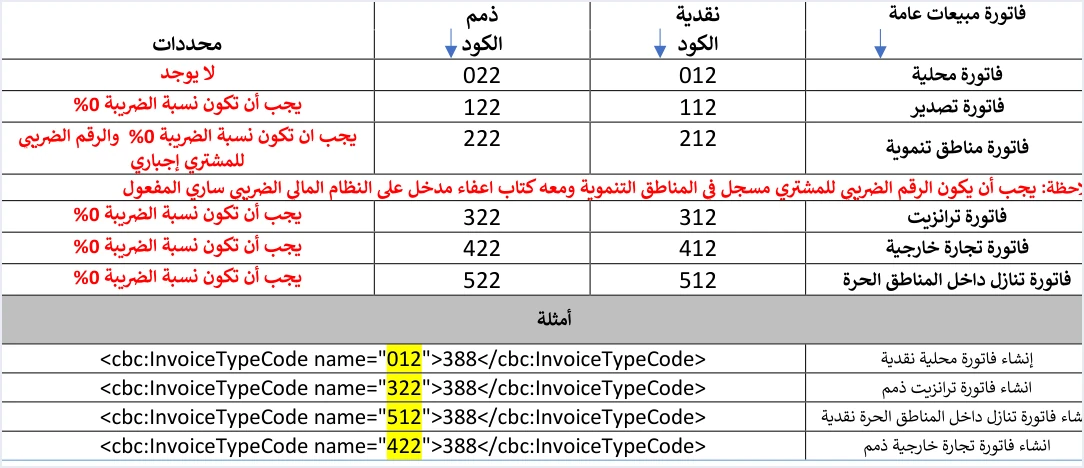
Two things stand out in the table. The buyer tax number condition goes with the development zone type in all three families, and it is the only one of the six types that carries this condition. The note on registration and the exemption letter appears under the development zone row in the tables of all three families, including the general sales tax invoice table in the image, and the explanation of the message repeats it.
The system reads the invoice type from the file, but the file alone does not decide that a sale is a development zone sale. The buyer’s registration and the exemption letter sit entirely outside the file, and they decide whether the name attribute may carry a code that starts with 2.
The buyer’s tax number is mandatory on development zone invoices
The buyer’s identity is written in the file in the cbc:ID element with its schemeID attribute. The seller picks one of three types for it, and the value is digits only.
NINfor the buyer’s national number.PNfor the personal number of a non-Jordanian.TNfor the buyer’s tax number.
Beneath the table of these types, the guide adds a condition that applies to the type this article covers. The buyer’s tax number becomes mandatory if the invoice type is development zones. The three identifier types in general are covered in our article JoFotara Buyer Identification: NIN, PN and TN.
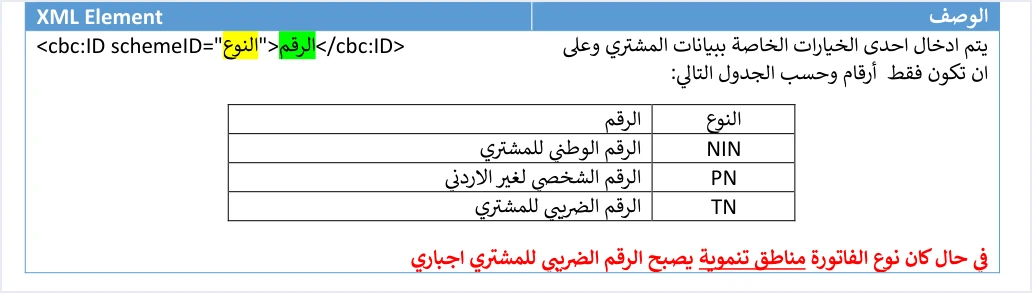
So if your software sends a development zone invoice in which the buyer is identified by its national number or personal number, the tax number the guide requires is simply not in the file. If the tax number is there, the next condition is that this same number is registered in the development zones. At that point the question moves from your file to the buyer’s data at ISTD.
The buyer’s name follows its own rule, separate from the trade type. It is always mandatory on a receivable invoice, and on a cash invoice worth more than JOD 10,000. To read how the guide’s templates shade mandatory and optional fields, see our article JoFotara Mandatory Fields: Reading the Technical Guide.
Three conditions in the message’s explanation
ISTD’s explanation of the message packs three conditions into one sentence. Taking them apart tells you where to look, because the first one is in your file and the other two sit with the buyer.
- The buyer’s tax number is on the invoice. It is mandatory on this type, and it is sent in the buyer’s identity with the type
TN. - That number is registered in the development zones. This condition is not checked from the file. It depends on the buyer’s registration with ISTD.
- A valid exemption letter is entered on the financial system. The guide describes the letter in two ways, as valid and as entered on the financial system at the Income and Sales Tax Department.
The cases to check when the message comes back follow from these conditions. The tax number may have one wrong digit, which turns it into a different number that is not registered in the development zones. The number may be correct while the buyer is not registered among development zone taxpayers. Or the invoice type code itself may be the wrong choice for a sale that does not meet the conditions of this type, for example a code starting with 2 on a local sale. This last case is our inference from the definition of the type, not text from the explanation of the message.
The exemption letter: what the guide says and what it does not
Version 1.5 of the technical guide only describes the document as a valid exemption letter entered on the financial system. It does not name the body that issues the letter or say how long it stays valid. This article therefore sets neither point. On them, the reference remains the buyer who holds the letter, and ISTD.
The exemption letter condition does not mean that the invoice is exempt from being sent. A development zone invoice is one of the invoice types that are sent to the National Invoicing System. It has its own codes in the technical guide like the other types, and no QR code comes back for it until it is accepted.
The tax rate on a development zone invoice
The guide requires a 0% tax rate on development zone invoices in the general sales tax and special tax families. An income invoice carries no tax lines at all, so the rate condition does not apply to it. Its condition in the table remains that the buyer’s tax number is mandatory, with the same note on registration and the exemption letter beneath it.
At a 0% rate the category S is not used. On a domestic invoice, Z is used for an exempt line and O for a zero-rated one. For this trade type the guide is more specific. For export, transit, foreign trade, assignment within free zones and development zones, the rate is 0% with category O for all goods, and development zones also need the buyer’s tax number and a valid exemption letter. The guide prints the 0% and category O rule in a note under the tax rate field in the general sales tax and special tax line tables (pp. 42 and 69).
When the rate breaks this condition, a different message comes back, General tax percentage must be zero. The point here is that correcting the rate does not clear the BuyerTaxNumber message, because each message has its own condition.
How to fix the BuyerTaxNumber error step by step
- Read the full response. Confirm that the invoice status is
NOT_SUBMITTED, and save theEINV_MESSAGEtext exactly as it came back. If other messages came back with it in theERRORSarray, fix them together before you resend. - Check the invoice type code. Does the code in the
nameattribute start with 2 on purpose? If the sale is not to a buyer registered among development zone taxpayers, the problem is the choice of type, not the tax number. - Check the buyer’s identity in the file. Make sure that
schemeIDisTN, that the value is digits only, and that it matches the buyer’s tax number in its documents digit for digit. - Confirm the registration with the buyer. Ask whether its tax number is registered in the development zones, and whether it holds a valid exemption letter entered on the financial system. You cannot fix these two conditions from your file, and the buyer follows them up on its side.
- Do not resend the same file unchanged. If the conditions are not met, the invoice does not meet the conditions of the development zone type as the guide sets them. The right type depends on the facts of the sale and the buyer’s registration, so review it with your accountant before the next send.
- Check the tax rate on the lines. On a general sales tax or special tax invoice of this type, the rate is 0% and the category is
Ofor all goods, neverS. - Resend with the same number and identifier. When a send fails, the guide requires resending with the same invoice number (
ID) and the same unique identifier (UUID), not with new values. - Judge by the status, not by the HTTP code. The invoice is accepted when its status comes back as
SUBMITTEDwith a QR code in theEINV_QRfield, and the guide requires that code to be shown on the seller’s invoice.
Pre-submission checklist for a development zone invoice
In its operating instructions, the guide recommends checking totals, taxes, the taxpayer number, the buyer number and the mandatory fields before sending, to reduce 400 errors. This checklist applies that recommendation to this invoice type.
- The buyer is registered among development zone taxpayers and confirmed this before the invoice was issued.
- The buyer holds a valid exemption letter entered on the financial system.
- The first digit of the
namecode is 2, and the second and third digits match the payment method and the tax family. - The buyer is identified with the type
TN, and the value is digits only and matches its tax number. - On a general sales tax or special tax invoice, every line is at 0% with category
O. - The buyer’s name is present if the invoice is a receivable invoice, or a cash invoice worth more than JOD 10,000.
How Qoyod helps
When you issue your invoice from accounting software, you do not write the XML file by hand. Qoyod is integrated with the National Invoicing System (JoFotara). Qoyod builds the invoice file in UBL 2.1 format with its unique identifier (UUID) and sends it to the National Invoicing System without any manual intervention. Qoyod’s integration with the National Invoicing System works on this layer as follows.
- A check before sending. Qoyod checks each invoice at field level as it is created, covering the tax number, the document type and payment method, the General Sales Tax rate and whether the lines are complete, and alerts you to any error before the invoice is sent, to reduce rejections.
- Every invoice’s status in view. ISTD returns the invoice status and any error message, and Qoyod shows them in its status panel.
- Resending with the same identifier. The status panel lists invoices that were not sent and need to be resent, and when you resend one it keeps the same UUID.
The pre-send check is an alert, not a guarantee. The buyer’s registration in the development zones and the exemption letter are data held by ISTD, and acceptance of the invoice rests with the National Invoicing System alone.
Where to go next
- Other rejection codes and messages. In our article JoFotara Error Codes: Why an Invoice Is Rejected and How to Fix It.
- The full picture of the system. How it works and how to connect your business to it, in our article Jordan’s National E-Invoicing System.
Other cases in this Error Center sit close to this one. Code 400 itself, and how to read the EINV_MESSAGE field, has its own page, as does the General tax percentage must be zero message. Another 400 message, Total General Amount is Not Correct, concerns invoice totals that do not match their lines. Code 500 points to the tax number, the income-source sequence and the tax rates, and code 403 points to the Client ID and the Secret Key.
E-invoicing and full accounting in one system
Qoyod is integrated with the National Invoicing System (JoFotara). You issue your invoice in Jordanian dinars from Qoyod, it is booked to your ledgers automatically and sent to the system, and once it is accepted it comes back with a QR code from the Income and Sales Tax Department.
Frequently asked questions
What does the BuyerTaxNumber error mean on development zone invoices?
The message means that the buyer’s tax number on a development zone invoice is not linked to the development zones. The technical guide explains that the buyer’s tax number is mandatory on this type, and that it must be registered in the development zones with a valid exemption letter entered on the financial system.
Can I send a development zone invoice with the buyer’s national number?
No, because the technical guide requires the buyer’s tax number on this type of invoice, sent in the buyer’s identity with the type TN. The national number (NIN) or the personal number of a non-Jordanian (PN) does not meet this condition.
Who issues the exemption letter required on a development zone invoice?
Version 1.5 of the technical guide does not name the body that issues the letter, or how long it stays valid. It only requires the letter to be valid and entered on the financial system, so the reference for its details is the buyer and ISTD.
Is a development zone invoice exempt from being sent to the National Invoicing System?
No, a development zone invoice is sent to the National Invoicing System like the other types, and it has its own codes in the technical guide. The exemption letter is one of the conditions of this type, not an exemption from sending the invoice.
What tax rate applies on a development zone invoice?
The guide requires a 0% tax rate on development zone invoices in the general sales tax and special tax families, with category O for all goods and never S. An income invoice carries no tax lines.
Do I generate a new unique identifier when I resend after the fix?
No, the guide requires resending with the same invoice number and the same unique identifier, not with new values. You then judge the result by the invoice status, which means acceptance when it comes back as SUBMITTED with a QR code.
References
- Income and Sales Tax Department (ISTD), technical guide for integrating with the National Invoicing System through the API, version 1.5 (in Arabic), pp. 12, 16, 33, 42, 58, 69 and 102.
- Income and Sales Tax Department (ISTD), procedures guide for issuing an invoice in the Jordanian National Electronic Invoicing System, 2026 edition (in Arabic).
- ISTD’s National Invoicing System guides (in Arabic)




