




This article explains the “The document date falls in a previous month” alert in Qoyod, which appears when you approve a sales invoice or a credit note dated in an earlier month, and what to check before you continue.
When this alert appears
The alert appears when you approve a sales invoice or a credit note whose date falls in a month earlier than the current one. It reminds you that a VAT return may already have been filed with the Zakat, Tax and Customs Authority for that period, and that approving the document with this date may later require an amendment to that return.
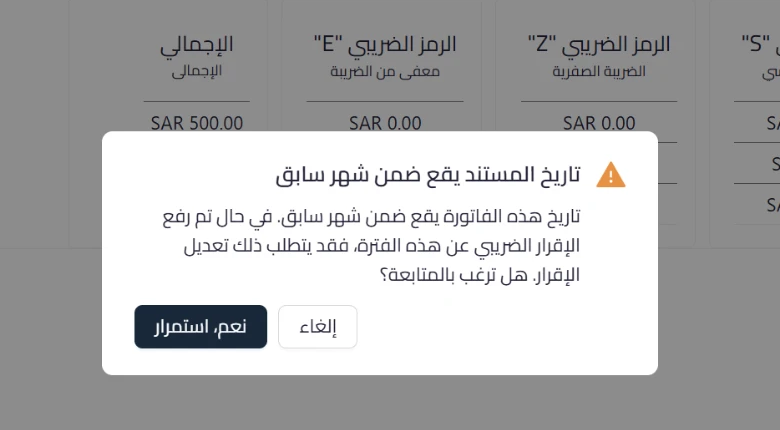 View full size
Path in Qoyod
Sales › Sales Invoices › Save and approve
Sales › Credit Notes › Save and approve
Resolution steps
- When the alert appears, review the document date and confirm it is the correct date for the transaction.
- If the date was entered by mistake, choose “Cancel”, correct the date, then approve again.
- If the date is correct, check whether the VAT return for that period has already been filed.
- Choose “Yes, continue” to complete the approval with the date as it stands.
- If the return for that period was already filed, it may need amending. Check with the Zakat, Tax and Customs Authority to determine the procedure that applies in your case.
Fields
- Document date: the date set on the sales invoice or credit note, which is what the alert reads and compares with the current month.
Notes
- This is an advisory alert that does not block approval, so you can continue directly after reading it.
- Qoyod does not check the status of your return with the authority, and it neither files nor amends the return. The alert reads the document date only and compares it with the current month.
- Approving a document dated in an earlier month is available in Qoyod, but it may change that period’s figures, which is where the possible need for an amendment comes from.
- The alert requires no setup.
- For details, see the release note on the Qoyod updates page.
- See also Qoyod Compliance Alerts: an overview and Future Invoice Issue Date Warning.



