




We have added an alert that appears when you approve a sales invoice or a credit note dated in a month earlier than the current one. Before the approval goes through, the alert reminds you that a VAT return may already have been filed for the period that date falls in, and that approving the document with this date may later require an amendment to that return.
The situation this alert covers is a familiar one. An invoice issued late, or a credit note correcting an older sale, carries the date of the month it belongs to rather than today’s date. But if the return for that period has already been submitted to the Zakat, Tax and Customs Authority, the new document may change the figures of a period that was filed, which may call for an amendment. The alert puts that in front of you at the moment of approval, instead of leaving you to find it during a review or an audit.
When the alert appears
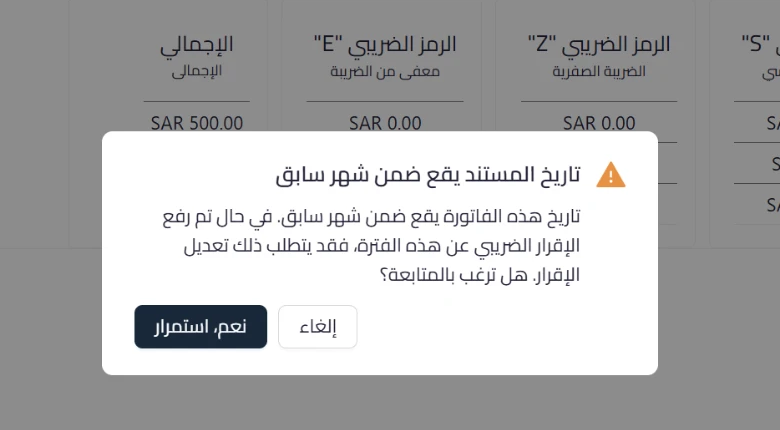
The prior month invoice date alert appears when you approve a sales invoice or a credit note whose date falls in a month earlier than the current month.
What the alert says
The alert is titled “The document date falls in a previous month”. Its text explains that the document date falls in a previous month, that if the VAT return for this period has already been filed this may require amending the return, and then asks whether you wish to continue.
Your two options
- Yes, continue: completes the approval with the date as it stands.
- Cancel: closes the alert and returns you to the document so you can review or change the date before approving.
An advisory alert that does not block approval
The alert is advisory only. It does not block the approval, it does not change the document date, and it does not touch the accounting entries. It reads the document date and compares it with the current month, nothing more, and it does not check the status of your return with the authority. The decision stays yours: continue informed, or go back and review the date.
Why it matters
- It surfaces the possible tax impact at the moment of approval rather than after the period is closed.
- It gives you the chance to tell a deliberately backdated document from a date entered by mistake, before it reaches the books.
- It leaves the decision with the user, so legitimate work is never held up and no particular date is forced.
What the alert does not do
The alert does not file the return, does not amend it, and does not connect to the authority’s portal. Amending a return for a period already filed remains the business’s responsibility through the Zakat, Tax and Customs Authority portal. The alert also does not decide whether an amendment is required in your case, which depends on whether the return for that period was in fact filed.
The alert requires no setup.
Read next
- Prior Month Document Date Alert in the help center: the full resolution steps.
- Future Issue Date Warning for Tax Invoices: the matching alert in the other direction.