




This clarification explains whether you can add two salaries for an employee in the same month in the payroll flow. You cannot add two salaries for an employee in the same month directly, but you can add an additional value in the same payroll flow if the employee worked overtime hours.
Steps
-
Adding Overtime Hours
-
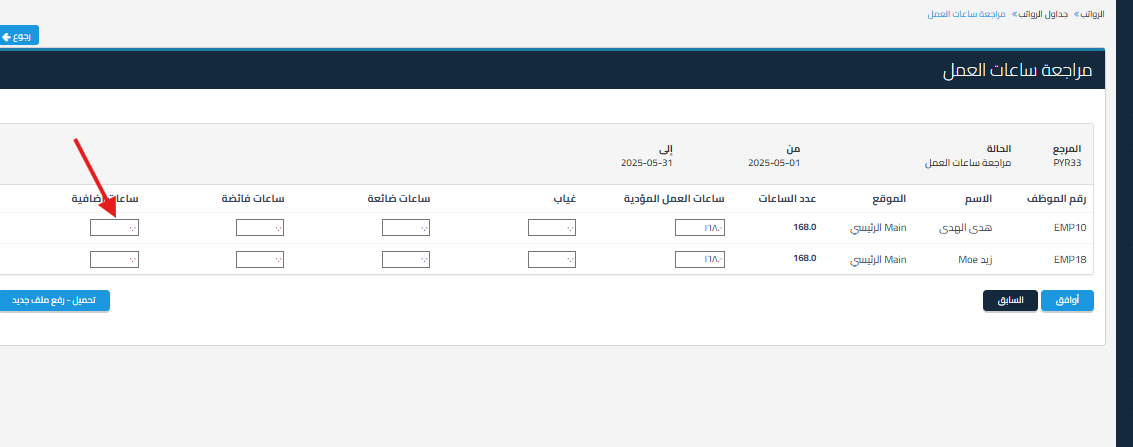
Go to the Review Work Hours page while setting up the payroll flow
-
Enter the number of overtime hours in the field “Overtime Hours”

-
-
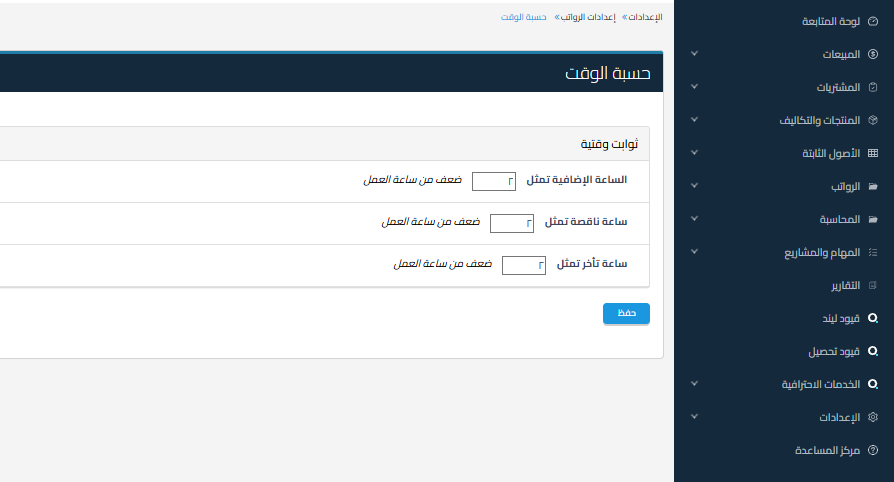
Specify How to Calculate Overtime Pay
-
From Settings
-
Select Payroll
-
Click Edit next to Time Calculation
-
Modify the rate or calculation method if needed

-
Important Notes
-
The system does not allow two payroll flows in the same month for the same employee
-
Use allowances from employee data or overtime hours to compensate for any additional amounts within the same payroll flow
-
Make sure to save the changes before approving the payroll flow



