




This article explains how to separate receipt voucher reference numbers from payment voucher reference numbers in Qoyod, from a single option in the Receipt Settings tab, which prefix and sequence each type gets once it is switched on, and what stays the same if you leave it off.
What is this, and when do you use it?
By default, receipt vouchers and payment vouchers share the same numbering under the PYT prefix. Qoyod’s accounting software gives you an option that separates them, so payment vouchers get their own prefix and sequence, and receipt vouchers get their own prefix and sequence too. Use it in these cases:
- Knowing a voucher’s type from its reference number directly, without opening the voucher.
- Reviewing voucher lists and statements and telling money received from money paid at a glance.
- Matching voucher numbering in Qoyod to the document numbering your accounting system already uses.
See the release announcement for what was added.
The path in Qoyod
Settings › General Settings › Receipt Settings
Steps
- Open Settings, then General Settings.
- Press the Receipt Settings tab in the top tab row.
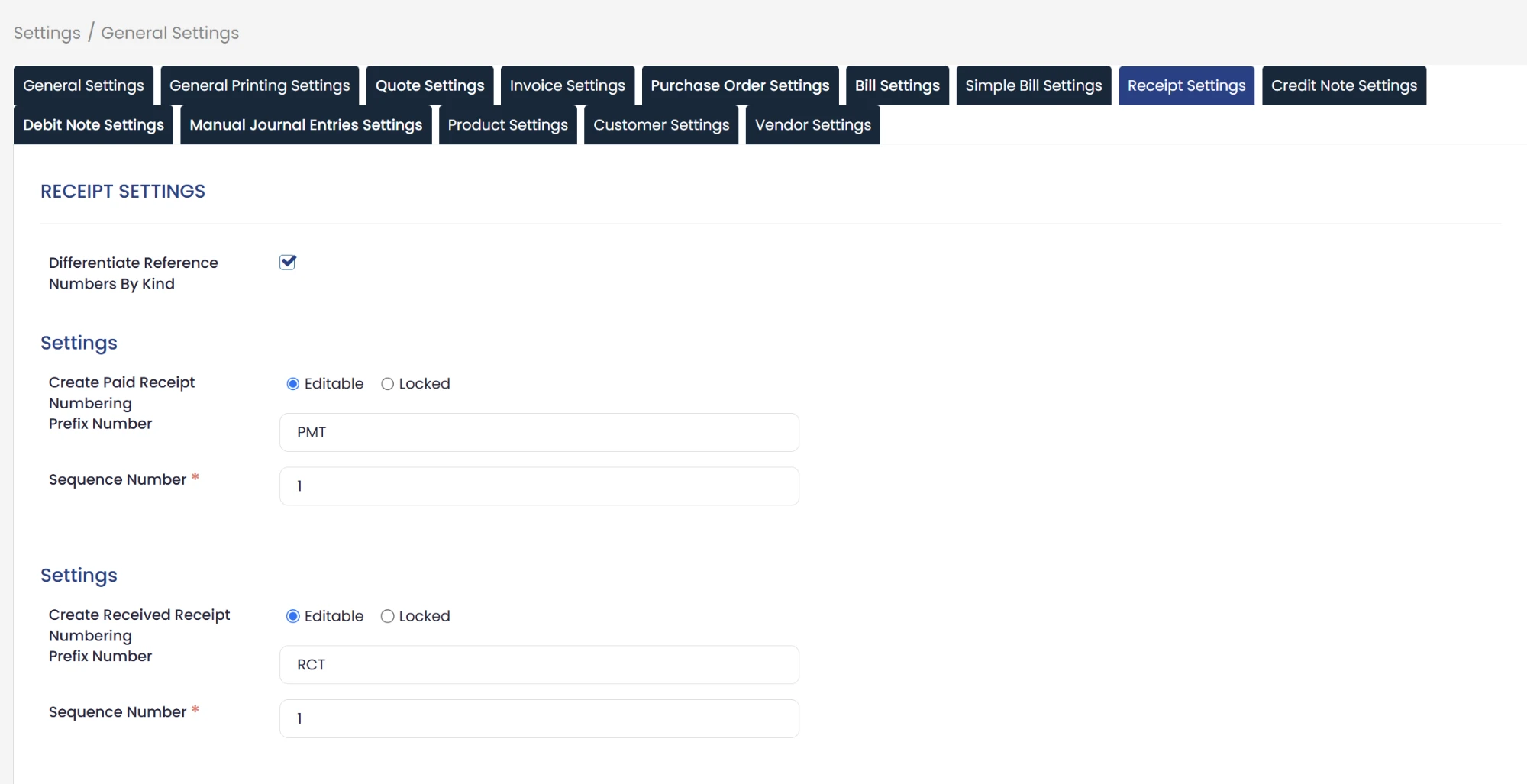
- Tick the Differentiate Reference Numbers By Kind checkbox.
- In the Create Paid Receipt Numbering block, check the Prefix Number field that carries the PMT prefix, then enter the number the numbering starts from in the Sequence Number field.
- In the Create Received Receipt Numbering block, check the Prefix Number field that carries the RCT prefix, then enter the starting number for the receipt voucher sequence in the Sequence Number field.
- Save the settings.
 View full size
Fields
The Receipt Settings tab holds two separate settings blocks, Create Paid Receipt Numbering for payment vouchers and Create Received Receipt Numbering for receipt vouchers, and each one holds these fields:
- Prefix Number: the field that carries the reference number prefix, PMT for payment vouchers and RCT for receipt vouchers.
- Sequence Number (required): the number the numbering of that voucher type starts from, which you set to suit your accounting system.
- Editable / Locked: an option shown at the top of each of the two blocks.
Special cases
If you leave the option off
The system keeps working as usual, and receipt and payment vouchers keep sharing the same numbering under the PYT prefix, with no change at all. To configure that shared numbering, see how to edit voucher sequence and reference numbers.
If General Settings does not appear for you
See why General Settings is not showing to check your subscription and permissions.
Notes
- The option concerns the voucher reference number only.
- The Sequence Number field is required in both blocks, so enter a starting number for each type before saving.
- To number your other documents by financial year, see document numbering using the financial year.
Frequently asked questions
Where do I find the option to separate voucher reference numbers?
In Settings, then General Settings, then the Receipt Settings tab, under the Differentiate Reference Numbers By Kind option.
Which prefix does each type get once it is switched on?
Payment vouchers get the PMT prefix and receipt vouchers get the RCT prefix, and each one has its own number sequence.
Can I set the starting number for each sequence?
Yes. You set the starting number for each sequence separately, from the Sequence Number field in that type’s block, to suit your accounting system.
What happens if I do not switch the option on?
The system keeps working as usual, and receipt and payment vouchers keep sharing the same numbering under the PYT prefix, with no change at all.
What is the practical benefit of separating the numbering?
Telling a voucher’s type apart quickly from its reference number directly, without having to open the voucher itself.



