Qoyod
Pricing

 Knowledge Base

How to Hide Dashboards for Specific Users by Adjusting Role Permissions

You can hide the dashboard from some users by following these steps:

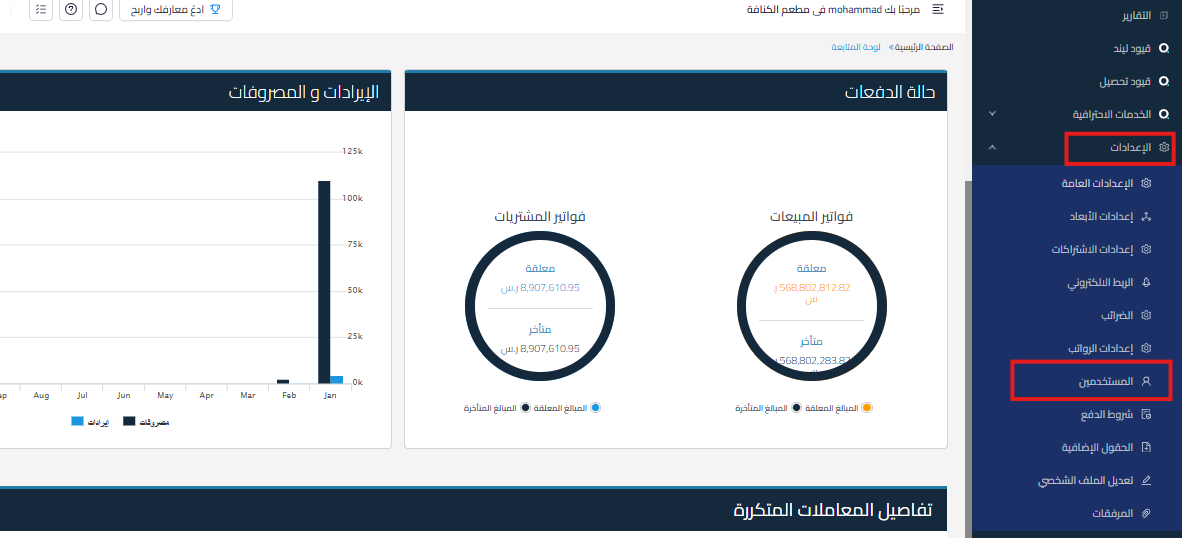
      • Go to Settings.

        f9a70fe4241d9bfa How to Hide Dashboards for Specific Users by Adjusting Role Permissions | Qoyod

      • Select Users then click on Manage Roles.

        416404b44c567852 How to Hide Dashboards for Specific Users by Adjusting Role Permissions | Qoyod

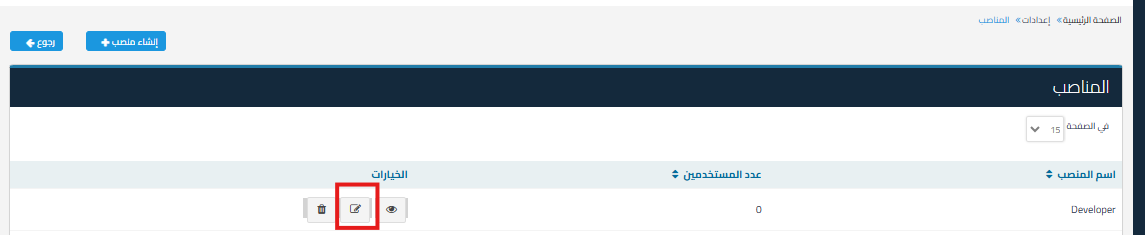
      • Select Edit next to the role you want to hide the dashboard from.
        08c5c5a01bf04efc How to Hide Dashboards for Specific Users by Adjusting Role Permissions | Qoyod

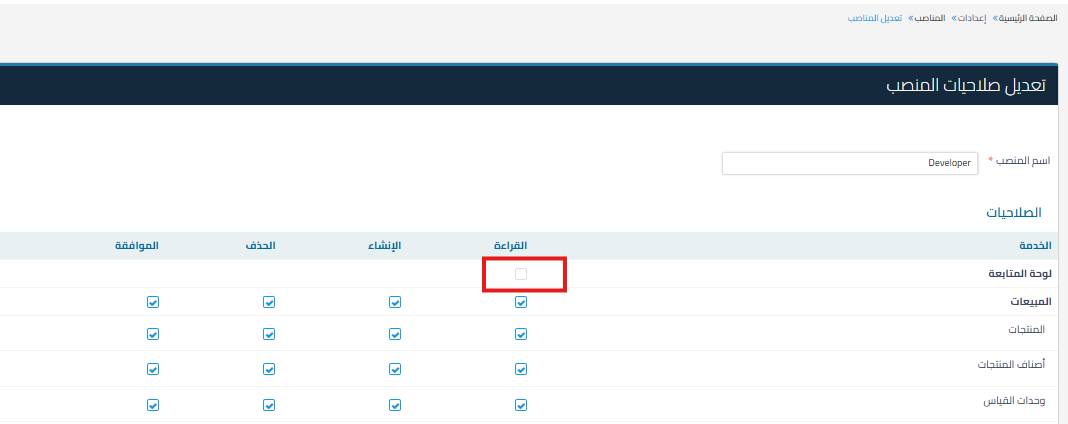
      • Uncheck (uncheck the box) next to Dashboard.
        52efc8e62505183d How to Hide Dashboards for Specific Users by Adjusting Role Permissions | Qoyod

      • Click on Save to apply the changes.

Additional Notes:

  • These settings will allow you to control access to the dashboard according to the role within the organization.

Keywords for inquiry:

  • How do I hide the dashboard from some employees?

  • Can I prevent a user from seeing the dashboard?

  • What’s the way to disable dashboard permissions?

  • I want to hide the dashboard from an employee, what are the steps?

  • How do I edit role permissions and remove the dashboard from them?

  • I don’t want everyone to see the dashboard, can I control permissions?

  • Why don’t some employees see the dashboard?

  • Can I disable the dashboard for a specific role?

  • How do I control access permissions for the dashboard?

  • What’s the difference between enabling or disabling dashboard permissions?

مركز المساعدة

لم تجد ما تبحث عنه؟

لا تقلق، لدينا المزيد من أدوات المساعدة.

ندوات مباشرة يقدمها فريق قيود لمساعدتك في استخدام البرنامج بسهولة والرد على أسئلتك.

تعرّف على أحدث تحديثات فيود والتحسينات المستمرة والخصائص الجديدة في مكان واحد.

فريقنا جاهز لمساعدتك وتقديم الدعم الفوري لأي مشكلة تواجهها على مدار الساعة