Qoyod
Pricing

 Knowledge Base

How to Compare Projects or Periods in Income Statement Reports Using Advanced Analysis

Here’s how to display a comparison between different projects or different periods within the income statement report.

  • Go to Reports.
  • Select Income Statement report.
  • Click on Advanced Analysis from the left side of the screen.

    64ada29e4d601b13 How to Compare Projects or Periods in Income Statement Reports Using Advanced Analysis | Qoyod

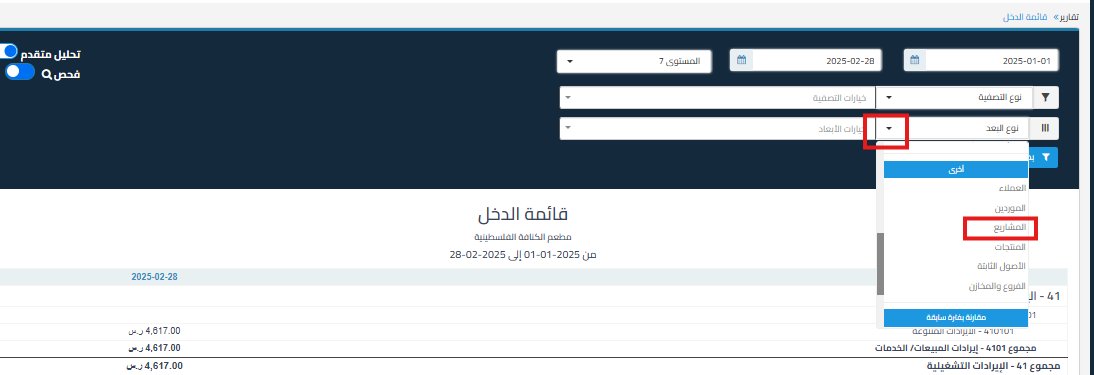
  • Select Projects or compare with a previous period (previous day, previous month, previous year, previous quarter) in the Dimension Type field.
    4d06102d445b1f5c How to Compare Projects or Periods in Income Statement Reports Using Advanced Analysis | Qoyod

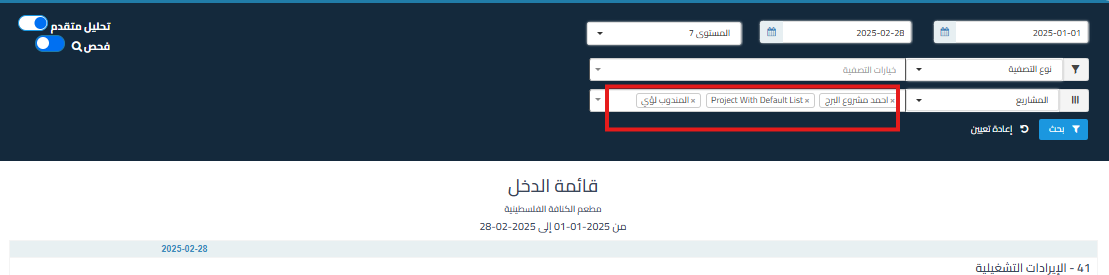
  • Select the projects you want to compare or the number of periods you want to review (1 period, 2 periods, 4 periods, up to 13 periods)

    6f78e2710f470335 How to Compare Projects or Periods in Income Statement Reports Using Advanced Analysis | Qoyod

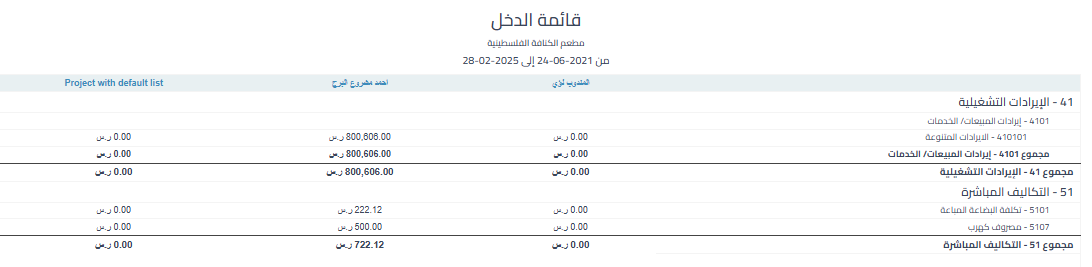
  • The income statement for each project or period will appear in a separate column to facilitate comparison.

    b3b9b69b7aab0b45 How to Compare Projects or Periods in Income Statement Reports Using Advanced Analysis | Qoyod

Additional Notes:

  • You can export the report to Excel for further analysis.
مركز المساعدة

لم تجد ما تبحث عنه؟

لا تقلق، لدينا المزيد من أدوات المساعدة.

ندوات مباشرة يقدمها فريق قيود لمساعدتك في استخدام البرنامج بسهولة والرد على أسئلتك.

تعرّف على أحدث تحديثات فيود والتحسينات المستمرة والخصائص الجديدة في مكان واحد.

فريقنا جاهز لمساعدتك وتقديم الدعم الفوري لأي مشكلة تواجهها على مدار الساعة