




This article explains when the “National ID required” alert appears while issuing an invoice with a health or education VAT exemption, and how to resolve it so you can save and submit the invoice and reduce the risk of rejection by the Zakat, Tax and Customs Authority (ZATCA).
When this alert appears
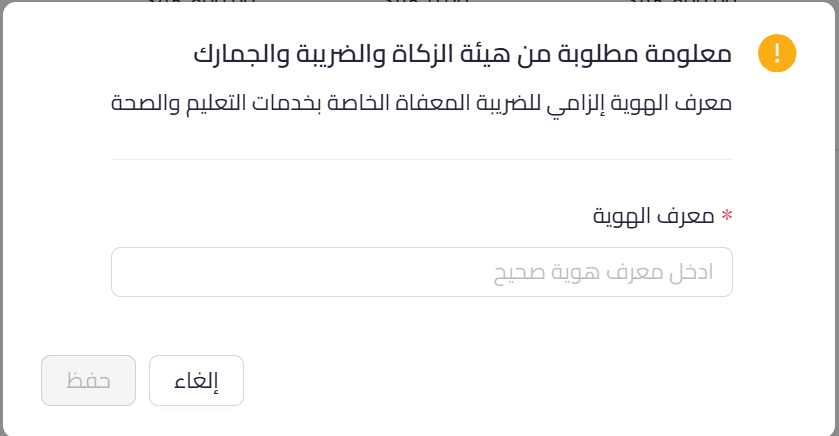
The alert appears while saving a sales invoice that contains a VAT-exempt line item under a health or education exemption. In this case the customer’s national ID becomes a required field, and the invoice cannot be saved until it is entered.
 View full size
Path in Qoyod
Sales › Sales Invoices › Create sales invoice
Resolution steps
- When the “Information required by ZATCA” dialog appears, go to the “Identity number” field.
- Enter the customer’s national ID, and make sure it matches the customer’s actual identity.
- Press “Save” to complete saving the invoice.
- If you do not have the number, obtain it from the customer first, since the invoice cannot be saved under this exemption without it.
Fields
- Identity number (required): the customer’s national ID, technically known to the authority as the Other Buyer ID (BT-46) of type National ID (NAT). It becomes required when a health or education exemption is selected.
- VAT exemption reason (BT-121) (required): the alert appears when the health or education exemption reason is selected on the line item.
Notes
- This is a mandatory alert: it prevents saving the invoice until the national ID is entered, a requirement issued by the Zakat, Tax and Customs Authority.
- The alert appears only with health or education exemption line items, not with standard-rated invoices.
- Before this update, invoices were saved without the number and then rejected later on submission, so the alert ensures the national ID is entered before saving, which reduces the risk of rejection for this reason.



