




Explanation of how to modify numbering and sequencing of simple invoices in the system.
Answer:
- Yes, you can modify the numbering of simple invoices through system settings.
- You can determine whether the numbering is editable or not, as well as change the ID number.
How to modify simple invoice numbering:
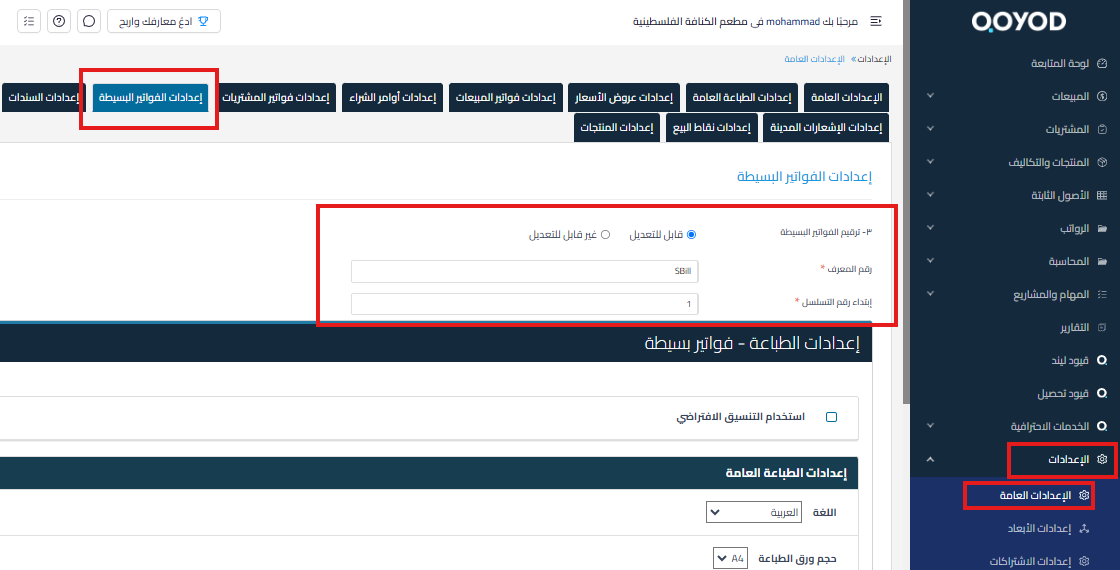
- Go to Settings.
- Select “General Settings“.
- From the top options, select “Simple Invoice Settings“.
- On this page, you can determine if the invoice numbering is editable.
- You can also change the ID number as needed.
If you are looking for voucher numbering rather than invoice numbering, see separate voucher reference numbers.



