




Qoyod
Pricing

 Knowledge Base

How to Edit Draft Invoices, Purchase Orders, and Quotations in the Qoyod Mobile App

You can edit sales invoices, purchase invoices, purchase orders, and quotations saved as drafts through the Qoyod mobile app.

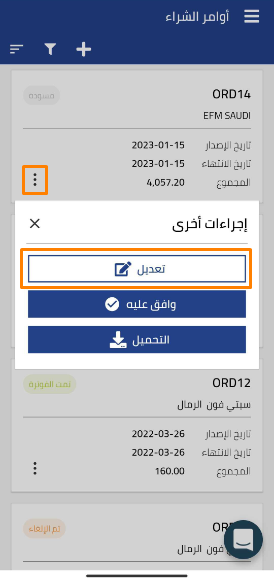
You can access this feature by tapping the 3 dots on the document saved as a draft
ad86f0cf9a714c16 How to Edit Draft Invoices, Purchase Orders, and Quotations in the Qoyod Mobile App | Qoyod

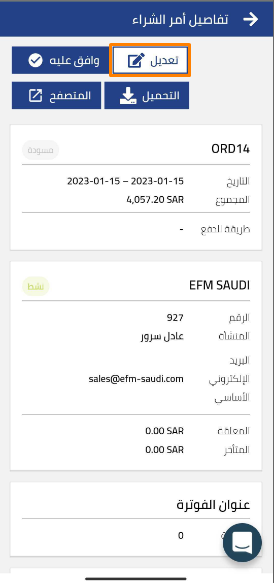
Or from within the details page of any document, where the Edit option is located in the menu at the top of the page
a411d55f1832e642 How to Edit Draft Invoices, Purchase Orders, and Quotations in the Qoyod Mobile App | Qoyod

Additional Notes:

  • Editing documents is only available for documents saved as drafts.
  • When you make an edit, changes are saved directly to the document.
مركز المساعدة

لم تجد ما تبحث عنه؟

لا تقلق، لدينا المزيد من أدوات المساعدة.

ندوات مباشرة يقدمها فريق قيود لمساعدتك في استخدام البرنامج بسهولة والرد على أسئلتك.

تعرّف على أحدث تحديثات فيود والتحسينات المستمرة والخصائص الجديدة في مكان واحد.

فريقنا جاهز لمساعدتك وتقديم الدعم الفوري لأي مشكلة تواجهها على مدار الساعة

