




Qoyod
Pricing

 Knowledge Base

How to Generate Financial Reports for a Specific Project in Qoyod (Income Statement and Balance Sheet)

Here is an explanation of how to extract financial reports related to a specific project.

Answer:

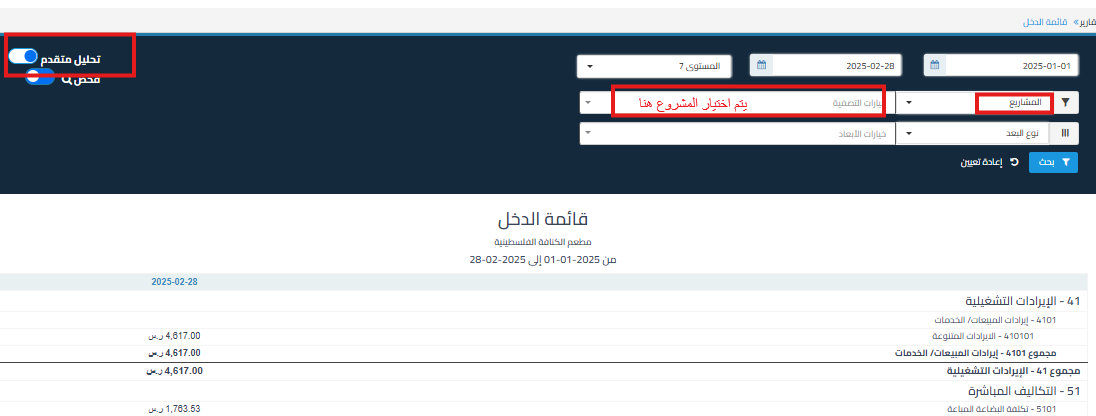
  1. Go to the required financial report (such as income statement or balance sheet).
  2. Click on the Advanced Analysis option available in the report.
  3. Use the filter options to select the project whose report you want to extract.
  4. After selecting the project, you will be able to view its financial reports.
    b1661f3774b924c1 How to Generate Financial Reports for a Specific Project in Qoyod (Income Statement and Balance Sheet) | Qoyod

مركز المساعدة

لم تجد ما تبحث عنه؟

لا تقلق، لدينا المزيد من أدوات المساعدة.

ندوات مباشرة يقدمها فريق قيود لمساعدتك في استخدام البرنامج بسهولة والرد على أسئلتك.

تعرّف على أحدث تحديثات فيود والتحسينات المستمرة والخصائص الجديدة في مكان واحد.

فريقنا جاهز لمساعدتك وتقديم الدعم الفوري لأي مشكلة تواجهها على مدار الساعة

