




Qoyod
Pricing

 Knowledge Base

Filter Customers Based on POS Customer Option Using Excel Export

Here is how to filter customers based on the “POS Customer” option, as you cannot filter directly within the system based on the “POS Customer” option. However, you can use the following method:

  1. Go to the Sales > Customers menu.
  2. Click on the “Export Customer List” option from the top toolbar.
  3. An Excel file will be downloaded containing all customer data, including the “POS Customer” field.
  4. Open the Excel file and use the “POS Customer” column to filter customers who have this option enabled.
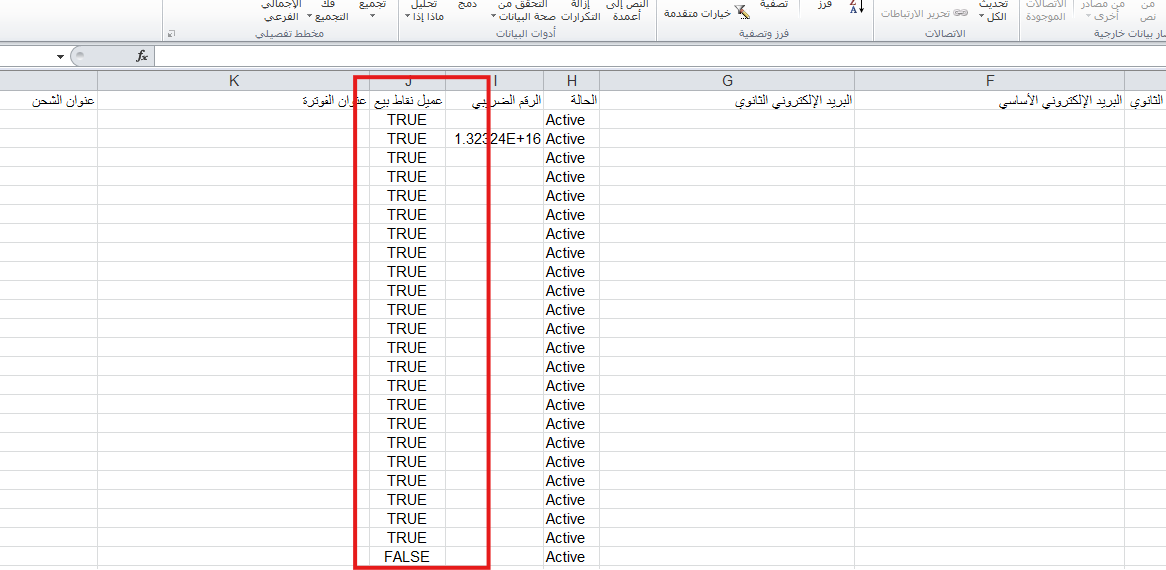
    ee3bffb133e176b7 Filter Customers Based on POS Customer Option Using Excel Export | Qoyod

Additional notes:

  • Exporting the list provides all customer data, allowing you to filter based on different fields such as “POS Customer”.
  • If you encounter any issues displaying data correctly in an Excel file, please refer to the following help article:

    How to export customer data to an Excel file.

Search keywords:

  • How can I filter customers based on the “POS Customer” option?

  • What is the method to filter customers who have the “POS Customer” option?

  • How can I search for customers who have the “POS Customer” option enabled?

  • Is there a way to filter customers who have the “POS Customer” option?

  • How do I filter customers based on “POS Customer”?

  • How can I view customers who have the “POS Customer” option enabled?

مركز المساعدة

لم تجد ما تبحث عنه؟

لا تقلق، لدينا المزيد من أدوات المساعدة.

ندوات مباشرة يقدمها فريق قيود لمساعدتك في استخدام البرنامج بسهولة والرد على أسئلتك.

تعرّف على أحدث تحديثات فيود والتحسينات المستمرة والخصائص الجديدة في مكان واحد.

فريقنا جاهز لمساعدتك وتقديم الدعم الفوري لأي مشكلة تواجهها على مدار الساعة

