




Qoyod
Pricing

 Knowledge Base

How to Reset Your Password and Troubleshoot Missing Reset Links in Qoyod

If you forgot your password, you can easily recover your account by resetting your password. Follow these steps:

Steps

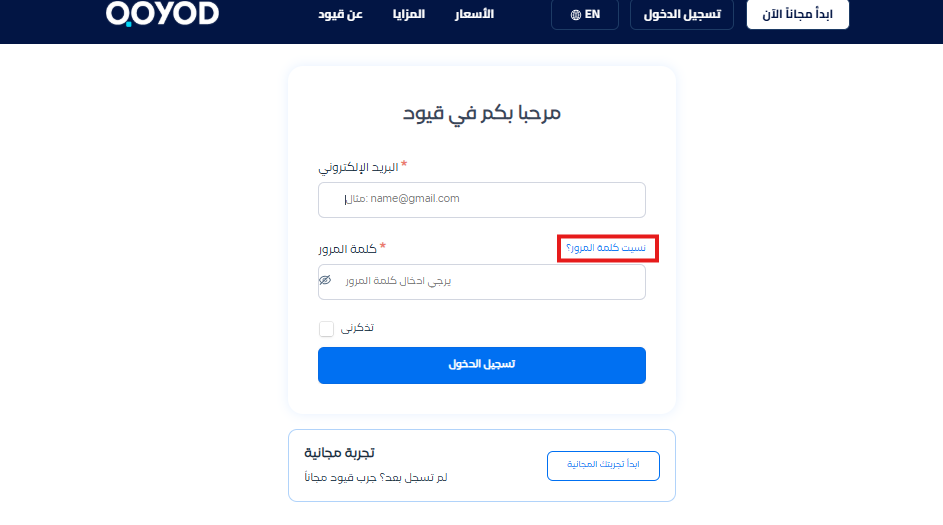
  1. Go to the login page

    • Click on the “Forgot Password” option.
      25b3227166989b31 How to Reset Your Password and Troubleshoot Missing Reset Links in Qoyod | Qoyod

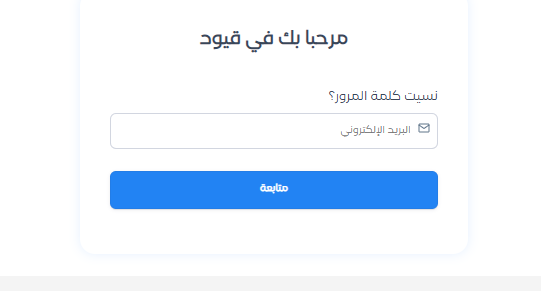
  2. Enter your email address

    • Enter the email address associated with your account.

      db4e40f747a53f1d How to Reset Your Password and Troubleshoot Missing Reset Links in Qoyod | Qoyod

  3. Check your email

    • Open the email and look for a message containing the password reset link.
  4. Change your password

    • Click on the link and follow the instructions to set a new password.
Important Notes

  • If you didn’t receive the email:
    • Make sure you entered the correct email.
    • Check your spam folder.

Search Keywords:

  • I forgot my password, how do I recover my account?

  • How do I change my password?

  • I can’t log in, it says the password is wrong. What should I do?

  • I clicked Forgot Password and didn’t receive anything. What should I do?

  • Where can I find the password reset link?

  • I tried to reset my password and didn’t receive an email. What’s wrong?

  • I want a way to reset my password in Qoyod

  • Where can I find the “Forgot Password” option?

  • I entered my email and didn’t receive anything. Please confirm if it’s registered with you

  • How do I verify that my email is linked to the account before I reset my password?

مركز المساعدة

لم تجد ما تبحث عنه؟

لا تقلق، لدينا المزيد من أدوات المساعدة.

ندوات مباشرة يقدمها فريق قيود لمساعدتك في استخدام البرنامج بسهولة والرد على أسئلتك.

تعرّف على أحدث تحديثات فيود والتحسينات المستمرة والخصائص الجديدة في مكان واحد.

فريقنا جاهز لمساعدتك وتقديم الدعم الفوري لأي مشكلة تواجهها على مدار الساعة

