




Important Note (Sales Opportunity): Adding a new enterprise = new paid subscription. After clarifying the steps for the customer, offer assistance and request their information:
-
Name
-
New enterprise name
-
Phone number (Required)
Then inform them: “We’d be happy to help you with the subscription easily. Let me escalate your request to our sales team to get in touch and help you choose the right plan.”
There are two ways to add a new enterprise in the Qoyod system:
1. Adding a new enterprise with the same email:
- You can easily switch between enterprises using the same account.
Steps:
-
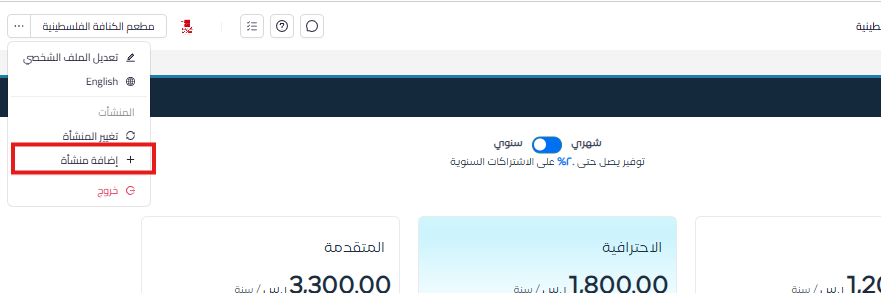
Click on (…) next to the enterprise name

-
Add Enterprise:
- Click on Add Enterprise, then choose the appropriate subscription (Monthly or Annual).
-
Choose Package and Add-ons:
- Select the required package by clicking Subscribe Now.
- Choose the add-ons you need such as:
- Payroll.
- Number of additional users.
- Number of additional locations.
- Number of POS users.
-
Complete Payment:
- Click on Continue to Preview, then fill in the enterprise information.
- Select payment method.
- Agree to the Terms and Conditions and Privacy Policy.
- Click on Complete Payment.
-
Switch Between Enterprises:
- You can switch between enterprises by clicking the three dots in the top left of the screen, then select Change Company.
2. Adding a new enterprise with a different email:
Steps:
-
Sign Out:
- Sign out from the current enterprise.
-
Sign Up:
- Click on Subscribe Now on the Qoyod system homepage.
-
Complete Registration and Payment:
- Follow the registration steps as usual and complete the payment process.
Additional Notes:
- Make sure to carefully select the required add-ons when adding a new enterprise.
- You can easily manage enterprises through the system interface if they are on the same email.



