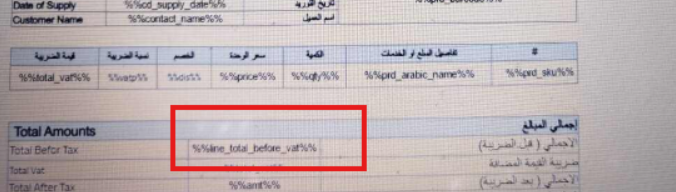
Here is an explanation of why the error “Items are not allowed outside the items section” appears when designing the invoice, as the error occurs when saving the invoice due to not entering the data within the correct table in the invoice form.
- Ensure that all added data is entered in the correct table, by verifying that data at the product level is within the table designated for products and data at the invoice level is added to the table for invoice-specific data
Additional notes:
- The error occurs when product data is entered in a separate field outside the table.
- You can review the table format to ensure the data entry is correct.
Practical example:
One of our customers encountered the error “Items are not allowed outside the items section“, and after reviewing the invoice, it was found that they had added the subtotal before tax for the product outside the products table