Qoyod
Pricing

 Knowledge Base

How to Enable SKU Duplication to Use the Same Number for Multiple Products

Guidelines on how to enable the SKU repeat option to use it with multiple products.

Answer:

Yes, you can now enable the SKU repeat option for your product to use it with other products according to your business needs, by following these steps:

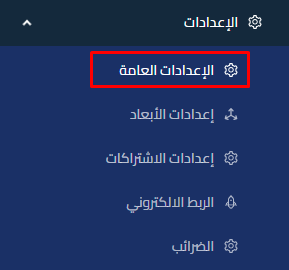
  1. Go to Settings.

    f542c92545f98f70 How to Enable SKU Duplication to Use the Same Number for Multiple Products | Qoyod

  2. Select General Settings.
  3. Go to the Products Settings tab.

    336021216bf042a6 How to Enable SKU Duplication to Use the Same Number for Multiple Products | Qoyod

  4. Enable the SKU repeat option.

Additional Notes:

  • When you enable this option, you can register the same SKU for more than one product without conflict.
مركز المساعدة

لم تجد ما تبحث عنه؟

لا تقلق، لدينا المزيد من أدوات المساعدة.

ندوات مباشرة يقدمها فريق قيود لمساعدتك في استخدام البرنامج بسهولة والرد على أسئلتك.

تعرّف على أحدث تحديثات فيود والتحسينات المستمرة والخصائص الجديدة في مكان واحد.

فريقنا جاهز لمساعدتك وتقديم الدعم الفوري لأي مشكلة تواجهها على مدار الساعة