




Instructions for extracting and viewing the details of the Performance Bond for each customer.
-
Extracting a Statement of Account for the Customer:
- Go to Reports > Statement of Account.
- Select the Accounts Receivable account and specify the required customer.
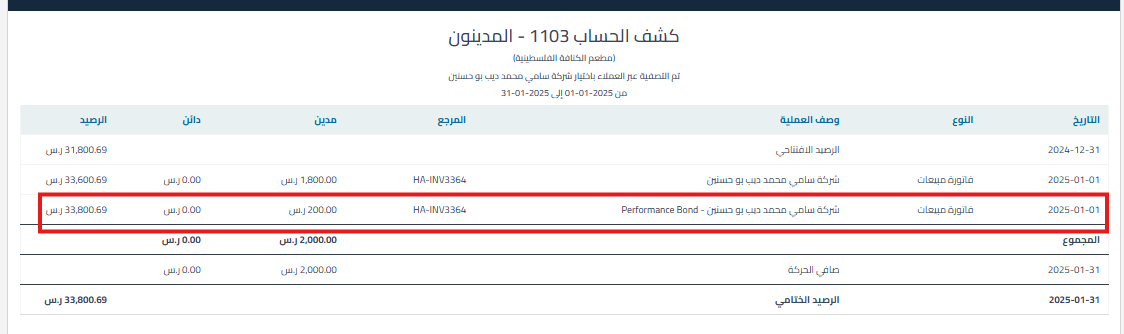
- Review the statement of account that displays all items including the Performance Bond.
- Performance Bond will be written next to the Performance Bond item along with the invoice reference number associated with it.
-
Searching for Performance Bond:
- Use the quick search feature Ctrl + F in the displayed statement.
- Type “Performance Bond” and all transactions related to the Performance Bond will appear.
-
Exporting Data to Excel:
- Click the “Export” icon to download the statement of account to an Excel file.
- Filter the “Transaction Description” column using “Performance Bond”.
- Review all transactions related to the Performance Bond separately.
Additional Notes:
- The filtering process allows you to focus only on transactions related to the Performance Bond, making it easier to prepare reports and analyze data.
Keywords:
-
How do I view the details of the Performance Bond for each customer?
-
I want to see all transactions related to the Performance Bond, what are the steps?
-
Is there a report that shows only the Performance Bond?
-
How do I filter the statement of account to view the Performance Bond?
-
Does the Performance Bond appear in the statement of account?
-
How do I know the invoice number associated with the Performance Bond?
-
Where does the system show me that the transaction relates to Performance Bond?
-
How do I search for the word Performance Bond in the statement of account?



