




Guidelines on how to calculate VAT accrual based on the payment date of invoices to government entities.
In accordance with the General Authority of Zakat and Tax and Customs regulations on modifying the VAT accrual date for entities contracting with government entities, effective from November 1, 2021
A feature has been launched to calculate VAT accrual in the tax return based on the payment date of invoices and credit notes for government entity customers
Where the date and value of the paid amount are reflected in the tax return instead of the issue date or accrual date of the invoice/credit note for government entity customers
To enable the tax accrual feature based on the payment receipt date, follow these steps:
1- Enable electronic invoicing for the entity
2- Enable the option: Entity is contracted with government entities
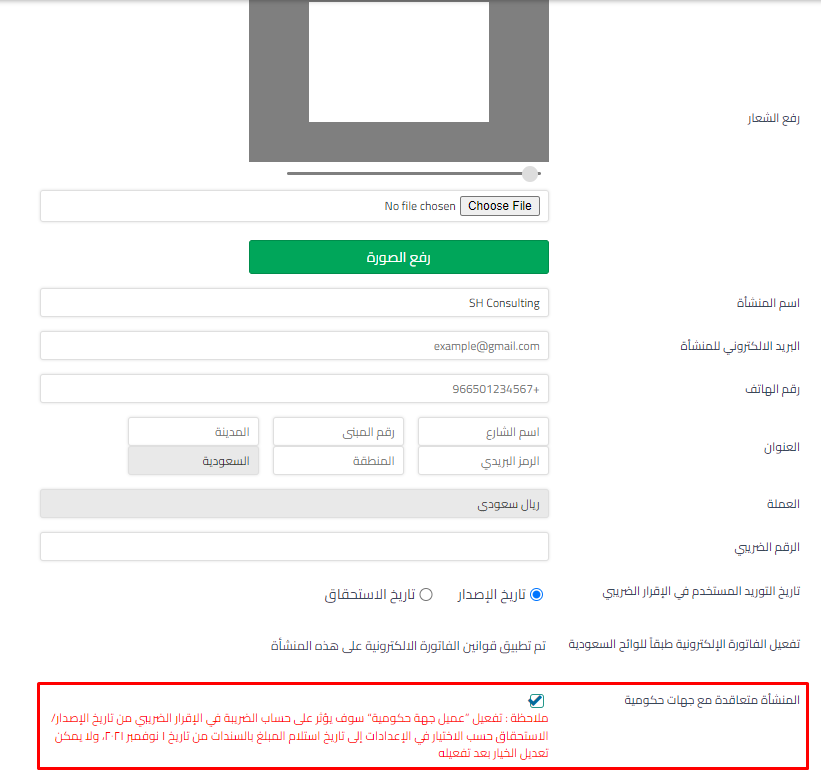 View full size
3- Add/edit a customer by selecting: Government entity customer “the customer must not be a POS customer”
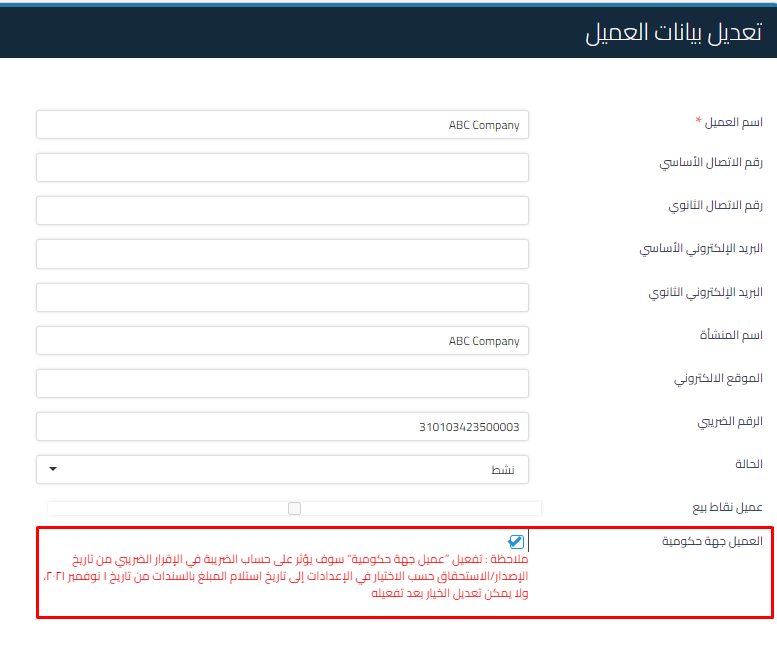 View full size
This means invoices will not be reflected at issuance or accrual date as set in general settings, but rather when linked to receipt vouchers based on the paid amount “partially or in full”. Each VAT type is reflected in the tax return according to the principle of proportional allocation when there are multiple VAT types for invoices issued on November 1, 2021 and thereafter
Similarly, credit notes will not be reflected in the tax return until they are linked to a disbursement voucher via “refund” and this is only for government entity customers
Keywords:
-
Is tax calculated at issuance or payment for government entities?
-
When is tax reflected if the customer is a government entity?
-
How do I make tax depend on payment time instead of the invoice?
-
I have a contract with a government entity, when do I calculate tax?
-
The government invoice didn’t appear in the return, why?
-
How do I enable the option to deal with government entities?
-
I have a government entity customer, how do I edit it in the system?
-
Tax didn’t appear after I issued the invoice to the government entity?



