Qoyod
Pricing

 Knowledge Base

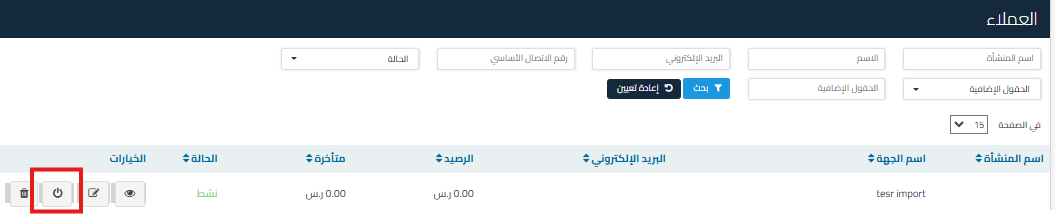
How to Deactivate a Customer to Hide From Invoices and Vouchers While Preserving Data

You can disable the customer so that they do not appear in sales invoices or vouchers while retaining all their data by following these steps:

  1. Go to the Sales menu.
  2. Select Customers.
  3. Click the “Disable” option next to the customer name you want to disable.

    d0c0d53461e1788d How to Deactivate a Customer to Hide From Invoices and Vouchers While Preserving Data | Qoyod

  4. The customer status will change to “Inactive”, which means they will no longer appear in:
    • Sales invoices.
    • Vouchers.
    • Manual entries.

Additional Notes:

  • The disabled customer’s data will remain saved in the system and can be accessed when needed.
  • The customer can be reactivated at any time if needed.

Search Keywords:

  • How can I disable a customer in the system so they don’t appear in invoices or vouchers?

  • Can I disable a customer so they don’t appear in sales invoices?

  • How do I stop the customer from appearing in vouchers and invoices while keeping their data?

  • How do I handle a disabled customer so they don’t appear in manual entries?

  • Can I disable a customer without deleting their data?

  • How do I reactivate a disabled customer?

  • What’s the way to disable a customer so they don’t show in sales invoices?

مركز المساعدة

لم تجد ما تبحث عنه؟

لا تقلق، لدينا المزيد من أدوات المساعدة.

ندوات مباشرة يقدمها فريق قيود لمساعدتك في استخدام البرنامج بسهولة والرد على أسئلتك.

تعرّف على أحدث تحديثات فيود والتحسينات المستمرة والخصائص الجديدة في مكان واحد.

فريقنا جاهز لمساعدتك وتقديم الدعم الفوري لأي مشكلة تواجهها على مدار الساعة