Qoyod
Pricing

 Knowledge Base

How to Enable and Use Overall Discounts on Purchase Invoices and Business Documents

We enable you to apply total discounts to sales and purchase invoices for more flexible discount management.

  • The total discount option can be enabled from the settings for all users.
  • The discount is calculated on the invoice total instead of being applied to each line item separately.

Enabling Steps:

  1. Navigate to Settings from the main menu.
  2. Then click on General Settings.
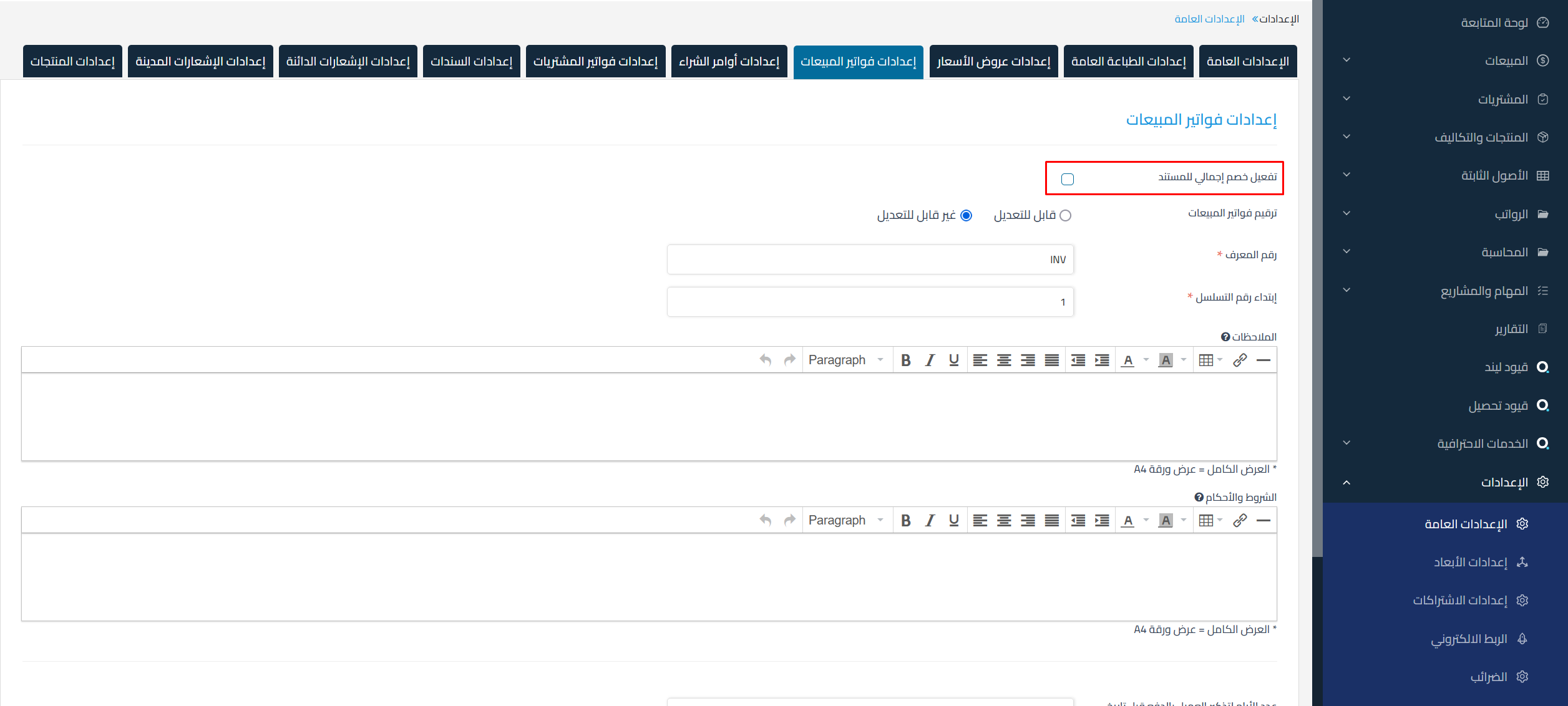
  3. Select Sales Invoice Settings or Purchase Invoice Settings.
  4. Enable the Total Document Discount option.
  5. Click Save.

    6d2d2139847cf1c0 How to Enable and Use Overall Discounts on Purchase Invoices and Business Documents | Qoyod

Additional Notes:

  • This option can be enabled or disabled at any time.
  • The change only affects new documents and does not apply to previous documents.

Search Keywords:

  • How can I apply total discounts to sales and purchase invoices?

  • Can I enable a total discount for documents in sales and purchase invoices?

  • Where do I find the option to enable total discount in invoice settings?

  • Does enabling total discount affect previous invoices?

  • Can I disable total discount after enabling it?

  • Can I apply total discount to only some invoices?

  • How can I enable the total discount option for all users?

  • How can I change the discount application method to include the invoice total instead of each line item?

  • Can I customize the total discount settings for each invoice individually?

  • What happens if I enable total discount on sales invoices only?

  • Does the total discount include all line items listed in the invoice?

  • How can I modify the total discount settings if it was previously enabled?

  • Can I apply total discount to sales invoices only or purchase invoices only?

  • Can I change the total discount settings for previous documents?

  • Enable Total Document Discount
مركز المساعدة

لم تجد ما تبحث عنه؟

لا تقلق، لدينا المزيد من أدوات المساعدة.

ندوات مباشرة يقدمها فريق قيود لمساعدتك في استخدام البرنامج بسهولة والرد على أسئلتك.

تعرّف على أحدث تحديثات فيود والتحسينات المستمرة والخصائص الجديدة في مكان واحد.

فريقنا جاهز لمساعدتك وتقديم الدعم الفوري لأي مشكلة تواجهها على مدار الساعة