




You can now convert part of a purchase order to a purchase invoice instead of the whole order at once. Pick the lines to invoice now and set the quantity for each, and the rest stays open to convert later, in one invoice or several.
Picking lines and quantities
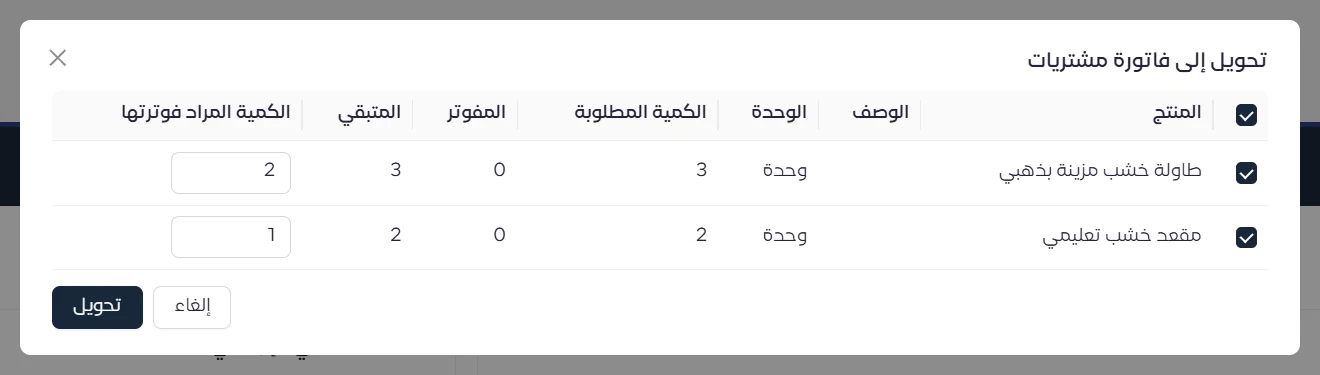
When you click Convert to Invoice on a purchase order, a window lists each line with its ordered quantity, the quantity already invoiced and what remains. Tick the lines you want, enter the quantity to invoice for each, then click Convert.
 View full size
A more accurate purchase order status
Converting a purchase order, or saving its purchase invoice as a draft, no longer changes the order’s status. It stays Approved until the purchase invoice is approved.
 View full size
The order moves to Invoiced once approved purchase invoices cover the full quantity.
So if you close the invoice screen without saving, or delete the draft, the purchase order is ready to convert again, just as it was.
Who this update is for
Businesses whose suppliers deliver in batches and who record a purchase invoice for each batch. Purchase orders are available on the Professional and Advanced plans.
Read next