




We are pleased to announce the addition of the customer / supplier statement report to the financial reports in Qoyod: a single statement that brings together every transaction tied to one contact, whether you deal with them as a customer, as a supplier, or as both.
Before this report, a business that buys from a contact and sells to the same contact had to pull two separate statements, then reconcile the figures by hand in an external file to find the net movement between them. That consumed the finance team’s time at every reconciliation, opened the door to addition errors, and delayed agreement on the closing balance with the other party.
Where to find it
Open the Reports page from the side menu, then choose the customer / supplier statement under the financial reports section.
Before you start: link the supplier to the customer
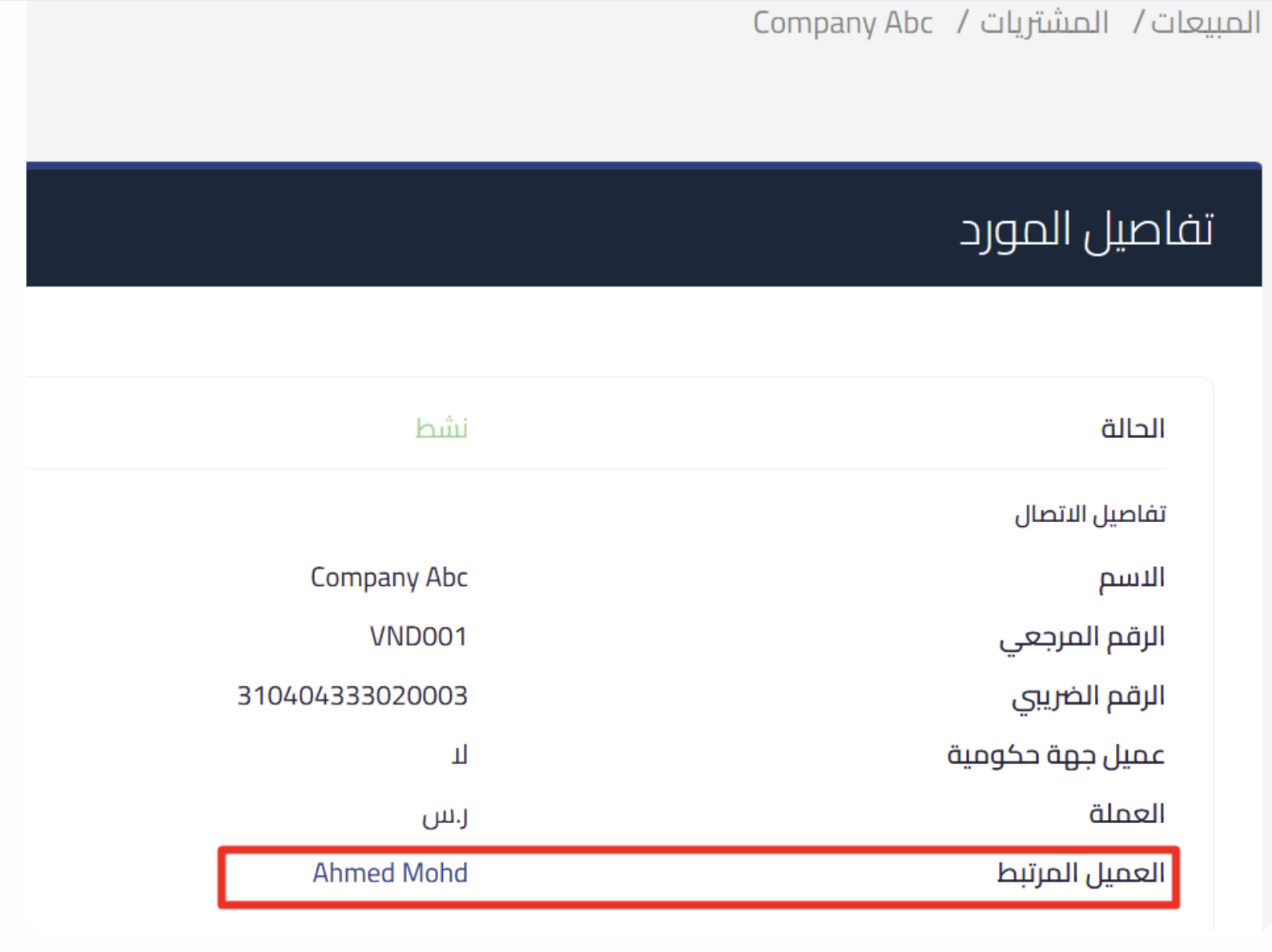
For the report to combine both roles, Qoyod needs to know that the supplier and the customer are the same contact. Go to Purchases then Suppliers, click Edit next to the supplier, turn on the link with customer option, search for the customer by name or reference number, and save. The contact is then shown as both a customer and a supplier, and the linked customer appears on the supplier details page as a link to the customer’s profile.
How it works
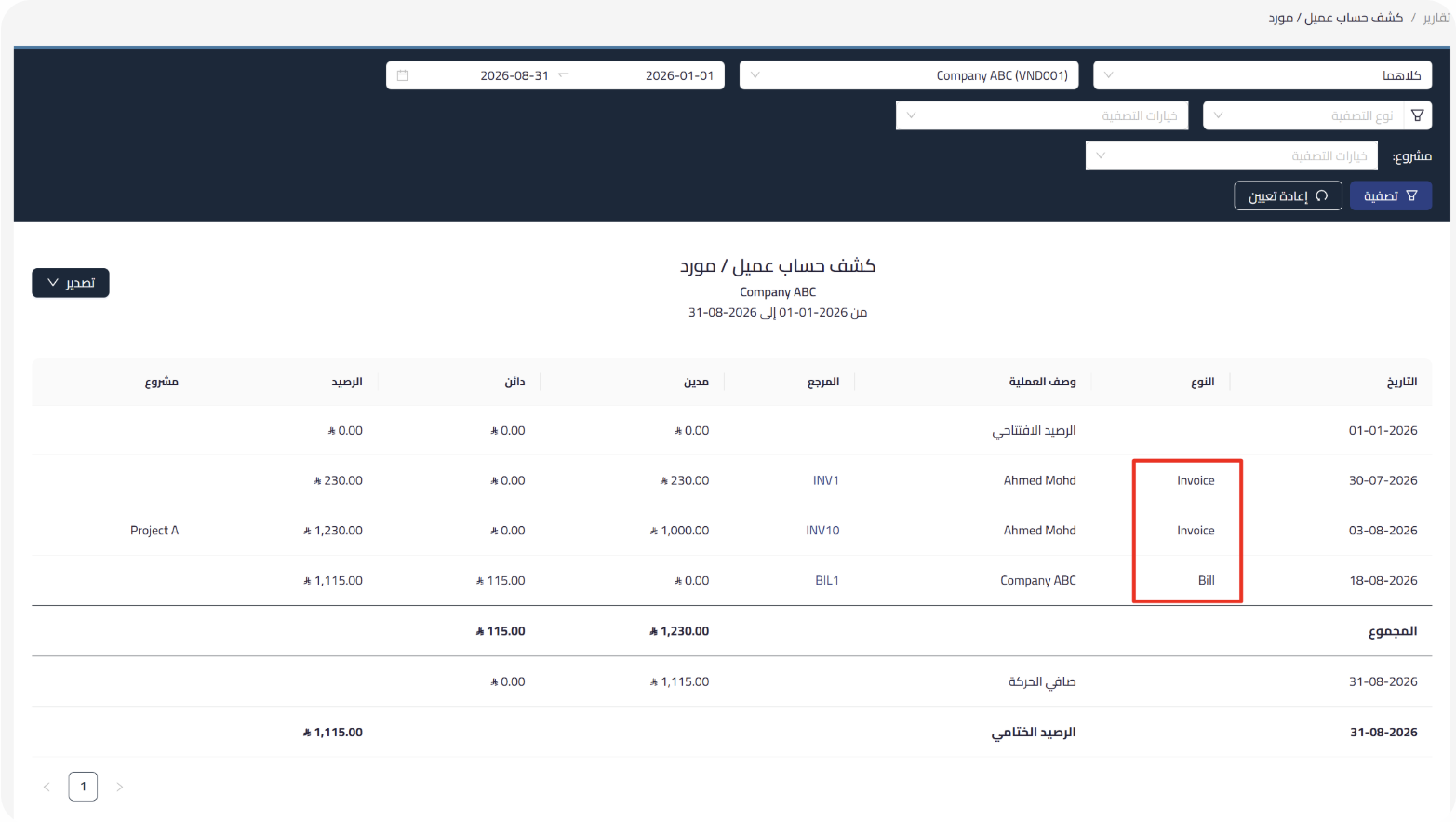
Inside the report, choose the period and the contact you need, then select the contact type: customers only, suppliers only, or both for contacts with a dual role. Click Filter and Qoyod lists every transaction tied to that contact in one table.
What the report shows
The statement gathers receivables, payments, sales, purchases, and credit notes into one table. It opens with the opening balance, shows each transaction with its date, type, description, reference, debit, credit, and running balance, and closes with the totals, the net movement, and the closing balance for the selected period.
Filter options
You can narrow the results by project, product, location, or fixed assets, along with the custom fields. The documents available for filtering differ by role: invoices, quotes, and credit notes for customers, and bills, purchase orders, simplified invoices, and debit notes for suppliers.
These filters carry over automatically to the exported file, and the filter criteria used appear at the top of the report, so whoever receives the file knows the basis it was produced on.
Export options
Export the report as Excel or PDF to store or share the data. The report also supports progressive data loading, so performance stays smooth with large volumes of transactions.
What makes it useful
- The net movement with a dual-role contact in a single statement, with no manual reconciliation.
- A clear opening balance and closing balance for every period.
- Precise filtering by project, location, or product that carries over to the exported file.
- Filter criteria documented at the top of the report when it is shared.
Who this report is for
Businesses that deal with the same contact as both a customer and a supplier, finance teams that reconcile supplier and customer accounts on a regular cycle, and anyone who needs a statement filtered to a specific project, location, or product.
Permissions
Access to the report is granted automatically to every user who already has access to the existing statement of account report. When you create new permission roles, access to this report can be enabled independently of the standard statement of account.
The report is available now on the Reports page.