


In Qoyod, a checkbox in the Manual Journal Entries Settings tab decides whether the currency, the exchange rate and the debit and credit in foreign currency (FC) columns appear on the manual journal entry page. When it is off, new entries are recorded in the base currency only.
Path in Qoyod
Settings › General Settings › Manual Journal Entries Settings
Steps
- From the side menu, open Settings, then General Settings.
- From the options at the top, choose Manual Journal Entries Settings.
- Check Allow Foreign Currency In Manual Journal Entries to show the foreign currency fields, or uncheck it to hide them.
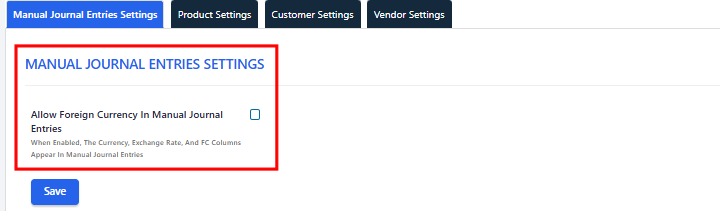 View full size
- Click Save.
- Open a new entry from Accounting, then the manual journal entries list, then create entry. The fields match your choice.
Fields
- Allow Foreign Currency In Manual Journal Entries: when checked, the entry page shows a currency dropdown, an exchange rate field, and debit in FC and credit in FC columns. When unchecked, these are hidden and new entries are recorded in the base currency only.
- Saving with deferral: with the checkbox checked, the deferral amount shows in foreign currency and you can choose between local currency and foreign currency. With it unchecked, deferral amounts show in the base currency only.
Special cases
The currency and exchange rate do not appear on the manual entry page
First check that the foreign currency checkbox is on in Manual Journal Entries Settings. Also check that your role has the foreign currencies permission, under Settings, then Users, then role management. If you are not an admin, ask your account admin.
Notes
- Only admins can change this setting.
- The change applies to all users when they open a new entry, with no need to sign in again.
- Turning the setting off does not change entries you already posted. Existing foreign currency entries keep their currency, rate and amounts, and you can still open them.
- The setting controls the manual journal entry page only. Financial reports have their own option to show foreign currency.
- This setting is available on all plans.
- To add foreign currencies and set their exchange rates, see Multi-Currency Support for Foreign Currencies.
- To save an entry with deferral using deferral templates, see How to Record and Allocate Prepaid Expenses in Qoyod.
- To design and print manual journal entries, see How to Design, Customize, and Print Manual Journal Entries.
- To record a manual entry in a foreign currency, see How to Record a Manual Journal Entry in a Foreign Currency.
- For what changed in this update, see the release note Show or Hide Foreign Currency in Manual Journal Entries.