


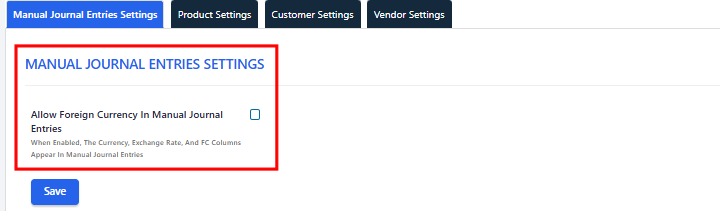
Admins in Qoyod now choose in the settings whether foreign currency fields appear on the manual journal entry page. A new checkbox in the Manual Journal Entries Settings tab controls it, so companies that work in one currency keep a simple entry screen.
Where to find it
Go to Settings, then General Settings, and open the Manual Journal Entries Settings tab. Check or uncheck Allow Foreign Currency In Manual Journal Entries, then click Save.
The change applies to all users when they open a new entry, with no need to sign in again. Only admins can change this setting.
 View full size
When the checkbox is checked
- The manual journal entry page shows the currency dropdown, the exchange rate field, and the debit in FC and credit in FC columns.
- When you save with deferral, the deferral window shows the deferral amount in foreign currency and lets you choose between local currency and foreign currency.
When the checkbox is unchecked
- The currency dropdown, the exchange rate field and the FC columns are hidden.
- The deferral window shows amounts in the base currency only.
- New entries are recorded in the base currency only.
What stays the same
- Turning the setting off does not change entries you already posted. Existing foreign currency entries keep their currency, rate and amounts, and you can still open them.
- The setting controls the manual journal entry page only. Financial reports have their own option to show foreign currency.
Who this update is for
Companies that work in one currency and want an entry screen without fields they never use, and companies that record manual entries in foreign currencies and need those fields on screen. The setting is available on all plans.
Read next