




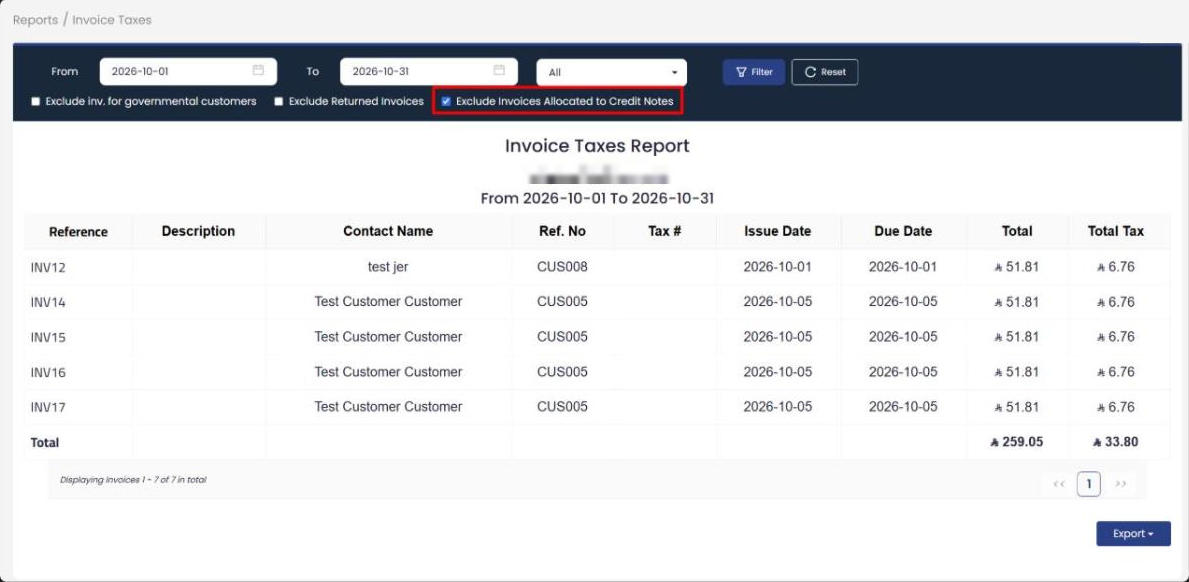
We added a new option to the Invoice Taxes Report: “Exclude Invoices Allocated to Credit Notes”. It lets you leave out of the report any invoice that has a credit note allocated to it.
How the option works
When you turn the option on, any invoice that has a credit note allocated to it, in full or in part, is excluded from the report’s invoice list and from the report totals.
An optional setting
The option is off by default, so the report stays exactly as it is until you turn it on. You can use it together with the two options already in the same report, “Exclude inv. for governmental customers” and “Exclude Returned Invoices”.
Key points
- A new option in the Invoice Taxes Report to exclude invoices allocated to credit notes.
- The exclusion covers both full and partial allocation.
- It applies to the invoice list and to the report totals together.
- Off by default, and it can be combined with the other two exclusion options.