




We are pleased to announce the addition of the sales debit notes tax report to the tax reports in Qoyod: a standalone report that lists your approved sales debit notes with their full tax detail, entirely separate from the credit notes report and the purchase debit notes report.
Before this report, sales debit notes had no tax report of their own. Reviewing their tax impact meant opening each note on its own, or working from reports that did not separate them from credit notes and purchase notes, then adding the figures up by hand before reviewing them. This release completes the sales debit notes module we launched in July, followed by the settlement, design and cancellation package and then the additional fields, this time on the reporting side.
Where to find it
Open the Reports page from the side menu, then choose sales debit notes tax report under the tax reports section.
How it works
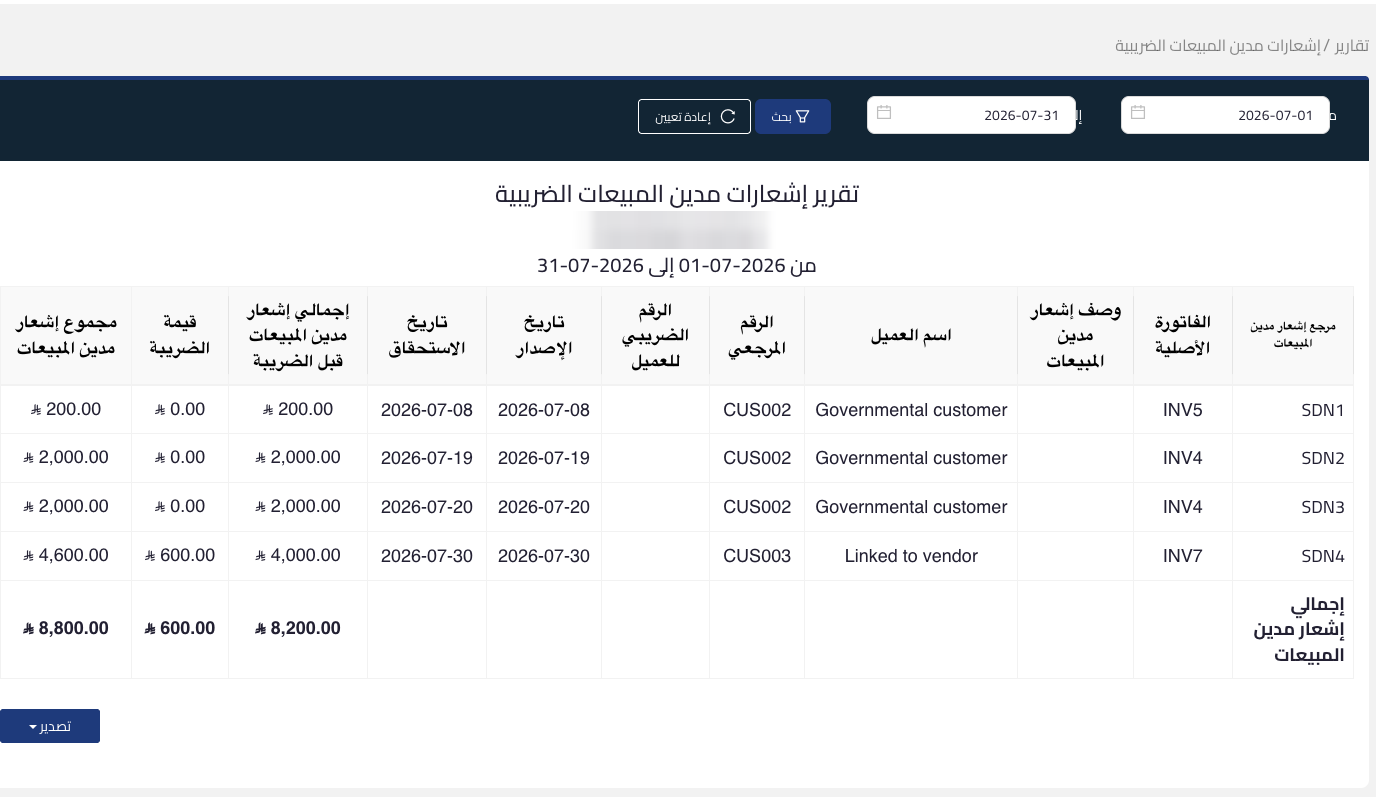
Set the date range you need, then press search. The report reads that range according to your business’s tax date setting, so it filters the notes by issue date or by due date depending on what you selected in the settings. The business name, its tax number and the covered period appear at the top of the report, and a reset button returns the filter to its initial state.
What the report shows
The report lists every approved sales debit note with its full detail in one table:
- The sales debit note reference and the original invoice linked to it.
- The note description, the customer name, their reference number and their tax number.
- The issue date and the due date.
- The total before tax, the tax amount, and the total after tax.
Totals that follow your filter
The report footer shows a grand total for each amount column, calculated on the filtered results rather than on every note. You read the tax amount and the total of the notes for the period you selected without adding anything up by hand.
What the report does not show
Draft notes and notes awaiting approval never appear in the report under any circumstances. What you see is the approved set only, which is what matters when you review the tax impact.
Export options
Export the report results with the current filter straight to an Excel or PDF file, to share with your external accountant or with management, or to run further analysis on them.
What makes it useful
- A standalone report for sales debit notes that mixes them with neither credit notes nor purchase notes.
- The original invoice and the customer’s tax number on the same row, which makes reconciliation and review easier.
- Ready totals per column that reflect the filtered results.
- Approved notes only, with no drafts or pending notes to blur the figures.
- One click to export the period you need as Excel or PDF.
Who it is for
Businesses that issue debit notes against their sales invoices, finance teams that review the effect of those notes on VAT before preparing the return, and anyone reconciling note figures against their original invoices.
The report is available now on the Reports page under tax reports. It is a review and reconciliation tool inside Qoyod, and it does not replace filing the tax return through the Zakat, Tax and Customs Authority portal.