




The pace of technological change in business keeps accelerating, and the way companies manage sales and payments has changed with it. Points of sale today are no longer just tills that record a transaction. It is the layer where selling, tax, stock and bookkeeping all meet at the same second, which is why the choice you make here quietly shapes how accurate your numbers are for the rest of the month.
This article explains what points of sale are, what a point of sale system is actually made of, which types exist, and how each one behaves once you connect it to accounting and inventory. It is written for owners and finance staff in Saudi Arabia who are choosing a system for the first time or replacing one that stopped keeping up.
What is a point of sale?
A point of sale, or POS, is the physical or digital place where a sale is completed between a merchant and a customer. That covers shops, restaurants, pharmacies and supermarkets, and equally the online checkouts where a customer pays without a counter at all. In everyday use, the phrase describes the exact moment the customer pays and receives an invoice.
What happens in that moment is what decides how accurate your books are afterwards. A point of sale system records the item and its price, applies the VAT due on it, deducts the quantity from stock, and issues a simplified tax invoice to the customer.
In Saudi Arabia that step is tied directly to e-invoicing requirements. The receipt your cashier issues is the document the Zakat, Tax and Customs Authority relies on, so any defect in it travels straight into your VAT return. That is why a till is a compliance tool, not only a sales tool.
Point of sale system components
A point of sale system is an integrated setup of hardware and software that lets a business complete a transaction and manage selling properly. The scale of that setup varies with the business: a small shop may need one screen and a receipt printer, while a multi-branch retailer needs several terminals reading from one shared stock balance.
The general rule is that any POS setup rests on three layers. There is hardware the cashier touches, software that governs products, prices and permissions, and a channel that carries what happened at the counter into the accounting records. A weakness in any one of the three shows up quickly as stock variances, missing invoices or reports that do not match real sales.
1. Hardware components
These are the devices that physically run the system at the counter.
- Computer or touch screen. The central interface used to process sales, manage products and open reports. It can be an ordinary computer, a touch terminal or a tablet.
- Receipt printer. Prints the customer’s invoice with the items, prices, VAT and the amount paid.
- Barcode scanner. Reads product barcodes so items are registered quickly and without typing errors.
- Card payment terminal. A separate device from a payment provider that accepts debit and credit cards.
- Cash drawer. Secures cash taken during the shift and keeps it organised for counting.
2. Software components
Software is the part that actually decides how the system behaves.
- POS software. Ties the devices together and runs selling, pricing and permissions.
- Inventory software. Tracks products and updates stock levels on every sale or restock.
- Accounting and reporting software. Turns sales into ledger entries and produces daily or monthly financial reports.
- Cloud storage. Keeps data on a hosted platform instead of a single machine, so it can be reached remotely.
3. Support functions
These are the surrounding conditions that keep the system usable day to day.
- A stable internet connection. Required to run cloud systems and to process digital payments.
- Maintenance and technical support. Handles faults and updates so the counter does not stop.
- Complementary hardware. Extras such as a customer-facing display that shows items as they are scanned.
How this looks in practice
- Retail. A shop runs daily selling and tracks stock automatically. This is the job that POS software for retail shops does, turning each sale into a stock movement and a ledger entry at the same time.
- Restaurants. Orders are taken at the counter or the table and sent straight to the kitchen.
- E-commerce. An online store uses a cloud system to manage stock and reconcile orders across channels.
Types of point of sale systems
Point of sale systems come in several shapes because businesses sell in several ways. The easiest way to make sense of the choice is to read every option along two axes: where the system operates, and where its data is kept.
On location, some tills are fixed at a counter and others travel with the seller. On data, some systems keep everything on the machine in front of you, and others keep it on a hosted platform that any authorised device can reach.
The second axis matters more in practice, because it decides whether you can follow several branches and reconcile sales against stock and accounting without manual work. Here is what each type is for.
Stationary POS
Stationary systems sit in a permanent location such as a supermarket, a pharmacy or a restaurant. They usually combine a computer or touch screen with a barcode scanner, a receipt printer and a card terminal, and they suit businesses that need a solid till in one known place.
This type is also called desktop POS, and it is still the most common shape in single-branch shops. In the Qoyod point of sale product, this version runs straight from a web browser on any computer or touch screen with no separate installation, and the barcode scanner, printer and cash drawer are connected according to the supported hardware the shop already has.
Mobile POS
Mobile systems turn a handheld device into a full till. They suit street vendors, food trucks, open-air markets, exhibitions and delivery staff who take payment at the door rather than at a counter.
One point to check before buying: Qoyod’s POS app runs on Android 7.0 or newer, and there is no iOS app, so an iPhone or iPad is not a supported cashier device.
Cloud POS
A cloud POS keeps its data on a hosted platform rather than on the till itself, so sales can be followed remotely through a browser. Retail chains use this to see every branch in one dashboard, and a restaurant group can review each location’s daily takings without visiting it.
Cloud point of sale is the direction most Saudi businesses are moving in, because it removes the dependency on one machine and makes multi-branch reporting possible from day one. Qoyod’s POS is built entirely on this model, backed by cloud accounting, so each invoice reaches the accounting reports as soon as it syncs, with no internal server and no manual backups to maintain.
Integrated POS
An integrated system is one that is wired into other systems rather than standing alone, most often inventory and accounting. This is what removes the export-and-re-enter step at month end, and it is the difference between a till that records sales and a till that keeps your books current. Qoyod handles this through native POS integration with the accounting side.
Self-service POS
Self-service kiosks let customers scan and pay without a cashier. Supermarkets and cinemas use them mainly to shorten queues at peak hours, and they work best for baskets with a small number of easily scanned items.
Virtual POS
A virtual point of sale runs entirely online with no physical hardware, using a payment gateway to take money from the customer. Online stores and digital service providers rely on it, since there is no counter to equip in the first place.
Card reader POS
These are small readers that accept card payments, usually paired with a phone or a tablet. A taxi driver or an independent tradesperson taking card payments on site is the typical case.
Worth being precise here, because it is a common misunderstanding: a Qoyod POS device does not process card payments itself. It issues and prints the invoice. To accept cards, the shop needs a payment terminal from a provider such as Geidea or Hala, and the transaction is then recorded in Qoyod. Those are external payment providers, not Qoyod integrations. The help centre explains the arrangement in whether the POS device is connected to electronic payment.
Cloud POS or desktop POS: which one fits your business?
This is the decision that actually matters, and it is often described backwards, so it is worth stating plainly. A traditional desktop POS keeps its database on the machine itself. That is precisely why it keeps selling when the internet drops: it never needed the connection to record a sale in the first place.
Its real cost is elsewhere. Because the data lives on that one device, each terminal becomes an island with its own numbers, so multi-branch reporting is fragmented and getting sales into the ledger is usually a manual export.
Internet dependency is structural to the cloud model instead, since the records live on a hosted platform. Qoyod narrows that gap with an offline mode on the Android app, which stores invoices on the device and syncs them when the connection returns. One caveat is mandatory: do not sign out of the app before syncing finishes, because an unsynced invoice is deleted and never enters the system.
Where the two models genuinely differ
| Dimension | Traditional desktop POS | Cloud POS (Qoyod) |
|---|---|---|
| Access to data | Tied to the location Held on one machine inside the branch |
From anywhere Through a browser on any connected device |
| Multi-branch view | Fragmented reports Every terminal keeps its own separate numbers |
One dashboard Sales from every branch in a single place |
| Sales into accounting | Usually manual Invoices exported and handed to the accountant separately |
Direct Each sale becomes a ledger entry and a stock movement |
| Selling without internet | Yes, data stays local Keeps selling offline because the database sits on the device, but those records stay trapped there and never reach a consolidated report |
Cloud plus offline mode The Android app stores invoices on the device and syncs them when the connection returns, so they reach the central reports |
How businesses use point of sale systems
Point of sale systems are a core part of trading for businesses of every size. The real benefit is not only a faster cashier, though: it is the trail of data each sale leaves behind.
Every invoice the till issues feeds three records at once, namely the stock balance, the sales journal, and the performance reports you read your decisions from. That is the difference between a shop that knows today’s profit and a shop that waits until month end to discover the variances. Here are the benefits in more detail.
1. Faster selling and checkout
Clear interfaces and short flows let staff complete a transaction quickly, which shortens queues and makes the shopping experience easier for the customer.
2. Higher operational efficiency
The system removes repetitive manual work such as calculating prices and writing invoices by hand, and it keeps stock under control at the same time, which raises overall productivity.
3. Better operations management
Performance data shows which parts of the operation are weak and which are working, so decisions about staffing, hours and product mix rest on numbers rather than impressions.
4. Tighter inventory control
Sales are tracked and stock is updated automatically at every terminal, which helps identify fast movers and slow movers before they turn into shortages or dead stock.
5. A better customer experience
Accurate product, price and promotion information at the counter builds trust, and trust is what turns a transaction into a returning customer.
6. Tailored offers and services
Storing customer details, purchase history and preferences makes it possible to shape offers around what people actually buy instead of guessing.
7. Stronger marketing and promotions
Discounts, promotions and loyalty rewards can be built on real purchase data, which is the practical route to brand loyalty.
8. Accurate reports and analysis
Detailed reporting on product sales, stock levels, business performance and customer behaviour supports strategic decisions rather than reactive ones.
9. Fewer human errors
Automated pricing and controlled payment steps cut the mistakes that manual selling produces, along with the cost of correcting them later.
10. Better security and reliability
Access is controlled per user, discounts and price changes can be restricted to specific staff, and cash boxes can be allocated per user, so responsibility for every transaction is traceable. Customer and transaction data is covered by Qoyod’s data security, protection and privacy controls.
11. Continuous updates
POS providers ship regular updates, so businesses keep pace with new requirements without replacing their setup each time the rules change.
12. Higher revenue
Taken together, faster operations and better data on what customers buy help lift revenue and support steadier growth.
POS reports: what you actually see after each sale
In a connected system you do not wait until month end to learn how the shop performed. POS reports appear as soon as an invoice syncs, and in Qoyod they are grouped into three views that answer three different questions.
The POS reports and visibility view covers a sales report showing which products move fastest, a shift report for reconciling cash between the start and the end of a shift, and a cashier report that separates each user’s sales when more than one person works the same terminal.
One scope note that matters when you plan the rollout: session and shift management runs in the Android POS app only and is not available on the web version. The browser version covers selling and invoicing. Because the till is wired into the ledger, these figures also flow into the company’s financial reports with no extra data entry.
Three reports that track the shop every day
POS inventory management: how each sale hits your stock balances
The clearest form of POS and accounting integration is POS inventory management, where every unit sold is deducted from the available balance as the invoice is issued, with no manual stock update after the shift closes. That is what makes a perpetual inventory system workable in a real shop.
The link has limits worth knowing. In Qoyod, a stocked product with a zero balance cannot be sold from the POS device, and new quantities cannot be added from the POS app at all. Stock is added on the web only, through opening balances, a purchase invoice, or an inventory count. Non-stocked service items sell without a quantity.
There is also no scale integration, so weight-priced goods are handled by entering the total and letting the system derive the quantity. Review balances from the web regularly. Our guide on adjusting entries and inventory covers the accounting side, and the free inventory management template helps you audit balances first.
How Qoyod connects your point of sale to your accounting
Qoyod is POS with accounting in one system rather than two tools bolted together. Each invoice a cashier issues becomes a ledger entry and a stock movement immediately, with no posting step in between, which is what cuts the manual re-entry and saves your accountant time at close. Because Qoyod is certified by the Zakat, Tax and Customs Authority and integrated with the Fatoora platform, the invoices behind those entries meet e-invoicing requirements as issued.
Sitting on the accounting software core means you can follow live branch performance from a browser on any connected device, and the interface is usable without a bookkeeping background.
Hardware is worth setting expectations on. Printers are not auto-detected: you choose the brand, the model and the paper size in POS settings, then connect over Bluetooth or USB. Barcode readers and cash drawers connect the same way. Qoyod currently sells the SUNMI D3 Pro desktop unit and the SUNMI V3 handheld.
- Printer setup. Pick brand (Sunmi, Epson or Keyto), model, and paper size (58mm or 80mm) before first use, with an optional toggle to open the cash drawer after printing.
- Offline selling. The Android app keeps invoicing when the connection drops and syncs on reconnect. Do not sign out before syncing completes or the unsynced invoice is deleted.
- Device clock. A POS invoice is dated at the moment it is created and cannot be edited in the app. While offline the app uses the device clock, so a wrong device time produces wrong invoice dates.
- Invoice history. The app shows the last 7 days; older invoices are found by reference number or customer phone, or opened on the web.
- Platforms. Android 7.0 or newer, plus browser POS on desktop. There is no iOS app.
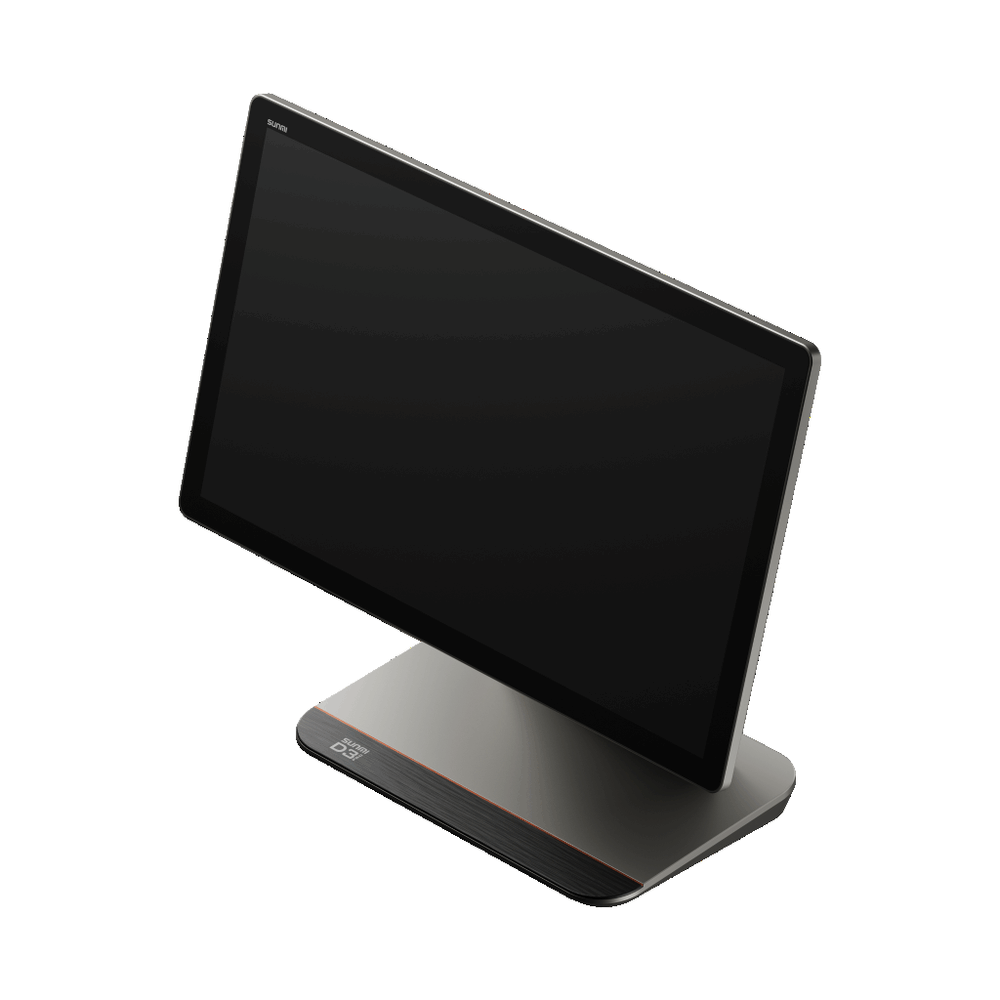
Cloud access and connected devices
The cloud model is what makes the rest of it work. Sales are visible live from anywhere through a browser, there is no internal server to maintain and no manual backup routine, and adding a second branch does not mean starting a second set of books. If you are still weighing platforms, our comparison of the best cloud accounting software for small businesses sets out the criteria, and the guide to POS software in Saudi Arabia covers the cashier side specifically.
Read also: Point of sale device: the hardware side of a POS system.
Conclusion
A point of sale system is a core part of daily trading. Recording sales and processing payments accurately raises operational efficiency and improves the customer experience, and both feed profit and reputation. It also produces the reports owners need to decide early instead of reacting late.
On cost, Qoyod offers subscription plans for small, medium and large businesses that differ in user count and included modules, and the team will help you match one to your operation. POS is a separately paid add-on rather than part of any plan, and it is not available during the free trial. The help centre article on POS subscription sets out how POS users are billed.
The sensible order is to start with the accounting system and e-invoicing during the 14-day trial, then add POS users to run the cashier once you move to a paid subscription. A VAT calculator and a monthly sales report template are useful while you plan the move.
- Pick the type by branch count. One device suits one shop; multiple branches need a cloud system that pools their sales in one place.
- Wire selling to stock and the ledger. Every invoice should deduct the quantity and create the accounting entry automatically, with no manual step.
- Review your reports weekly. Sales, shift and cashier reports are the fastest way to catch variances before they grow.
Join our community. Follow our LinkedIn page and X account to be first to see new articles and updates from the world of accounting and finance.
