




Last updated: 25 August 2026 (reflects the Kingdom-wide electronic wage payment requirement effective 1 January 2026).
Until recently, a household in Riyadh could hand a driver his monthly wage in cash, ask him to sign a paper form, and consider the month closed. That is no longer how it works. Since 1 January 2026, every employer of a domestic worker in Saudi Arabia is expected to pay the wage through an official electronic channel, and cash on its own no longer counts as compliant payment.
Which raises an obvious question about the paper document most households still use. Does a salary payment form for domestic workers still matter once the money moves by bank transfer? It does, and arguably more than before: the transfer proves that money left your account, while the form proves what the money was for, which month it covered, and what the worker agreed she had received.
This guide covers both halves. What the form should contain, how the new electronic payment requirement works in practice, and how an employer keeps the two consistent so a wage dispute never turns into a guessing game.
What is a salary payment form for domestic workers?
It is a simple document that records one month’s wage payment to one domestic worker, signed by both sides. The worker’s signature confirms she received the amount. The employer’s signature confirms it was paid.
Households often treat it as paperwork for its own sake. It is closer to an accounting source document: the primary evidence behind a payment, the thing you produce when someone asks what happened eleven months ago. For a business that employs domestic staff, drivers or housekeeping crews, it also carries the same weight as any other expense voucher in the ledger.
The form serves four purposes, and they matter in different situations:
- It documents the working relationship. A dated series of receipts is the clearest record of a relationship that otherwise leaves very few traces.
- It protects the worker. She has written confirmation of what she was paid and when, in her own hand.
- It supports compliance. Regular documentation is what an employer relies on when asked to demonstrate that wages were paid on time.
- It removes ambiguity. Most wage disputes are not fraud. They are two people remembering a number differently.
What changed in 2026: salaries now move through Musaned
The Ministry of Human Resources and Social Development did not introduce electronic wage payment for domestic workers overnight. It arrived in phases, each one lowering the threshold, until the requirement covered everyone.
How electronic wage payment reached every household employer
-
Jul 2024New arrivalsWorkers entering the Kingdom for the first time.
-
Jan 2025Four or more workersEmployers of four or more domestic workers.
-
Jul 2025Three or moreThe threshold drops to three workers per employer.
-
Oct 2025Two or moreEmployers of two or more workers join the system.
-
Jan 2026Every employerAll domestic worker salaries move through official channels.
The mechanism is the Wage Protection System applied to household employment through Musaned, the ministry’s platform for domestic worker recruitment and contracts. Businesses have lived with wage protection for years. What is new is that a private household is now inside the same logic: the wage has to be traceable.
Approved payment channels
Payments run through channels linked to Musaned, which currently means a participating bank account or an approved digital wallet. Two details cause most of the friction:
- The account must be in the worker’s own name. Paying into your account, a relative’s account or a shared account defeats the purpose of the system and does not register as a wage payment.
- Use the domestic worker salary option, not an ordinary transfer. A generic transfer moves the money but does not necessarily record it against the worker’s file, which is the part you will want later.
Workers who prefer cash are not locked out. A Mada card issued in the worker’s name lets her withdraw her salary, and the same approved channels let her send money home. The requirement is about the wage being recorded, not about forcing anyone into a cashless life.
So where does the paper form still fit?
Think of the transfer and the form as answering different questions. The bank record answers “did money move, when, and how much”. It says nothing about the period covered, the overtime included, or the advance deducted. The form answers all three.
Keep both. If a complaint is ever raised, the transfer receipt establishes payment and the signed form establishes what was agreed. One without the other leaves a gap that somebody else gets to fill in.
What the salary payment form must contain
Wording varies between recruitment offices and template sources, and that is fine. The fields below are the common core, and a form missing any of them is weaker evidence than it looks.
Six details that make a salary payment provable
A payment you cannot evidence is, in a dispute, a payment you did not make. Whether the record is a signed form, a transfer receipt or a payroll entry, it needs all six of these.
- The worker’s full name and ID or passport number
- The employer’s full name and ID number
- The month the payment covers, not just the transfer date
- The gross amount in SAR, matching the documented contract
- Any overtime, allowance or deduction, itemised
- Proof of receipt: a signature, or a transfer reference
Worker and employer details
For the worker: full name, national ID or passport number, and job title, such as nanny, housekeeper or cook. For the employer: full name, national ID number, and address. The ID numbers are what tie a loose sheet of paper to two specific people.
Salary details
Record the amount paid and, crucially, the period it covers. Many households write only the payment date, which is exactly the information a bank statement already gives you. The month covered is the value the form adds.
Where the amount is not a flat figure, itemise it: basic wage, overtime, allowances, then any deduction. The overtime calculation is worth showing rather than folding into a single total, because a lump sum with no breakdown is the thing people argue about.
Signatures
Both parties sign. Many forms also include a fingerprint field, which remains common practice in household employment. Where the wage is transferred electronically, note the transfer reference next to the signature so the two records point at each other.
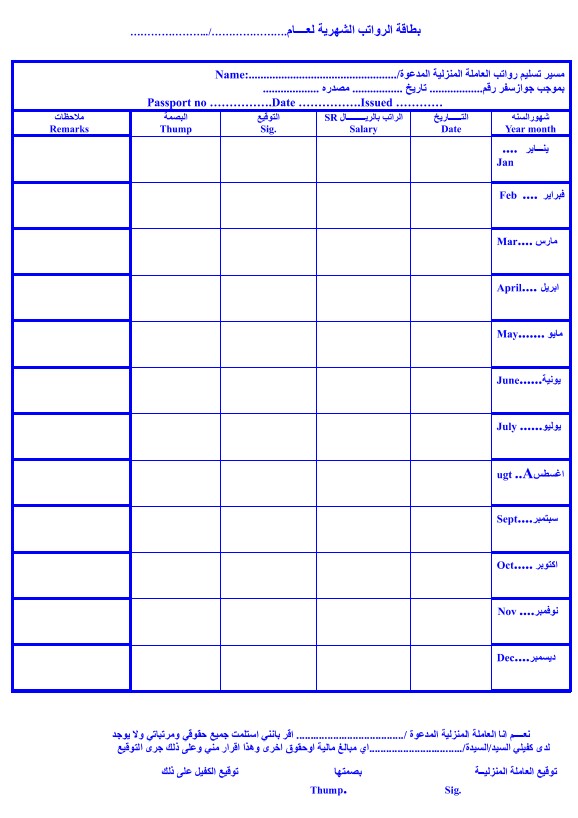
A printed form is fine, and a template you fill in each month is faster than drafting one. Our domestic worker salary receipt template covers the fields above in a ready-to-print PDF layout, with a twelve-month grid for the year. Households running several workers usually outgrow it quickly, in which case a salaries register template keeps the whole year in one sheet.
How to prepare the form, step by step
Setting up the form takes one afternoon, once. After that it is a monthly five-minute task.
Collect the fixed information first. Both parties’ names, ID numbers and the work location go in once and never change. Getting them right at the start prevents twelve months of copied errors.
Fix the payment schedule. Decide the payment day and the period it covers, and write both on the form. Vague timing is the most common weakness in household wage records.
Define what makes up the amount. Basic wage, overtime rate, allowances, and how advances are recovered. Deciding this before the first dispute is considerably easier than during one.
Leave room for signatures. Both parties, plus a fingerprint field if you use one, plus a line for comments where an unusual month can be explained.
Then convert the final layout to PDF so the format stays fixed, print two copies each month, and give one to the worker. The form repeats every payment, which is what turns a stack of receipts into a record.
How to document the contract and pay the wage electronically
Two separate things happen on Musaned, and employers often conflate them. The contract is documented once. The wage is paid every month. Both need to be in place.
Documenting the contract
Contract documentation runs through your Musaned account:
- Sign in to Musaned with your personal credentials.
- Open the Contracts page from the menu, where all contract options live.
- In the New Requests section, choose Documentation.
- Complete the request with the contract details: the worker’s data, the terms, and the agreed wage. Accuracy here matters, because the documented wage is the figure your monthly transfers are compared against.
- Submit the request. A documentation link is sent to the worker by text message.
- The worker opens the link, enters her residence number and the verification code sent to her, reads the contract and approves it within five days of receiving the message.
- Once she approves, the documented contract is issued and its status becomes valid. Download a copy and keep it.
Paying the monthly wage
Paying a domestic worker’s salary the compliant way
The routine is deliberately dull, and that is the point. A wage paid the same way on the same day every month, with a receipt kept each time, produces a record that answers questions before they are asked.
What Saudi regulations say about domestic worker wages
The domestic worker regulations published on Musaned set out the wage obligations directly, and they are shorter than most employers expect:
- Currency. Wages are paid in the official currency of the Kingdom, so amounts are stated in SAR.
- Frequency. The employer pays the wage monthly, using the methods the Ministry determines. That last clause is what the electronic payment requirement rests on.
- Timing. Payment falls at the end of each Hijri month, unless both parties agree otherwise in writing.
- Deductions. Deductions are limited to legitimate categories, and the total may not exceed one quarter of the wage.
- Work the worker was prevented from doing. Where the employer’s own actions stopped her working, she is still entitled to the wage for that period.
- End of contract. On termination, the employer settles wages and entitlements within one week at most.
The one-week settlement rule is the one that catches households out, because it lands in the middle of travel arrangements and final paperwork. Treat the last payment as a deadline, not a formality, and document it exactly like the other eleven.
Five mistakes that turn into wage disputes
None of these are exotic. All of them are common.
Paying into the wrong account. Transferring to a relative’s account or a joint account because it was easier to open. The money arrives; the wage payment does not register.
Recording the payment date but not the period. A transfer on 3 March could be February’s wage or March’s. Twelve ambiguous entries later, nobody can reconstruct which months were actually paid.
Netting advances silently. An advance deducted without a line on the form looks, from the worker’s side, like a short payment. Itemise it, every time.
Letting the transfer drift from the documented contract. An informal raise that never reaches the Musaned contract creates a permanent mismatch between what is documented and what is paid.
Keeping the record only on paper. Paper is lost, water-damaged and thrown out. Scan each signed form the month it is signed, or generate it from a system that keeps its own copy.
How employers record domestic worker wages in their books
For a household, a folder is enough. For a business that employs drivers, housekeeping staff or site helpers, the wage is an expense that has to land in the right period, and that is ordinary payroll accounting.
Take a simple case. A company in Jeddah employs a driver on SAR 2,000 a month. In March he works 10 overtime hours worth SAR 150, and SAR 300 is recovered against an advance issued in January. The gross is 2,150, the deduction is 300, and the net transfer is SAR 1,850.
Three facts have to survive in the books: the expense of 2,150 belongs to March, the 300 reduces the advance receivable rather than the expense, and the bank shows 1,850 leaving the account. Collapse them into a single 1,850 expense entry, which is what usually happens in a spreadsheet, and both the March cost and the advance balance are now wrong.
This is also why the payroll statement and the receipt should agree line for line. When they do, the monthly bank reconciliation confirms the wage rather than raising a question about it. Businesses with steady monthly wages often set them up as recurring transactions so the entry is never simply forgotten.
Two related obligations sit next to the wage itself and are worth keeping straight, because they follow different rules: social insurance contributions and end-of-service benefits. If you want to see the end-of-service figure before it becomes due, the end of service calculator works it out from length of service, and the salary calculator handles the monthly net.
How Qoyod helps you document salary payments
One point first, because it decides what software can and cannot do here: Qoyod does not transfer the wage. The transfer goes through a Musaned-approved bank or wallet. What Qoyod does is calculate the wage, produce the receipt, and post the accounting entry, so the paperwork behind the transfer exists without being retyped every month.
The relevant piece is the payroll module, which is not bundled with the plans. It is a separate add-on you activate from Qoyod add-ons before the first payroll run, along with the linked accounts, the work schedules, and the employee records.
Once it is on, this is what you actually work with:
- Employee records holding personal and job data, first salary date, the linked work schedule, and any allowances, which is where the monthly figures come from.
- Payroll runs built per period and per branch, with a work-hours review step where overtime and absence hours are entered by hand or imported from an Excel template.
- Salary Receipts, one per worker per month, showing entitlements (basic wage, allowances, bonuses) and deductions (advances, absence), the total after deductions, and a Download PDF action. This is the digital counterpart of the signed form.
- Automatic journal entries: the accrual entry when the run is saved, the payment entry when wages are paid through the system, plus deduction, bonus and social insurance entries where configured.
- The Employee Salaries report, listing name, department, basic salary, allowances and net pay, filterable by period, department and payment status, and exportable.
- The Employee Statement of Account, which shows advances, deductions, bonuses and payroll dues per worker with the running debit or credit balance, and an All Employees view for the whole team in one report.
- Cost centre and project tagging on a payroll run, useful when wages need to be attributed to a site or a contract.
One behaviour worth knowing before you start: a payroll run cannot be edited after it is saved. To change it you delete the run and create it again with the correct data, which is a strong argument for reviewing the hours screen carefully rather than quickly.
Retyping the form every month, or generating it from a payroll run
| Task | Paper form and spreadsheet | Qoyod payroll module |
|---|---|---|
| Producing the monthly receipt | Retyped each month Names, ID numbers and amounts are re-entered by hand, so a typo survives until someone notices it. |
Generated once Salary Receipts are produced from the payroll run and downloaded as PDF, one per worker per month. |
| Working out the amount | Manual arithmetic Overtime, allowances and advances are calculated in a side sheet that nobody reviews. |
From the employee record Entitlements and deductions come from the worker’s saved allowances, advances and work schedule. |
| Posting it to the books | A separate entry, later The journal entry is typed after the fact, which is where wages drift into the wrong month. |
Automatic on save The accrual entry posts when the run is saved, and the payment entry when the wage is paid through the system. |
| Answering “what did we pay, and when” | Folder archaeology The answer sits in twelve printed forms, if all twelve were filed. |
Two reports The Employee Salaries report and the Employee Statement of Account, filtered by period and exported. |
Households employing one worker do not need any of this, and a printed template serves them better. Businesses carrying wages across several people, months and cost centres are the case where a payroll run pays for itself, usually in the first audit. If the bookkeeping itself is the bottleneck rather than the software, Qoyod bookkeeping services take the monthly close off your desk entirely.
Frequently asked questions
Is the monthly salary receipt form mandatory?
The form itself is a documentation practice rather than a standalone legal requirement. What is required is that the wage be paid monthly, in SAR, through the methods the Ministry determines, which since January 2026 means an official electronic channel. The form is how you evidence what that payment covered.
Can I still pay my domestic worker in cash?
Handing over cash is no longer treated as compliant wage payment. The wage should be transferred through a Musaned-linked channel into an account or wallet in the worker’s own name. She can then withdraw the money in cash with her Mada card if she prefers.
What if the worker does not have a bank account?
Opening one is part of the employer’s setup, alongside the documented contract. An approved digital wallet in the worker’s name is the usual route, and Musaned lists the participating banks and wallets available.
Does the transferred amount have to match the contract?
It should. The wage in the contract documented on Musaned is the reference figure, so a permanent difference between the contract and the monthly transfer is worth correcting at the contract rather than leaving in place.
How much can I deduct from a domestic worker’s wage?
Deductions are limited to legitimate categories, and the regulations cap the total at one quarter of the wage. Anything deducted should appear as its own line on the receipt, never as a quietly reduced total.
When is the final salary due when the contract ends?
Wages and entitlements are settled within one week at most of the contract ending. Document that final payment exactly as you documented the monthly ones.
Do these rules apply to companies as well as households?
The domestic worker regulations and Musaned cover household employment. A company employing drivers or housekeeping staff under the general labour system follows business wage protection rules instead, though the accounting treatment of the wage is the same either way. Our guides on salary calculation and the payroll sheet cover the business side, and the WPS wage protection file template covers the upload format.
Conclusion
The salary payment form has not been made redundant by electronic transfers. It has been given a clearer job. The transfer proves the payment happened; the form proves what was agreed, which month it covered, and that the worker confirmed receipt. Employers who keep both rarely have a wage dispute worth the name.
What changed in 2026 is that the informal option disappeared. Wages for domestic workers now leave a trail whether or not the employer maintains one, so the sensible move is to make your own record match it: transfer through the approved channel, keep the receipt, itemise the month, and post the expense in the period it belongs to. That is the whole discipline. It takes minutes a month, and it is the difference between remembering what you paid and being able to show it.
For employers already running structured payroll, keeping the wage, the receipt and the journal entry in one place is the practical version of the same idea. See how human resources management and payroll fit together in real-time financial reports, so the cost of your staff is never a month behind.
