
















| Excerpt:
The cash register is history; it’s now an integrated, smart POS management system. Discover how Qoyod’s Cashier system, the best POS software in Saudi Arabia, maximizes efficiency via seamless cloud integration with inventory and cloud accounting. This guarantees your Saudi business speed, financial accuracy, and full ZATCA compliance. |
The role of the cash register has evolved dramatically. Today, it’s no longer just a cash box; it’s a fully integrated, smart management system essential for growth. For small and medium-sized businesses in Saudi Arabia (SMEs), adopting the right POS (Point of Sale) software is a critical step toward ensuring efficiency and compliance with local regulations. The manual processes that once defined retail are giving way to digital automation. This article explores how a modern POS software in Saudi Arabia, specifically Qoyod’s Cashier system, solves the complex challenges of speed, accurate cloud accounting, and strict adherence to the e-invoicing system in Saudi Arabia regulations enforced by the Zakat, Tax, and Customs Authority (ZATCA). By moving to a smart system, businesses in Riyadh, Jeddah, and Dammam can transform their operations.
Defining and Highlighting the Importance of POS (Cashier) Software
Simply put, POS software is a technological system used to complete commercial transactions at the final point of sale be it a physical store, a cafe, or a restaurant. Its modern significance lies in its ability to automate manual processes, achieving three core objectives: Speed, Accuracy, and Analysis.
The Cashier’s Role in Facilitating Management (The Three Pillars)
A modern cashier system acts as an effective assistant across three crucial management areas for any business:
- Sales Management: The software ensures unparalleled speed in completing transactions, reducing queue times and enhancing the customer experience. It also facilitates the application of discounts and promotional offers in an organized and accurate manner.
- Inventory Management: The POS software is the starting point for all inventory movement. As soon as a sale is finalized, the system automatically deducts the sold quantity from the available stock. This gives the business owner real-time visibility into stock levels and triggers alerts for low stock, preventing lost sales due to shortages.
- Accounting Management: The cashier is the primary entry point for financial data. In integrated systems, like Qoyod Accounting Software, every sales invoice is instantly converted into an accounting entry that directly impacts revenue records and the Income Statement. This saves management immense time and effort in manual recording and posting, ensuring financial reports are accurate and free from human error.
Why Businesses Need the Best POS Software in Saudi Arabia
The transition to modern POS software is not merely a technical choice; it’s a strategic necessity for the survival and growth of businesses in today’s competitive market, especially in rapidly growing cities like Khobar and Madinah. The benefits extend beyond the cashier to employees, customers, and senior management.
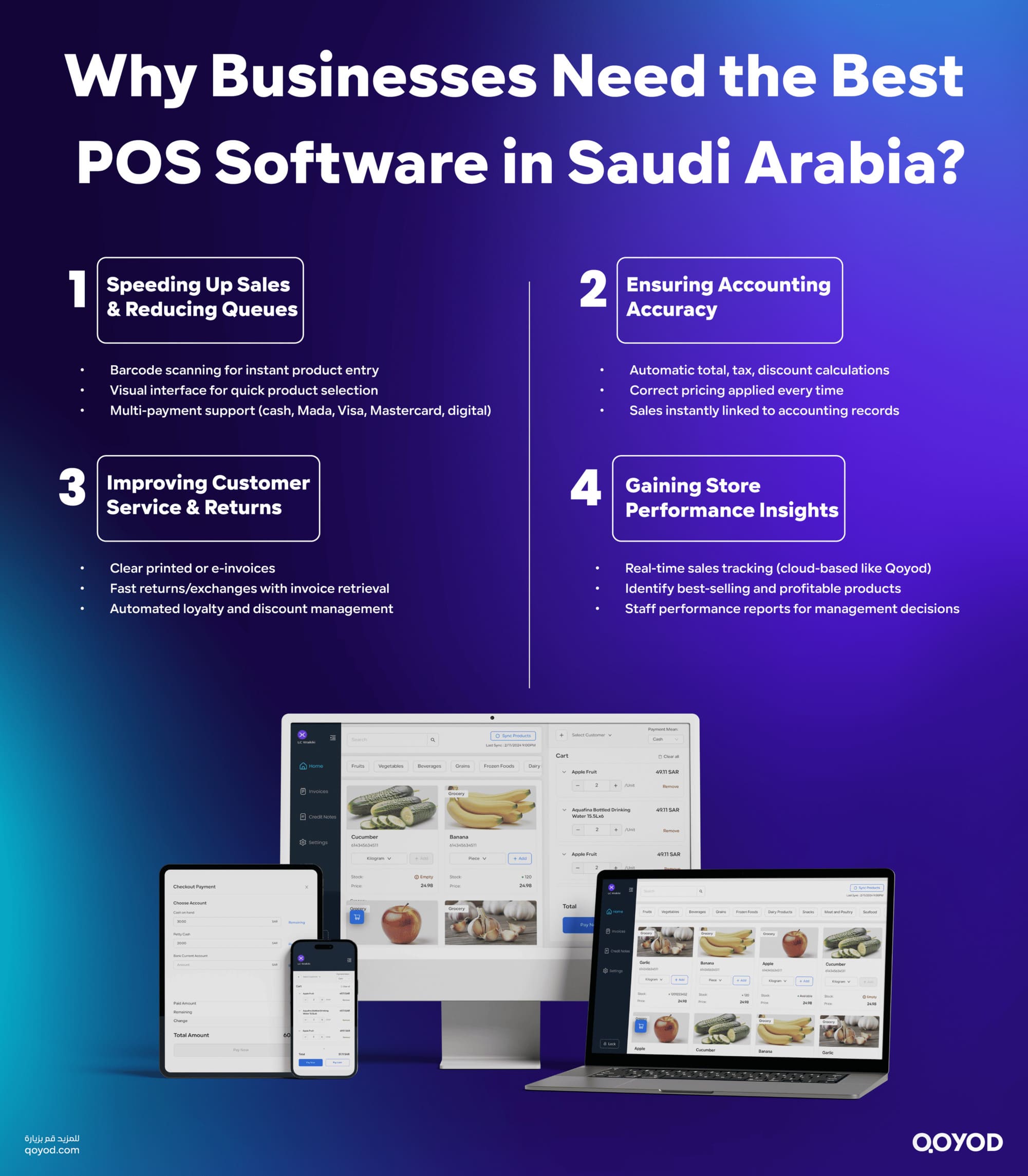
1. Accelerating the Sales Process and Minimizing Queues
Speed is key to customer satisfaction at the checkout point. Modern POS software is designed to minimize transaction time through various mechanisms:
- Barcode Usage: Instead of manually entering the product name or price, the barcode scanner automatically adds the product to the invoice in less than a second.
- Visual Interface: Using large buttons and icons makes it easy for the cashier to quickly access best-selling products without lengthy searches.
- Multi-Payment Support: Swift handling of cash, bank cards (Mada, Visa, Mastercard), and digital payments prevents friction or delays at the point of payment.
Result: Reduced waiting time increases staff productivity, boosts customer satisfaction, and ensures sales aren’t lost due to long queues.
2. Ensuring Accounting Accuracy and Eliminating Human Errors
Manual accounting mistakes are a significant source of wasted time and money in traditional businesses. POS software fundamentally solves this problem:
- Automated Calculation: The program instantly and automatically calculates the total, tax, discounts, and change due to the customer.
- Avoiding Pricing Errors: Once the product is selected, the system accurately applies the recorded price, preventing sales at an incorrect price.
- Automatic Accounting Link: Every sale is instantly recorded as an accounting entry, ensuring daily and monthly financial records perfectly match actual sales.
Result: Elimination of cash discrepancies at the end of the shift and accuracy that is unaffected by work pressure or employee distraction.
3. Enhancing Customer Service and Facilitating Returns
The impact of POS software extends to the quality of customer interaction and after-sales service:
- Clear, Documented Invoices: Issuing printed or electronic invoices (via email or SMS) with precise details on tax, products, and discounts.
- Quick and Easy Returns: Instead of searching paper records, the system allows fast retrieval of the original invoice via its number or date, completing the return or exchange process in minutes and automatically adjusting inventory.
- Loyalty and Discount Management: Specific customer loyalty offers or discounts can be automatically applied, enhancing their personalized experience.
4. Providing Comprehensive Store Performance Insight
The POS software is the main data source for management decisions. It provides a complete dashboard of business performance:
- Real-time Monitoring: The ability to track sales and revenue in real-time from anywhere (especially in cloud-based systems like Qoyod).
- Identifying Most Profitable Products: Detailed analysis pinpoints best-selling and most profitable items, aiding correct purchasing and stocking decisions.
- Staff Performance Reports: Measuring the productivity of each cashier and sales employee separately, supporting performance evaluation and rewards.
Result: Transforming data into valuable information that helps management make strategic decisions to increase profits, optimize inventory, and determine optimal working hours.
Essential Specifications for the Ideal Cashier System
The ideal POS software must combine operational efficiency with accounting precision. To serve a commercial establishment effectively, it must possess a set of specifications that ease staff work, speed up the customer experience, and ensure data integrity.
1. Ease and Flexibility of the Interface
The interface is the employee’s daily point of contact with the program, and its efficiency directly impacts store productivity:
- Intuitive and Speed-Optimized Design: The interface must be designed for lightning-fast speed, allowing the cashier to complete the sale with the fewest clicks or taps possible.
- Touch-Optimized: Most modern points of sale use touchscreens, so the program must be responsive to this technology, with clear, spaced buttons to avoid errors.
- Managing Suspended Invoices: A feature is necessary to allow the cashier to suspend the current invoice (e.g., if a customer forgets an item) and begin a new customer’s invoice, then return to the suspended one easily later.
Learn More:Point of sale device
2. Supporting POS Hardware
The ideal program must communicate effectively with point-of-sale hardware to ensure a smooth operation:
- Barcode Scanner: Immediate integration with the scanner to pull product data (name and price) directly into the invoice, eliminating the possibility of human data entry error.
- Thermal Receipt Printer: Support for quick printing of receipts and simplified invoices, accommodating various paper sizes (e.g., 58mm or 80mm) to match the printer used.
- Cash Drawer: Automatic opening of the drawer upon completion of a cash transaction, ensuring control and documentation of every cash movement.
3. Multiple Payment Options and Account Management
Payment flexibility is crucial to meet different customer preferences:
- Diverse Payment Options: The program must support recording payments by Cash, Bank Cards (Mada, Visa, Mastercard), in addition to modern electronic payment options.
- Credit Sales (Accounts Receivable): The ability to link the invoice to a specific customer and record it as Accounts Receivable within their records vital for establishments dealing with frequent or corporate clients.
- Recording Daily Expenses: The ability to record simple cashier expenses (e.g., office supply purchases) within the shift to ensure the accuracy of the cash count at the end of the day.
4. Easy Management of Returns and Discounts
Handling problems should be as easy as the sale itself:
- Quick Returns Process: Providing a fast mechanism to find the original invoice (by number or customer), process a Sales Return, specify the refund method (cash or deposit), and record the impact on inventory automatically.
- Flexible Discount Application: The ability to apply discounts at the item level or on the total invoice, whether a percentage or a fixed amount, clearly showing the discounted amount to the customer.
Qoyod: The Cashier System as the Foundation of a Cloud Accounting System
These four specifications are the gold standard for any POS software. Choosing Qoyod’s Cashier Software ensures you get this strong foundation, plus the crucial advantage of comprehensive integration and cloud-based operation.
In Qoyod, the POS software does not function as a standalone system; it acts as a Point of Sale application directly connected to the core cloud accounting system. This guarantees that:
- All the operations mentioned above (sale, return, credit sale) automatically and instantly generate accounting entries.
- Inventory data is always up-to-date because the cashier system is synchronized with Qoyod’s central inventory system.
- The employee can focus on speed at the point of sale, while Qoyod ensures accounting accuracy and tax compliance in the background, without any additional manual intervention.
By choosing Qoyod, you are not just getting a cashier program; you are getting a point of sale connected to a simplified ERP (Enterprise Resource Planning) system designed for Saudi businesses.
Download Qoyod POS for your business now
Qoyod Cashier System: Accounting Accuracy in a Fast Interface
The Qoyod Cashier System represents a paradigm shift in point-of-sale management, combining the requirements for speed and efficiency at the storefront with the accuracy and comprehensiveness of the back-end accounting system. The true power behind this system is its deep cloud integration, making it more than just a cash register,it’s a system that ensures financial operations run without interruption or error.
1. Cloud Accounting Integration: The Power of Instant Synchronization
Qoyod’s competitive edge lies in being an integrated cloud accounting system. The Qoyod Cashier is a fully synchronized POS application with the core accounting engine.
How Invoices Synchronize Directly with Qoyod’s Accounting System:
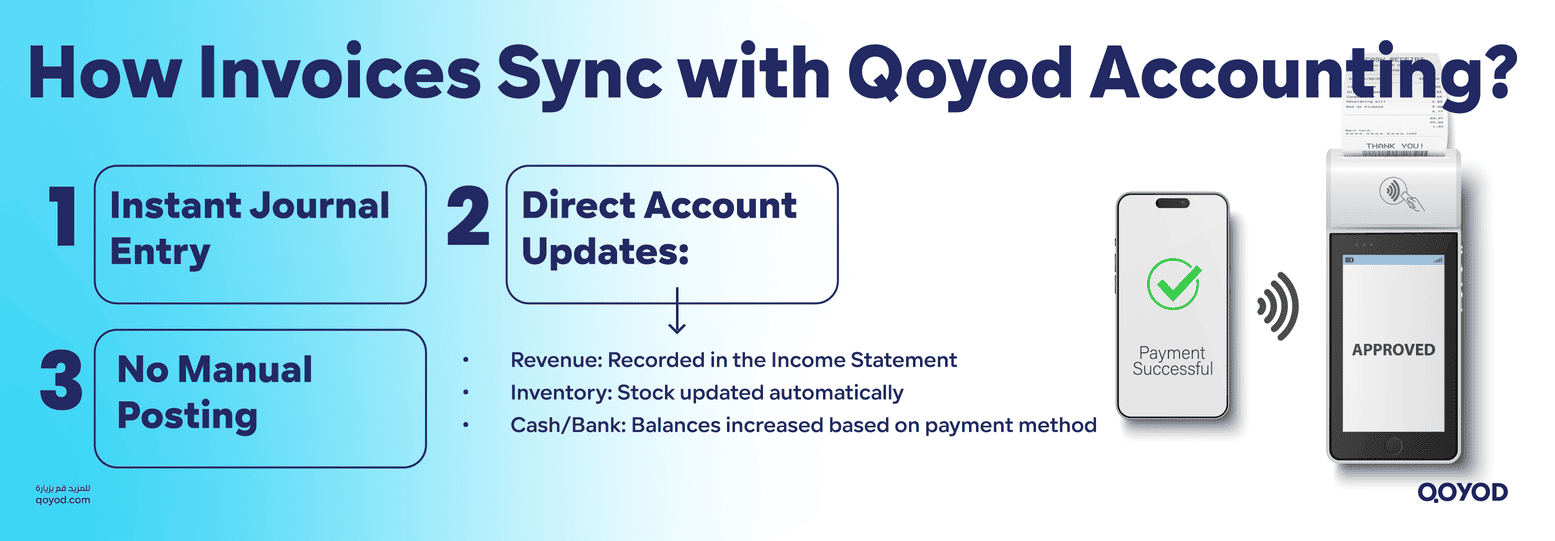
- Instant Journal Entry: The moment the cashier presses the payment button in the POS app, the system not only issues a receipt but also creates a complete accounting journal entry inside the Qoyod cloud system.
- Direct Impact on Accounts: This accounting entry directly affects:
- Revenue: Recording the sales amount as revenue in the Income Statement.
- Inventory: Automatically deducting sold items from stock balances.
- Cash/Bank: Increasing the balance of the cash drawer or bank account (depending on the payment method).
- Eliminating Manual Posting: This synchronization removes the need to manually post or enter data at the end of the day or month, saving accountants and management immense time and preventing common manual accounting errors.
2. Remote Business Monitoring: Cloud Management and Immediate Oversight
Given Qoyod’s nature as a cloud system, it offers business owners comprehensive oversight and monitoring flexibility, especially for those with multiple branches across Riyadh or Jeddah:
- Access from Anywhere: The business owner can open the Qoyod dashboard from any internet-connected device (phone, tablet, laptop) and follow the live performance of all branches instantly.
- Branch Performance View: The system provides detailed and aggregated reports allowing comparison of performance across different branches, identifying the most profitable location, and determining peak hours for each geographic site.
- Remote Permission Control: The manager can remotely define or modify the permissions of any cashier in any branch, such as raising or lowering the maximum allowed discount, or adding new users.
3. Supporting the E-Invoicing System in Saudi Arabia and Government Compliance
In the modern regulatory environment, compliance with e-invoicing standards is indispensable. The Qoyod Cashier system is designed to ensure complete compliance:
- ZATCA Requirements Compliance: The system ensures that simplified invoices issued from the points of sale comply with the requirements of the Zakat, Tax, and Customs Authority (ZATCA) in Saudi Arabia, in terms of format, encryption, and technical requirements. [External link to ZATCA e-invoicing portal for reference]
- Automatic Tax Calculation: Value Added Tax (VAT) is calculated automatically on every item in the invoice, and this data is aggregated with ultra-high precision, making the process of preparing and submitting the tax return easier for the establishment by the deadlines.
Clarity in Detail: Separating Roles for Increased Efficiency
Qoyod adopts an effective model for dividing tasks to increase efficiency:
- Point of Sale (POS) App: This tool is designed for the cashier, and its sole focus is on speed and ease of item entry and payment. This interface is highly simplified and free of accounting complexities to ensure transactions are completed at a record pace.
- Qoyod Main Dashboard: This tool is designed for management and accountants. Here, inventory is managed, employee permissions are defined, the Chart of Accounts is reviewed, and detailed financial reports (such as the Income Statement and Balance Sheet) are analyzed. All this data flows in automatically from the points of sale.
This clear separation ensures the front-end employee is fast, while the back-end management is accurate and fully informed about every detail of the business.
WATCH: How to manage sales and purchase invoices?
Conclusion: A Quantum Leap in Business Management
Ultimately, the question is no longer whether your establishment should use modern POS software, but when you will start using an integrated system that matches your growth ambitions. The shift from a traditional cash register to advanced cashier software represents a qualitative leap in management approach, moving the business from strenuous, error-prone manual operations to the age of automation and instant accuracy.
The importance of this transition focuses on three core pillars:
- Operational Efficiency: Shortening sales completion time, eliminating queues, and relieving employee stress, which reflects a positive and memorable customer experience.
- Financial Control: Ensuring every sale, return, or discount is documented with extreme accuracy, limiting any potential manipulation, and providing reliable data for tax reporting.
- Strategic Vision: Turning points of sale into a continuous source of invaluable analytical data, identifying the most profitable products, understanding customer behavior, and making inventory and purchasing decisions with greater confidence.
Choosing a technology partner for this transition is crucial. When you select Qoyod POS software, you choose a solution that skillfully combines functional performance with comprehensive accounting integration. Qoyod gives you the necessary cashier speed at the front end ,an interface designed to complete invoices in seconds,while ensuring the accuracy of cloud accounting in the background, where every sales movement synchronizes instantly and directly with the Chart of Accounts and financial reports.
The decision is now in your hands. Growth and accuracy are no longer a matter of luck or strenuous manual effort but the result of the smart tools you choose. Take the step towards the comprehensive automation and accounting accuracy offered by Qoyod, and propel your business towards new levels of efficiency and professionalism.
Best POS Software in Saudi Arabia | Qoyod Smart Cashier FAQ
Discover answers to common questions about Qoyod’s POS system. Learn about features, compliance, supported payments, and seamless operations for your business.
What is a POS system and how is it different from a regular cash register?
A POS (Point of Sale) system is a digital platform that handles sales, inventory, and payments, offering advanced features compared to traditional cash registers.
How does Qoyod’s cloud POS solution help manage multiple branches remotely?
Qoyod’s cloud-based POS lets you monitor and control sales at all branches in real time from anywhere, streamlining business operations and reporting.
What features should a business in Saudi Arabia look for in a POS system?
Key features include e-invoicing compliance, support for local payment methods (Mada, Visa, MasterCard), Arabic language support, and cloud access.
Does Qoyod Cashier comply with Saudi e-Invoicing regulations (ZATCA)?
Yes, Qoyod Cashier is fully compliant with ZATCA e-Invoicing regulations, ensuring seamless and accurate electronic invoicing.
Can the POS system automatically sync sales with inventory and accounting?
Yes, Qoyod’s POS system updates your inventory and accounting records instantly, saving time and reducing manual errors.
How does Qoyod Cashier improve accuracy and reduce accounting mistakes?
The system automates transaction records and provides detailed reports, minimizing manual errors and improving financial accuracy.
Does Qoyod POS support issuing electronic invoices and financial reports?
Yes, the system generates electronic invoices and comprehensive financial reports automatically.
How are refunds and discounts handled in the POS system?
Qoyod POS allows easy processing of refunds and discounts while keeping records clear and compliant.
Can the POS system work offline if the internet is down?
Yes, you can continue using Qoyod POS offline; all data will sync with the cloud once the connection is restored.
Is the system fully available in Arabic, and is local technical support provided?
Qoyod POS supports the Arabic language entirely and offers local technical support for Saudi businesses.