| Expert Summary:
This comprehensive guide breaks down the critical features and selection criteria for modern Sales Management Software. Learn how these cloud solutions, particularly those that integrate with robust platforms like Qoyod Accounting Software, can automate sales processes, ensure e-invoicing compliance, and drive sustainable growth for global SMBs |
.In today’s global business landscape, Sales Management Software has become indispensable for the sustainability and growth of small and medium-sized businesses (SMBs). Sales management is more than just selling products or services; it’s an integrated system built on continuous planning, organization, and supervision of the sales team to achieve specific financial and strategic objectives that ensure business growth and profit maximization. Effective sales management means deeply understanding customer needs, building strong relationships, and fostering trust, which ultimately leads to enhanced customer loyalty and sustained sales volume.
Modern sales management transcends the traditional role of direct selling by incorporating advanced technology. This includes Customer Relationship Management (CRM) tools and sophisticated analytics and reporting systems, such as those integrated within Qoyod Accounting Software. This evolution is crucial in the current competitive environment, where market changes and customer needs accelerate rapidly. Relying solely on traditional, manual management approaches is insufficient for achieving success.
In traditional management, sales teams often focused on closing deals without a clear system for performance monitoring or data analysis, which led to accumulated problems and difficulty meeting growth targets. In contrast, modern sales management utilizes digital tools to enable precise planning, performance oversight, and customer behavior analysis. This allows businesses to improve the overall buying experience and increase operational efficiency.
By using modern management software, the sales team can not only track prospects and current customers but also easily manage quotes, invoices, and order tracking. This creates a more organized and transparent work environment. This approach speeds up performance, reduces errors, and increases the company’s ability to compete and achieve higher profits with less effort. Therefore, sales management is not just a function but an integrated strategy for accelerating business growth and solidifying a company’s market position.
The Importance of Sales Management for Business Expansion
- Achieving Commercial Objectives: By developing targeted strategies to boost sales, meet growth goals, and facilitate market expansion.
- Maximizing Profit and Increasing Profitability: Through optimizing sales operations, developing the sales team, and effectively directing efforts toward strategic goals.
- Developing Customer Relationships: Building long-term relationships and increasing customer loyalty, which ensures sales continuity and sustainable profit.
- Analyzing Markets and Competitors: Assisting management in making informed decisions and directing marketing and sales efforts more efficiently and effectively.
Traditional vs. Modern Sales Management
| Feature | Traditional Approach | Modern Sales Management (Software-Driven) |
| Method | Direct selling, individual deal-closing focus. | Integrated strategies using CRM tools, data analysis, digital marketing, and continuous training. |
| Technology Use | Minimal or none; relies on manual efforts. | Heavy reliance on cloud-based accounting and sales systems (like Qoyod) for automation. |
| Efficiency | Lower, prone to human error and data silos. | Higher, with accelerated processes and clearer, data-backed results. |
By implementing modern Sales Management Software, businesses can significantly improve sales operations, enhance the customer experience, reduce processing time, and boost conversion rates, leading to sustainable, long-term business growth.
Criteria for Selecting the Best Sales Management Software
When choosing the best Sales Management Software, it’s essential to consider several core criteria. These standards ensure the software accurately meets the business needs, enhances sales process efficiency, and effectively contributes to business growth. Here are the most important criteria:
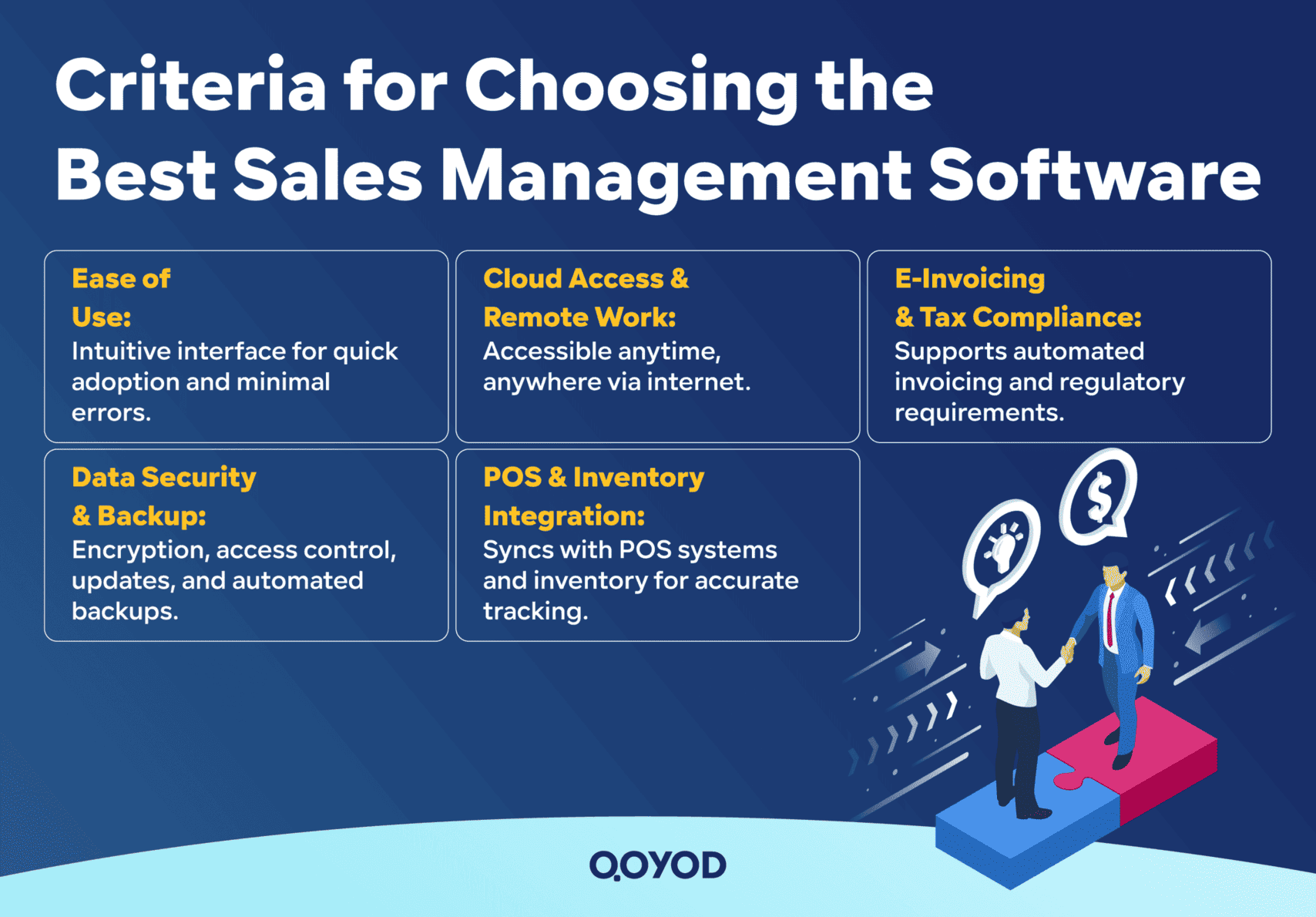
1. Ease of Use and System Interface
Ease of use is paramount. The user interface must be simple and intuitive, making it easy for sales teams to interact with the software without extensive or complicated training. An intuitive interface reduces the time spent on operations and minimizes errors. Modern designs that support seamless navigation between tasks and provide quick access to information help employees perform their duties with focus and efficiency.
2. Cloud Accessibility and Remote Work Capability
Modern business environments increasingly rely on cloud computing technology, which allows access to the software from anywhere, anytime, via the internet, whether through desktops or mobile devices. This enables sales teams and accountants to monitor and manage operations remotely, speeding up decision-making and ensuring continuous operations during travel or challenging circumstances.
3. E-Invoicing and Tax Compliance Integration
The ideal Sales Management Software must fully support integration with e-invoicing systems, which are becoming a mandatory requirement for tax compliance across many global jurisdictions (refer to OECD standards for digital tax trends). The software should adhere to relevant tax authority standards to facilitate the automated issuance and exchange of e-invoices. This simplifies auditing procedures, saves time on financial operations, and ensures regulatory compliance.
4. Data Security, Updates, and Backup Features
The software must provide advanced protection for sensitive data, featuring multiple security layers such as encryption, access control systems, and multi-factor authentication. Furthermore, automatic system updates are crucial for introducing new features and quickly patching any security vulnerabilities. Automated data backup is essential to prevent the loss of vital information in emergencies.
5. POS and Inventory Management Integration
Many businesses rely on Point of Sale (POS) systems for direct sales transactions. Therefore, the software must support seamless integration with POS hardware. Crucially, the system must integrate fully with the Inventory Management system to instantly track changes in quantities sold and received. This prevents shortages or surpluses and helps optimize supply and ordering processes.
By selecting sales management software that adheres to these criteria, your business secures a powerful tool that optimizes financial and operational performance, guiding growth strategies efficiently and effectively in the contemporary business environment.
Essential Features in Sales Management Software
When evaluating the best Sales Management Software, the core features it offers are instrumental in driving sales operations efficiently and professionally. Here is an explanation of the most important features and their operational impact:
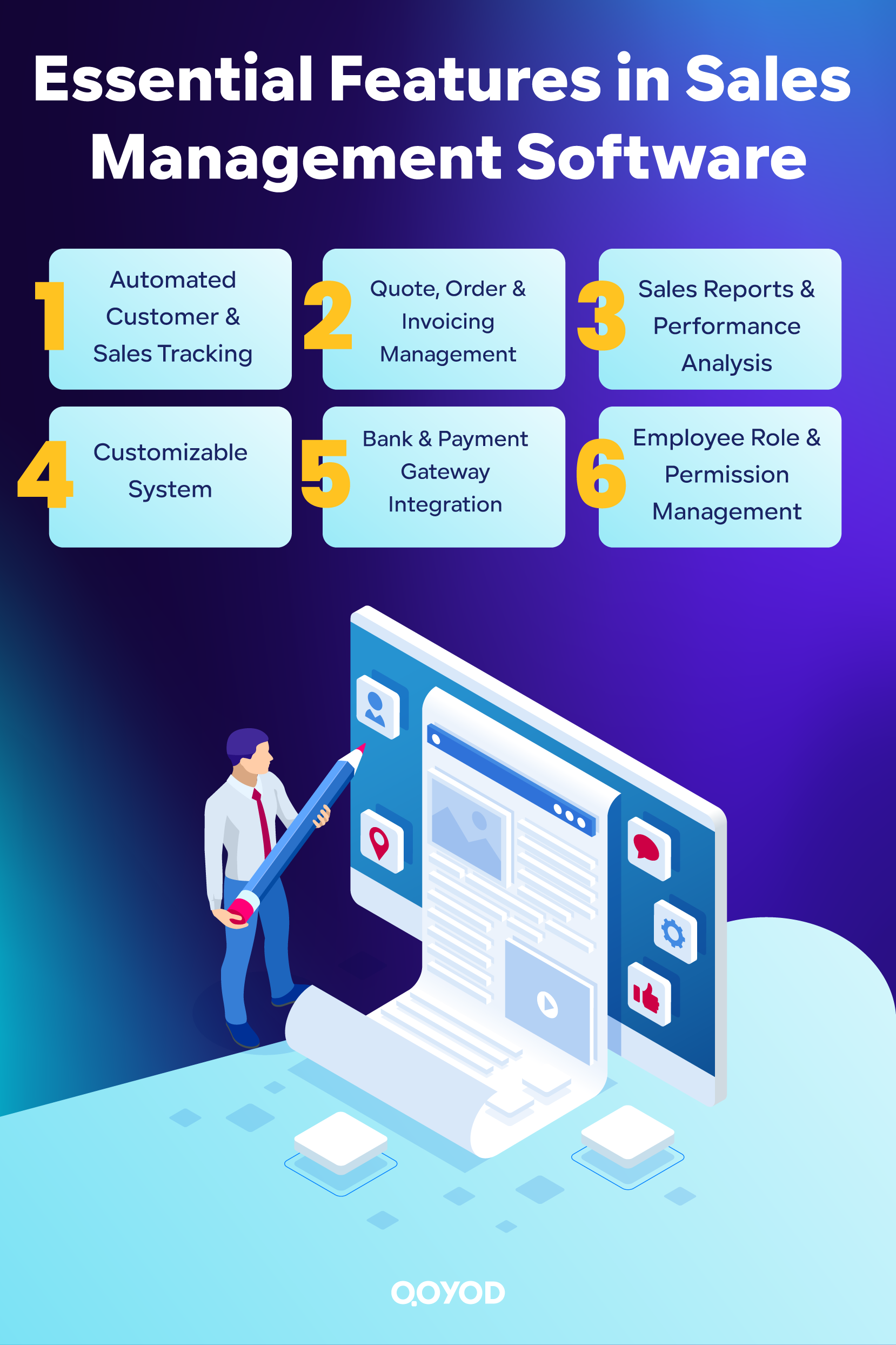
1. Automated Customer and Sales Tracking
The software allows for the registration of customer data and the creation of dedicated files containing all vital details, such as contact information, purchase history, and historical correspondence. This facilitates tracking the customer through all stages of the sales cycle, building stronger and more effective relationships. Modern sales systems also automatically track customers via alerts and task schedules, ensuring no opportunity is missed and improving conversion rates.
2. Quote, Order, and Progressive Invoicing Management
Modern software provides the ability to generate and electronically document quotes, tracking every order from quote acceptance through to product or service delivery. It allows for the automatic creation of progressive or partial invoices based on work progress, ensuring the accuracy of financial data and rapid response to customer needs and received purchase orders.
3. Sales Reports and Performance Analysis
Data analysis and interactive reports are among the most critical features of any integrated system. They allow users to view detailed reports on sales team performance and compare actual results with targets over any time period. These reports help identify the best-selling products, profit indicators, monitor market trends, and provide actionable recommendations for improving future performance.
4. System Customization and Modification by Business Activity
Most modern software offers a high degree of customization, allowing input screens, menus, forms, and reports to be adjusted according to the sector and nature of each business, whether it operates in retail, wholesale, or provides field services. This customization enhances the system’s effectiveness in meeting actual needs and achieving integration with other business tools.
5. Bank Account and Payment Gateway Integration
Sales Management Software enables the electronic linking of the system with bank accounts, recording every collection movement directly to or from the bank. It also often supports payment integration with electronic payment platforms to quickly settle transactions and facilitate reconciliation and financial review processes.
6. Employee-Specific Authority Segmentation
Modern systems offer advanced capabilities for role and authority distribution. The administrator can define the permissions for each employee (e.g., view-only, edit, approve, or reports-only). This enhances data security, helps management monitor individual employee performance, and reduces usage errors or unauthorized data leaks.
These features ensure that the Sales Management Software is not just a records or reporting tool, but a true enhancer of operational fluidity, data accuracy, and the business’s ability to grow and respond quickly to market and customer demands.
Comparing Top Sales Management Systems Globally
Below is a detailed comparison of popular Sales Management Software, emphasizing the additional services provided by the companies, particularly Qoyod Accounting Software, and its supporting programs.
Qoyod Accounting Software
Qoyod is a cloud-based accounting and management system that provides complete management for sales, e-invoicing, inventory, customers, and performance reports. It offers full compliance with global e-invoicing and tax requirements.
Core Features:
- Simple, fully Arabic-supported interface (translated to be ‘user-friendly and fully supported in the local language’).
- Integrated e-invoicing management compliant with government/tax authority standards.
- Financial reports and analytics, efficient inventory management, and full bank and payment integration.
- Advanced support for authority distribution and monitoring of employee and sales representative performance.
- POS system support and system customization based on the business activity.
- High security and protection for cloud data and easy internet accessibility.
Other Services and Support (The Qoyod Ecosystem):
- Qoyod Tahseel :
A service that facilitates the collection of invoices and payments by linking the software to digital payment platforms and creating payment links and QR codes for customers. It also offers specialized teams for collection on the company’s behalf if necessary.
- Qoyod Lend:
Allows for the direct application for loans and financing from banks and financing companies through the Qoyod system, with an automated analysis of financial eligibility to speed up approvals and facilitate access to financing services.
- Qoyod Bookkeeping:
A professional service for managing daily accounting operations, including recording journal entries, expenses, payroll, collections, and external account reconciliation.
All these services are integrated into the same system and managed from the same control panel, consolidating all financial solutions into one platform.
ERP X (Sals ERP – Neutralized Name)
An Enterprise Resource Planning (ERP) system that focuses on managing business operations for medium and large enterprises. It includes sales management, e-invoicing, inventory, customer, human resources modules, and tax compliance.
Core Features:
- Strong integration between sales and inventory modules, tracking sales processes and finances.
- Localized interface support (Arabic) and wide customization options.
- Detailed management of quotes and orders, with permissions for each user and branch monitoring.
- Detailed reports and design suitable for various types of projects and enterprises.
Support Services:
- Integrates with internal programs to link bank accounts, logistics operations, and Human Resources Management (HRM), and provides electronic payment solutions and direct e-invoicing integration.
Drawbacks:
- The system is relatively complex and requires time and training to fully utilize its capabilities.
- Some services are added as paid options depending on the enterprise’s needs.
Retm (Neutralized Name)
A cloud-based accounting and sales program that focuses on integrating sales operations, customer management, instant response to orders, and linking invoices and bank accounts, with significant control over performance and inventory reports.
Core Features:
- Accurate sales operation management with support for e-invoices and Value Added Tax (VAT).
- Performance analysis reports and tools.
- Full support and control over user permissions.
Support Services:
- Integrates with security and protection features, with electronic payment options and banking partnerships.
Drawbacks:
- Pricing is often unclear and requires follow-up with the service provider.
- The abundance of functions may be confusing for new and non-specialized users.
Al-Amin Soft (Neutralized Name)
An accounting program that supports sales management, inventory, customers, treasury, and POS. It is characterized by high flexibility for small and medium-sized projects, with good support for reports and e-invoicing.
Features:
- Multi-option desktop system with detailed reports.
- Good support for the local language and e-invoicing.
Drawbacks:
- Relies only on desktop versions and is not fully cloud-based.
- Requires manual updates, causing difficulties when managing more than one branch remotely.
Practical Steps and Tips for Choosing Your Best Sales Management System
When subscribing to any Sales Management Software, following these practical steps and tips will ensure maximum benefit and avoid later operational or development problems:
1. Utilize the Free Trial or Demo Period
Always start by testing the free or demo version of the software before making a final subscription decision. During this period:
- Test all core functionalities: customer registration, invoice issuance, report analysis.
- Confirm the interface is easy and smooth for your team.
- Navigate between screens and use the advanced tools you’ll need daily (reports, permissions, bank operations).
- Compare several software options simultaneously, noting your and your employees’ feedback.
2. Importance of Training the Work Team
The success of system usage largely depends on engaging the work team and enhancing their competency.
- Organize practical training sessions, either through the provider or internal team sessions.
- Focus training according to roles: sales management, accounting, inventory, POS.
- Utilize the user manual, educational videos, and available knowledge bases.
- Seek programs that offer direct guidance sessions for new users and system update reviews.
3. Verify Technical Support and Periodic Updates
Fast technical support and continuous updates are essential for operational continuity and security.
- Ensure the availability of multiple technical support channels (WhatsApp, phone, live chat, email).
- Inquire about the average response speed for each support type in case of emergencies or sudden downtime.
- Check the software’s update history and if the technical team consistently releases updates and enhancements.
- Prioritize an option with periodic follow-up with the technical team for the highest quality experience and quick issue resolution.
Following these steps ensures the subscription decision is not just a license purchase but the establishment of a sustainable partnership that supports business objectives, develops employee expertise, and mitigates long-term operational risks.
FAQ: 10 Common Questions about Sales Management Software
What is Sales Management Software?
They are technological systems that help businesses organize sales operations, manage customers and inventory, issue invoices, track orders, and analyze performance, thereby boosting productivity and accuracy.
How do these programs help increase profits?
The software speeds up the sales cycle, reduces human errors, enhances customer loyalty, and provides analytical reports that contribute to strategic decisions that increase sales and profits.
Does every business need specialized software?
Using the appropriate software for the business size is preferable, but it's essential for any project aiming for increased discipline, compliance assurance, and speed of execution, especially with rising competition.
How important is testing the demo system?
The free trial gives you an opportunity to test ease of use, understand the tools, and gauge the system's ability to cover all your business needs before the final purchase decision.
How are employees trained on the system?
Companies provide manuals, educational videos, and direct technical support, and customized training sessions can be implemented for each department to ensure proficiency in using the software.
Is sales management software compliant with e-invoicing?
Yes, most modern software solutions are compatible with global tax authority requirements and automatically issue e-invoices with QR codes.
What security options do these programs offer?
The software provides security methods such as encryption, periodic backup, authority segmentation, and multi-factor login to protect business and customer data.
Can the software be linked to inventory and bank accounts?
Most modern software supports integration with inventory, bank accounts, and POS to unify data and facilitate financial operations.
What is the difference between traditional and modern Sales Management Software?
Traditional management relies on manual effort and individual decisions, while software provides automation, smart reports, and integration with digital tools for greater efficiency and speed.
What are the most important criteria for choosing the most suitable system?
The software must be easy to use, integrate with e-invoicing, allow cloud access, support security and updates, and provide strong technical support.
Conclusion: Drive Growth with Qoyod Accounting Software
Sales Management Software is a strategic investment that empowers small and medium-sized businesses to move from manual, error-prone operations to an automated, data-driven, and highly efficient sales process. By integrating sales operations with a robust cloud accounting system, businesses gain the accuracy and compliance needed to thrive in a global market. Prioritize features like cloud accessibility, e-invoicing support, and comprehensive reporting to ensure sustainable growth.
Try Qoyod Accounting Software now to make your business operations easier and more accurate with solutions designed for modern businesses.